





Opera just rolled out an early preview of WebAI across Opera One, Opera GX, and Opera Neon, and it might finally fix the biggest annoyance with browser AI right now. Instead of pinging a remote server every time an extension summarizes an article, the browser runs the AI model right on your computer.
Most AI browser tools today force developers to pay per token or make you paste in your own paid API key. With WebAI, websites and extensions tap directly into local models like Google’s Gemma or Apple’s Foundation Models sitting on your hard drive, meaning zero cloud bills and no data leaving your machine.
“A lot of what people want from AI doesn’t need a data center. Your laptop can already do it, without sending your data anywhere,” said Krystian Kolondra, EVP of Browsers and AI at Opera.
This follows Opera’s recent decision to drop its subscription fee for access to its dedicated AI browser called Opera Neon. Giving developers free local inference is a wise move, especially when people are getting tired of paying $20 a month for five different AI tools.
You do not have to worry about Opera secretly eating up your hard drive space with heavy AI files either. The feature is completely opt-in, which mirrors the approach we saw recently when Opera Air disabled all AI features by default to keep things clean and clutter-free.
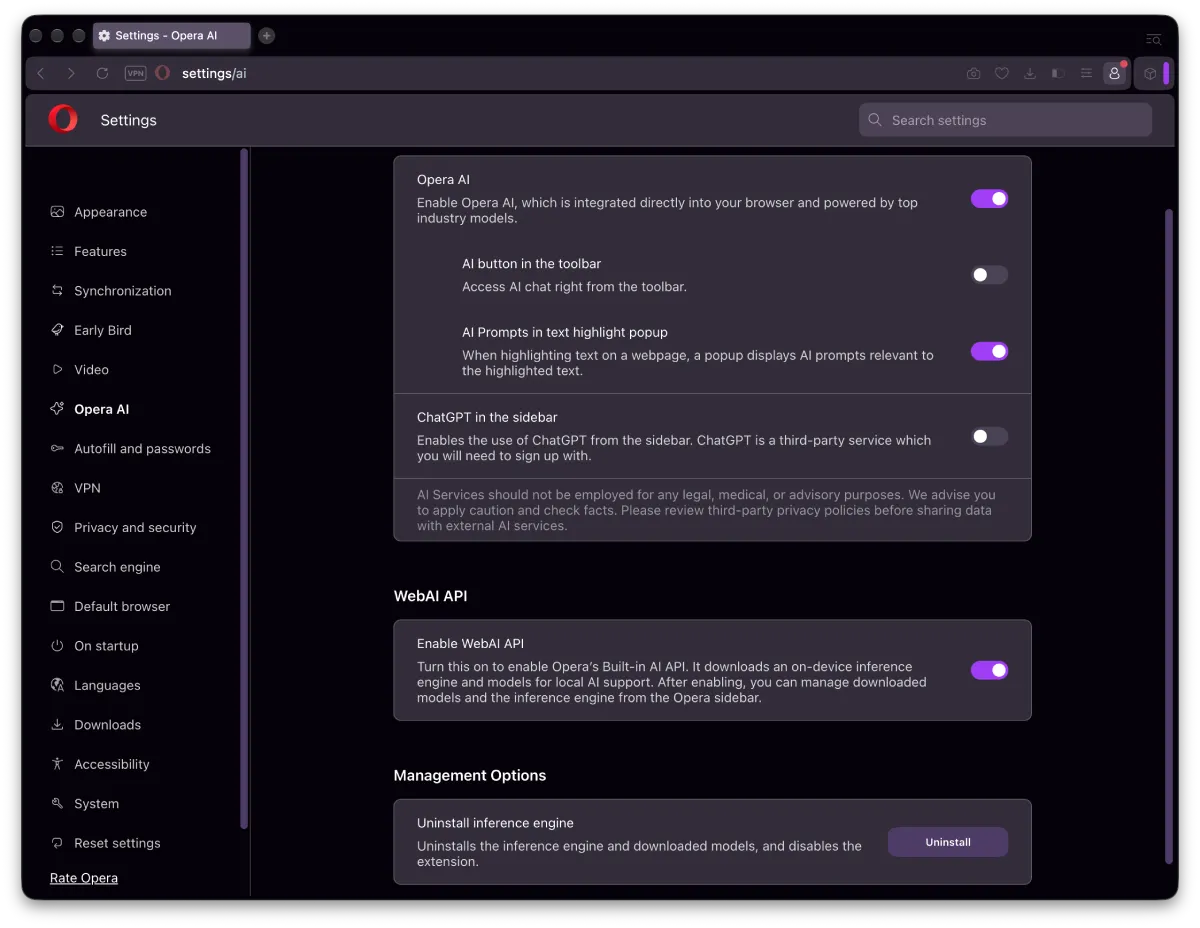
If you actually want to try it on a 64-bit Windows PC or an Apple Silicon Mac, you have to jump into the settings under Opera AI, toggle the Web AI API on, and wait a few minutes for the local model to download.
Sadly, Linux users and Intel Mac owners are left out in the cold for now, much like the missing Linux packages in the recent Opera 140 Developer update.
To show off what local processing can actually do without a chat box, Opera built six tiny demo extensions. One highlights paragraphs in an article based on what project you are currently working on, while another generates a quick reading quiz or turns an article into a cheesy social media post.
With user-focused features and improvements like this, it’s easy to see why Opera claimed massive growth in the US and UK earlier this year.


Dwayne Cubbins
3161 Posts
I cover fast-moving stories across apps, online platforms, and everyday tech — phones, wearables, consoles, and whatever else people are fighting with this week. Bugs, rollouts, scams, policy enforcement, and the occasional internet-culture rabbit hole are all fair game. My goal is simple — make confusing tech news readable. When I'm not working, I'm working out or chilling with my dog. Got a tip? You can find me on X @dcubbins.