Google just rolled out the first stable version of Chrome 153 to iPad and iPhone users. While the update bumps the version number from 152.x to 153.0, there are no major changes.
The new build, labeled as version 153.0.8010.24 in the App Store, has the same boring one-line description that regular users know all too well. Google simply says that this release brings “stability and performance improvements” and leaves it at that.

We installed the build on an iPhone 16 and weren’t able to spot any noteworthy changes. That said, as we pointed out in our coverage of the Chrome 153 beta release, the update carried fixes for occasional keyboard input deadlocks and better handling of fullscreen views while using the Gemini window. So we can expect those fixes here too.
Still, even if there are no flashy new features or major UI changes, it’s worth staying on the latest version of Chrome just for the security fixes that come with it.
Speaking of UI changes, in case you want to try out the new bottom bar redesign, you will have to enable it with an experimental flag. We’ve got all the details on how to do that here.
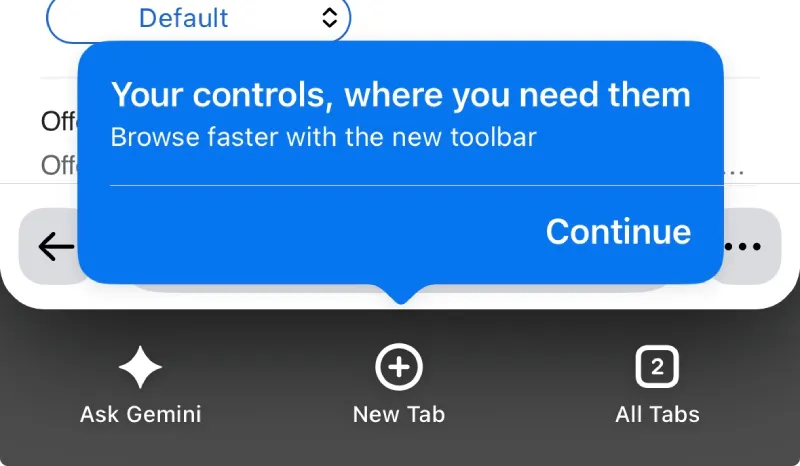
That redesign has left users in two camps. Some like it; others hate it. That could explain why it’s taking so long for Google to release the new bottom bar widely.
Most of what is happening here comes down to routine housekeeping. Google is now operating on a much tighter two-week schedule for browser releases, a pace so fast that even ChromeOS had to skip version numbers just to prevent its numbering from falling completely behind.
Keeping the two-week schedule in mind, it’s not surprising that there are no big new features to talk about.
If your iPhone has automatic app updates turned on, the update should install itself over the next few days. Otherwise, you can grab the fresh build manually by heading over to the App Store and refreshing your App Updates tab.


Dwayne Cubbins
3078 Posts
I cover fast-moving stories across apps, online platforms, and everyday tech — phones, wearables, consoles, and whatever else people are fighting with this week. Bugs, rollouts, scams, policy enforcement, and the occasional internet-culture rabbit hole are all fair game. My goal is simple — make confusing tech news readable. When I'm not working, I'm working out or chilling with my dog. Got a tip? You can find me on X @dcubbins.
Next article View Article