






Notification actions landed in Firefox 152, allowing you to add quick action buttons to your notifications. Here's how they work: pic.twitter.com/douN14wROB
— Firefox for Web Developers (@FirefoxWebDevs) July 9, 2026
Firefox 152 rolled out about a month ago, bringing along those nifty new World Cup widgets. If you’ve been following our ongoing coverage, you know Mozilla hasn’t slowed down since. We’ve seen a steady stream of incremental updates ranging from desktop homepage tab improvements and crucial fixes for Raptor Lake CPU crashes to a host of under-the-hood performance boosts.
Now, the Firefox developers are pulling back the curtain on one of the standout capabilities that quietly landed in the version 152 update: Notification actions.
The Firefox team recently took to social media with an explainer video detailing exactly how this feature works. While web notifications can sometimes feel like a nuisance, they remain incredibly popular. When implemented thoughtfully, they genuinely improve the user experience. Notification actions take this a step further by letting websites add quick, interactive choices like “Archive” or “Favorite” directly to the pop-up alert.
How Firefox Notification Actions work under the hood
For the web developers out there, the magic happens inside a service worker. Here is a breakdown of the process based on the Firefox team’s explainer:
- The Push Event: Notifications typically trigger in response to a
pushmessage event within a service worker. The service worker grabs the incoming data and commands the browser to show the notification. - Adding the Actions: Notification actions are essentially an optional upgrade to standard alerts. Developers simply pass an array of action names and titles (e.g.,
{ action: 'archive', title: 'Archive' }) into the notification parameters. - Handling the Click: When you click one of these new buttons, the service worker receives a
notificationclickevent. It checks theactionproperty to see exactly which button you pressed and executes the corresponding code in the background. If you click the general notification instead of a specific button, the system returns an empty string, typically just opening the web page as usual.
Platform support and visuals
Interestingly, this feature actually debuted years ago in Chrome 48 and Edge 18, but Firefox 152 finally brings it to the Mozilla ecosystem. How these actions look depends entirely on your operating system. If you are browsing on Android, the actions present themselves as clear, distinct buttons at the bottom of the notification card. On macOS, however, they neatly tuck away inside an “Options” drop-down menu.
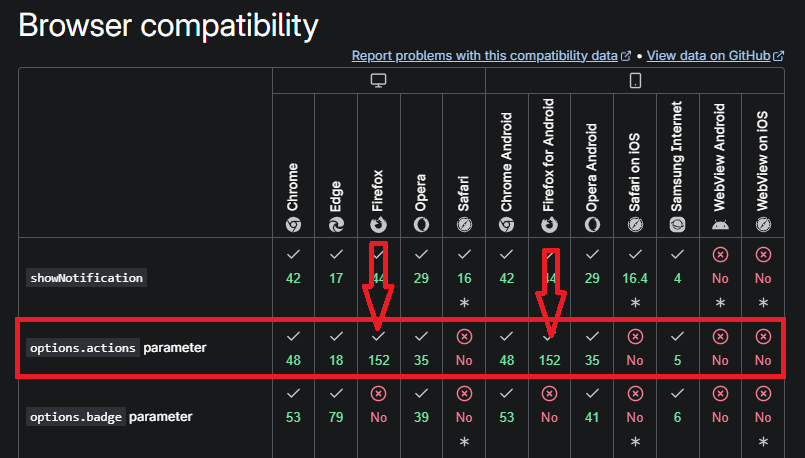
Currently, Apple’s Safari browser shows no signs of supporting this feature. However, Firefox devs point out that web builders can easily use Notification actions as a “progressive enhancement.” By checking the static Notification.maxActions property, websites can instantly detect if a user’s browser supports these buttons and serve them accordingly without breaking the experience for Safari users.
While many websites tend to abuse standard notifications, platforms with active social or email clients benefit massively from this update. The developers specifically highlighted the decentralized social network Mastodon as a prime example of doing it right. Mastodon’s web client seamlessly integrates these notification actions, allowing users to interact with alerts quickly and efficiently without ever having to open the native web app.
If you want to dive deeper into the code and mechanics behind push messages and service workers, Mozilla has documented the entire feature thoroughly over on the MDN Web Docs.

We stand out from the tech-media crowd because we break news stories; we mainly bring you stuff that you won’t find anywhere in the mainstream tech media. Our stories have been picked up by some of the world’s most popular websites and media outlets—more info is available here.

Hillary Keverenge
2723 Posts
Tech has been my playground for over a decade. While the Android journey began early, it truly took flight with the revolutionary Lollipop update. Since then, it's been a parade of Android devices (with a sprinkle of iOS), culminating in a mostly happy marriage with Google's smart home ecosystem. Expect insightful articles and explorations of the ever-evolving world of Android and Google products coupled with occasional rants on the Nest smart home ecosystem.
Next article View Article

Mozilla president backs open‑source AI ‘rebel alliance’ led by Canada and the EU
Mozilla president Mark Surman says Canada and the European Union could help loosen Big Tech’s hold over AI by putting more weight behind open-source models.
In a Fortune...
Jul 10, 2026 2 Min Read