


If Gemini has ever turned your laptop into a space heater while sitting in a Chrome tab, Google says that shouldn’t happen anymore. The company has confirmed that the high memory usage issue with the Gemini web app has finally been resolved.
Android Authority first spotted the confirmation in a Reddit reply.
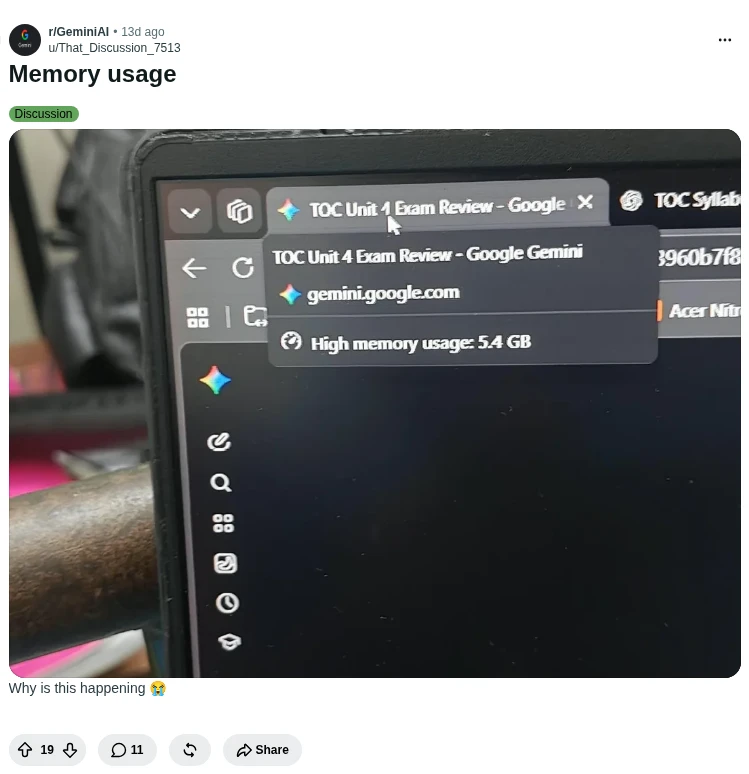
It all started with a post on the GeminiAI subreddit, where a user shared a photo of their laptop showing a single Gemini tab chewing through 5.4GB of RAM. The user only asked, “Why is this happening 😭?“
A couple of days ago, the official Google Support account jumped into the comments with some good news.

“This has now been resolved, so please let us know if you are still experiencing any issues with high memory usage in Chrome,” the company wrote.
That’s pretty much all Google said though. There’s no word on what was causing the problem or what got fixed.
And this isn’t some fresh bug either. Complaints about Gemini eating up RAM go back more than a year, with one older thread showing a tab sitting at 3.6GB. Other users have reported numbers as high as 8.4GB, which is just absurd for a chatbot tab.
Chrome quietly eating up resources is nothing new, of course, and we recently saw how browser extensions could be silently wearing out your SSD even when Chrome is closed.
Leaks like this aren’t a Google-only thing, to be fair. Zen recently pushed an update that patched a major memory leak where closed windows were never cleared from RAM, and Brave has been happily bragging about beating Chrome and Edge on RAM usage.
If you want to check whether the fix has reached you, just hover over the Gemini tab to see its memory usage, or open Chrome’s Task Manager with Shift + Esc on Windows. If the numbers still look wild, you can flag it through Chrome’s built-in “Report an issue” option.


Dwayne Cubbins
3247 Posts
I cover fast-moving stories across apps, online platforms, and everyday tech — phones, wearables, consoles, and whatever else people are fighting with this week. Bugs, rollouts, scams, policy enforcement, and the occasional internet-culture rabbit hole are all fair game. My goal is simple — make confusing tech news readable. When I'm not working, I'm working out or chilling with my dog. Got a tip? You can find me on X @dcubbins.