





Mozilla has kicked off beta testing for Firefox 160, and the standout addition this time around is a floating Mini Window that keeps your tabs pinned on top of everything else on your screen.
Most of us already use Picture-in-Picture to keep a video playing in the corner while getting actual work done. This new update takes that exact same concept and lets you do it with any webpage or even just a tiny slice of a page.
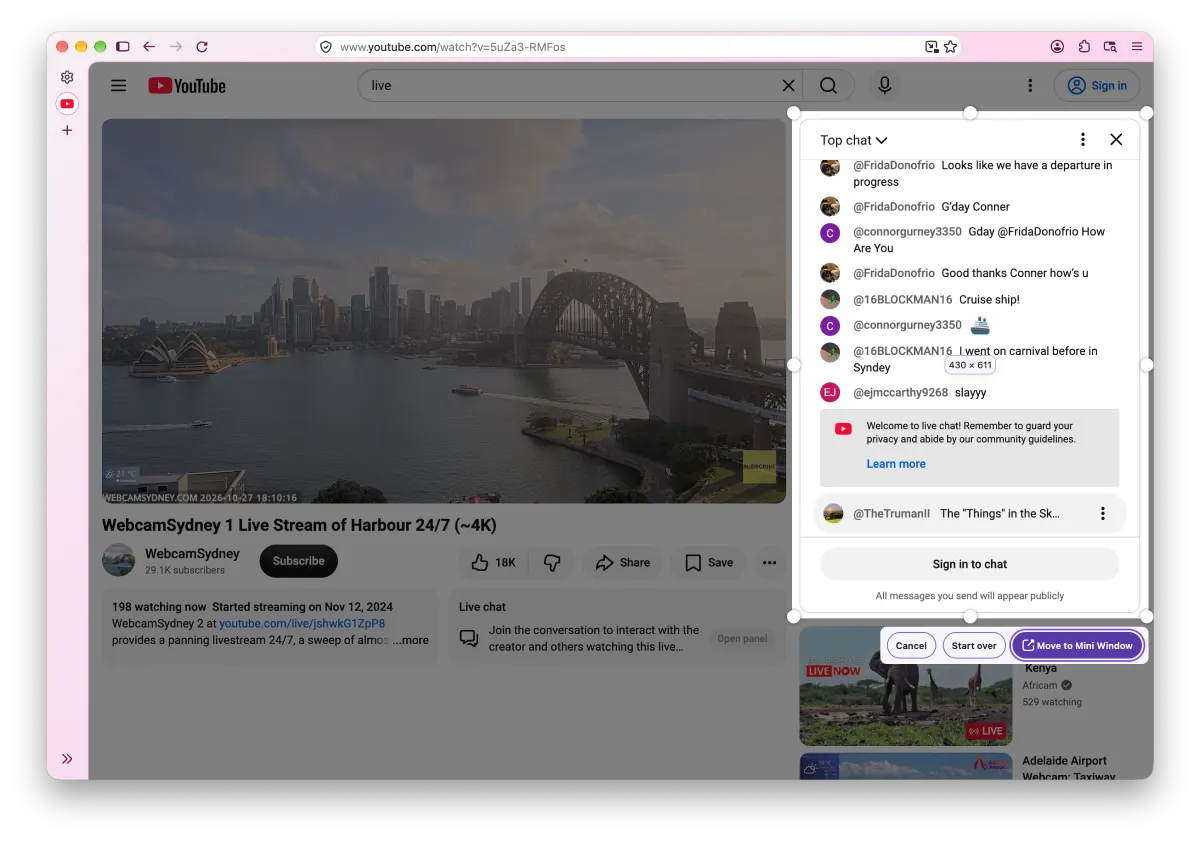
In a Mozilla Connect post, an employee shared a quick demo video showing how you can either pop out an entire tab or highlight a specific box on a site to float by itself. You can check out the demo video below to get an idea of how it works:
According to the blog post, the feature is especially handy when “you’re multitasking and need to keep a few sources of information in view at once” like a live chat, reference notes, or a long form you are filling out.
To try it out, you just right-click a tab to send the whole thing into a Mini Window, or right-click directly on a webpage to crop out the exact section you want to keep in view. Once it pops out, it disappears from your main browser window until you decide to send it back or close it.
This arrives right after Mozilla started courting displaced Arc users by teasing a replacement for the popular Little Arc pop-up window. When readers in the forum asked about opening links directly into a mini view without opening a normal tab first, asafko confirmed that “adding Open in Mini Window option is on our radar!”
Beyond the new floating windows, the Firefox 160 beta packs in a few other practical tweaks. The regular video Picture-in-Picture player now has a playback speed button ranging from 0.25x to 2.0x, and you can drag history items straight from the sidebar into your tab strip.
You also get a “Never allow” button to shut down annoying websites that constantly pester you to open email links in web apps. Following the recent Firefox v158 update that added JPEG XL support, the browser can now play MKV video files with FLAC, MP3, or PCM audio natively too.
While developers are still working on a native Private Window lock for Windows, Android users are getting tighter security in this beta with new local network restrictions enabled by default. Everyone will get their hands on the final Firefox 160 update when it rolls out to the stable channel on November 10.


Dwayne Cubbins
3153 Posts
I cover fast-moving stories across apps, online platforms, and everyday tech — phones, wearables, consoles, and whatever else people are fighting with this week. Bugs, rollouts, scams, policy enforcement, and the occasional internet-culture rabbit hole are all fair game. My goal is simple — make confusing tech news readable. When I'm not working, I'm working out or chilling with my dog. Got a tip? You can find me on X @dcubbins.