





Soon after Chrome, the Windows 11-style Mica design elements seem to have made their way out of Microsoft Edge as well.
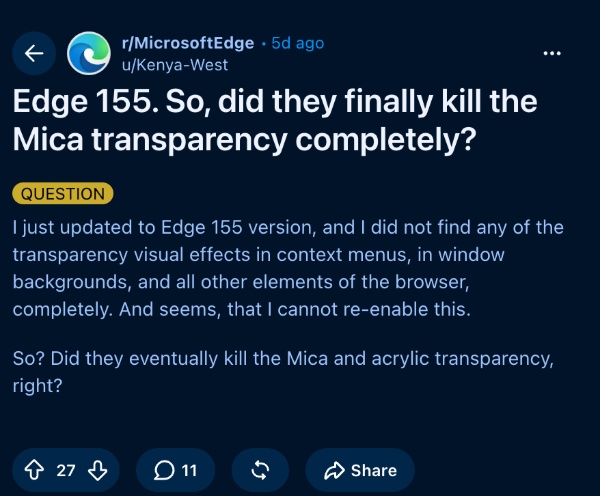
I stumbled across a post in r/MicrosoftEdge that describes how the acrylic design elements and the “opaque” visuals have been removed in v155 of Edge. Some of the design elements used to adapt and apply subtle colors based on your wallpaper.
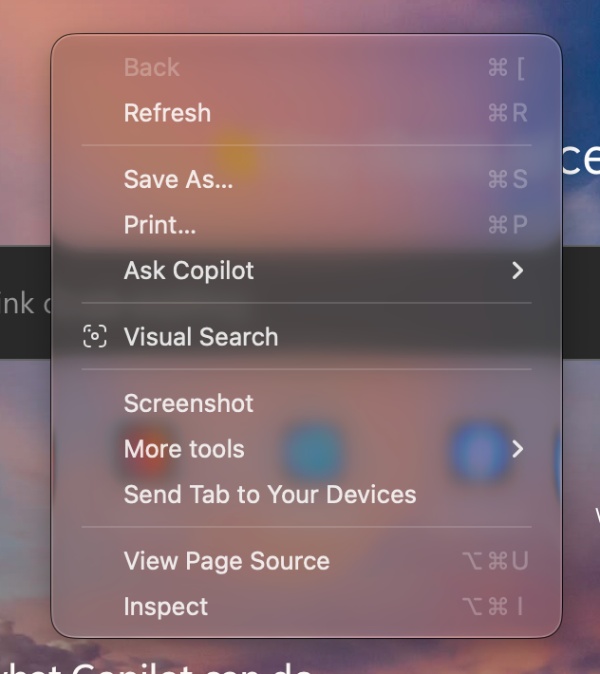
I could not check on a Windows system, but on macOS, the glassy elements with “transparent” aesthetics are still present. For example, if I right-click on a tab or right-click on the New Tab page, the options in the menu appear over a transparent and glass-like background. This hasn’t been removed in the latest v155 update or even in the v158 version of Edge Canary.
The only reason I’m mentioning this is because I’ve seen some claims about the glassy menus going away, which I have not been able to personally reproduce.

For those unaware, Mica is an opaque design style that Microsoft introduced. It doesn’t use a see-through effect like Apple’s Liquid Glass, or the bubbly design from Frutiger Aero. Instead, it’s more subtle and consumes fewer resources. It maintains slight personalization without going overboard.
Earlier, there was a whole menu dedicated to customizing the Windows 11-style look within the browser. Mica is supposed to reflect the desktop wallpaper, and the colors are applied to the title bar and toolbar. Assuming Microsoft has actually removed it, there’s a chance that the company might move towards the Copilot design language soon.
Earlier, we reported on Google Chrome losing the Mica aesthetics as well. This is likely a result of the removal of support from the codebase itself. You can find the commit about the removal here.
Curious about what else is new with the v155 update on Edge? We covered that here.
In other Edge news, there’s a feature being tested that lets you translate an entire document into another language and open it as a separate file. More on that here.


Sudhanshu K
327 Posts
I have been a consumer technology enthusiast for over 5 years. Thanks to my experience in software beta testing and product reviews, I've understood and learnt a lot about what bugs and issues bother people, and I spend time trying to simplify their solutions. I cover smartphones, software, social media, apps, AI, and most consumer tech gadgets. Actively pursuing a Computer Science bachelor’s degree. I'm mostly active on Twitter/X (@TechWhirlUlt), drop a DM or tag me if you want to share info or connect!