






If you often have dozens of tabs open on your phone, keeping them organized can be a real hassle. Vivaldi has offered tab stacks on mobile for some time, but grouping pages still takes more steps than it should.
But this might soon change. In the latest Snapshot 4163.4 update for Android, the team is testing a new feature that lets you choose where a web page goes before you open it.
Before this, long-pressing a link only let you open it in a new tab or behind your current window. Vivaldi says that “when long-pressing on a link on a web page you can now select in which stack it’s opened in.”
We installed the latest Snapshot build and confirmed that the feature is available. Here’s what you should now see when you tap on the ‘Open in new tab in stack’ option when you long-press on a link:
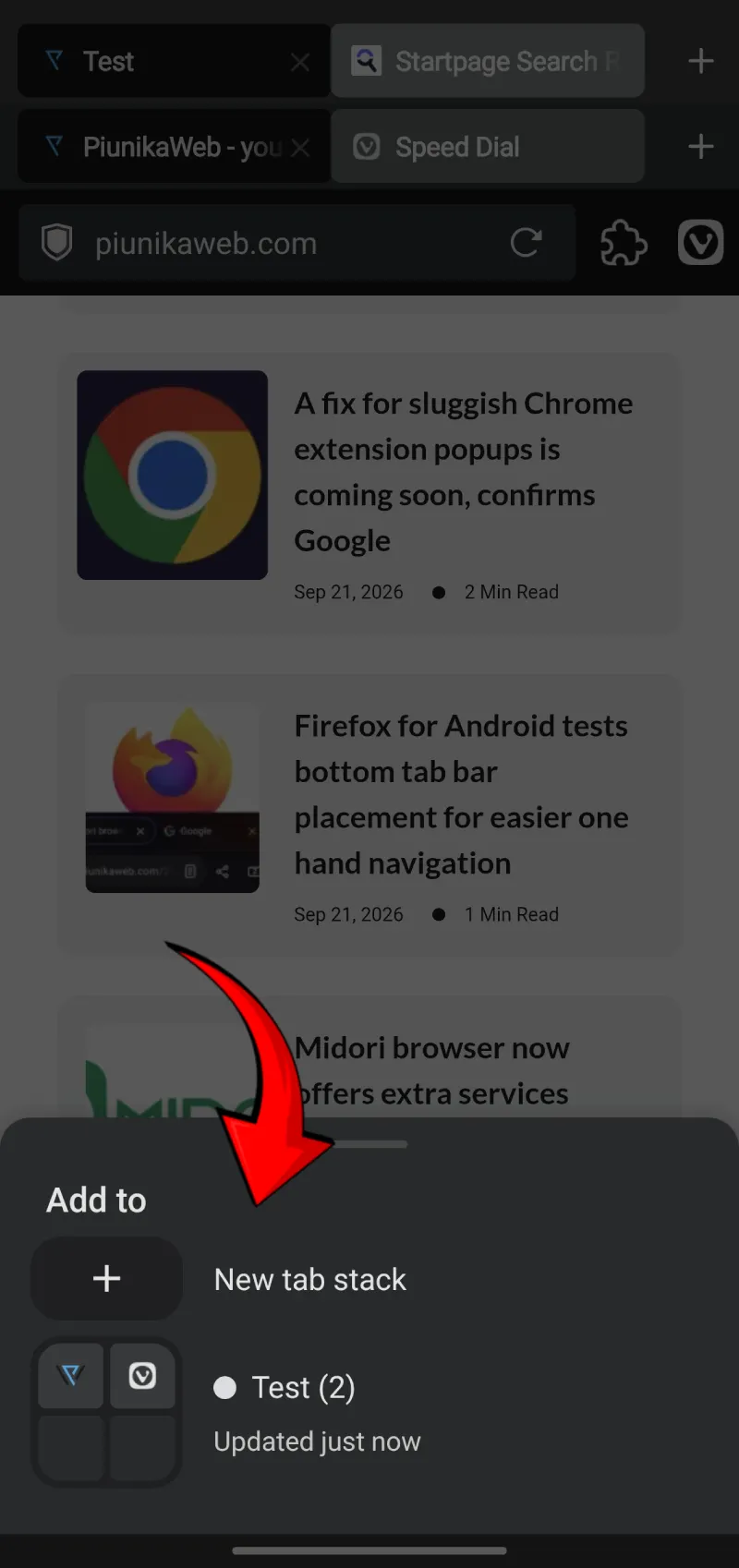
It may seem like a small change, but it saves you from opening a link, going to the tab switcher, and moving tabs by hand. If you do quick research or comparison shopping on your phone, you know how quickly messy tabs can pile up.
This new option follows a recent bug-fix update that addressed crashes and interface issues.
Many of those fixes were needed after the big v8.2 stable release, which brought major features like Chrome extension support and an address bar calculator to Android. Adding extensions on mobile was a big step forward, but it also introduced a few issues that needed fixing.
That said, the new option to choose where a link goes before you open it isn’t the only thing to look forward. The Snapshot 4163.4 update also fixes where download prompts appear, keeps the reload button from disappearing in the extensions menu, and updates the core engine to Chromium 152.0.7977.134
The full changelog is below:
[New][Tab Stacks] Allow opening links in specific stacks (VAB-13200)
[Download] Always asks for download location (VAB-13554)
[Extensions] Addon site permission dialog not scaled for mobile (VAB-13530)
[Extensions] Reload button disappears when opening the Extensions menu (VAB-13542)
[Media] Media player disappears when switching channels (VAB-13569)
[Speed Dial] Speed Dial items cannot be moved after changing sorting mode across groups (VAB-13533)
[Tab Stacks] Opening a link in a new tab after the active tab moves both tabs to last position (VAB-13650)
[Tab Stacks] Tab doesn’t open in a stack even though the position setting is “As Tab Stack With Related Tab” (VAB-13501)
[Regression][Settings] Google’s logo in front of ‘Vivaldi isn’t your autofill provider’ (VAB-13633)
[Regression][Window] Blank space at the bottom of the app window (VAB-13300)
[Crash] Tapping “Autofill Services” in Settings’ search causes Vivaldi to crash (VAB-13652)
Updated Chromium to 152.0.7977.134
Since this feature is only in the snapshot channel for now, regular users will not see it on Google Play unless they use the preview app. Most people will have to wait a bit longer for it to reach the stable version.


Dwayne Cubbins
3040 Posts
I cover fast-moving stories across apps, online platforms, and everyday tech — phones, wearables, consoles, and whatever else people are fighting with this week. Bugs, rollouts, scams, policy enforcement, and the occasional internet-culture rabbit hole are all fair game. My goal is simple — make confusing tech news readable. When I'm not working, I'm working out or chilling with my dog. Got a tip? You can find me on X @dcubbins.