Brave just picked up a fresh update with a bunch of new features, improvements, and bug fixes. The new build is rolling out to desktop users as version 1.95.101 and should be available to everyone.
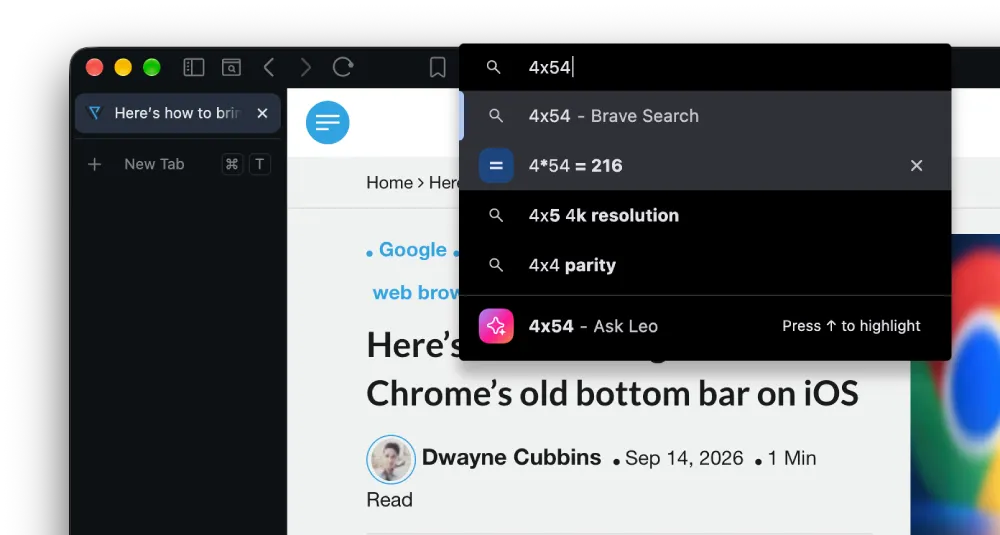
One interesting new feature is the address bar math calculator. If you type a basic equation into the URL field, Brave now calculates the answer right inside the dropdown suggestions. In case this feels familiar, it’s because Vivaldi did the same thing with its address bar a couple of weeks ago.
It works locally on your machine and saves you from frantically hunting for a calculator app just to solve a quick sum.
Apart from the calculator upgrade, Containers have also received some love. Tab hover cards now display the active container name, and you can enable mini icons in settings if you dislike bulky badges taking up tab space. There is also initial support for temporary disposable containers via startup flags.
These are welcome additions, but the good news doesn’t stop there. Last week we reported that Brave confirmed that broader Container automation features are currently in the works. So expect more refinements to come in the future.
Then there’s the slightly tweaked Focus Mode feature flag. The latest update refines the experience even further by removing the thin URL strip that used to appear on top. It’s still not as refined as it is on the current Nightly channel, but it’s a step in the right direction.
Here’s how it looks on the stable channel:
And here’s how it looks on the Nightly channel:
Notice that the window has a neat border around it in the Nightly version, whereas the stable version has no border at all. If you’ve used Arc, Zen, or Dia browsers, you’ll know that the Nightly version gets it closer to the look of those browsers. We went into more detail about the feature and how it to enable it here.
Beyond those headliners, the update adds a keyboard shortcut to close duplicate tabs, brings back the vertical tab toggle shortcut, and bumps the underlying Chromium engine to version 153.
There are dozens of other improvements and fixes too. You can check out the full changelog below:
Release Notes v1.95.101 (Sep 11, 2026)
- Added Zcash Ironwood migration banner. (#58493)
- [Security] Fixed wallet permission list being shown only after page refresh. (#51916)
- Fixed visibility of “Skip” button on the “Backup Wallet” screen when using dark theme. (#58241)
- Fixed spacing for asset loading skeleton on the “Accounts” page. (#57871)
- Added the ability to share a Leo conversation. (#56444)
- Added a light box preview of attached images and files. (#45678)
- Improved contrast on certain dialogs when using dark theme. (#58353)
- Increased Bring Your Own Model (BYOM) input limits. (#49577)
- Updated UI on the “Add model” and “Edit model” screens for BYOM. (#57721)
- Updated Leo to transition from full page to side panel views when clicking a conversation link. (#57047)
- Fixed full page screenshot not displaying accurate file size. (#57676)
- Added calculator results to the address bar dropdown when typing basic math expressions. (#52260)
- Added “Always use mini icon for containers” setting under
brave://settings/braveContentwhen “Containers” are enabled. (#56954) - Added container name to tab hover card. (#56175)
- Added support for temporary containers via command-line switch. (#57993 & #58019)
- Added a keyboard shortcut for “Close all duplicate tabs”. (#45199)
- Re-added keyboard shortcut for toggling between vertical and horizontal tabs. (#52874)
- Updated
navigator.userAgentDatato hide Brave UA for certain sites. (#47826) - Updated the “Customize” modal on the New Tab Page. (#57685)
- Updated .dmg installer backgrounds on macOS. (#58236)
- Disabled platform authentication (Cloud AP) SSO in container tabs. (#57741)
- Fixed padding and widths of tab groups when using vertical tabs. (#58010)
- Fixed improper display of container icons when scrolling the horizontal tab bar. (#57255)
- Fixed “Auto expand vertical tabs independently per window” setting not working on Linux. (#56842)
- Fixed “Edit Password” showing “chrome://” scheme instead of “brave://” for internal page bookmarks. (#40787)
- Upgraded Chromium to 153.0.8010.37. (#58822) (Changelog for 153.0.8010.37)
- Added calculator results to the address bar dropdown when typing basic math expressions. (#52260)
- Added “Always use mini icon for containers” setting under
brave://settings/braveContentwhen “Containers” are enabled. (#56954) - Added container name to tab hover card. (#56175)
- Added support for temporary containers via command-line switch. (#57993 & #58019)
- Added the ability to import passwords from Brave release channel build on macOS and Linux. (#55631)
- Added a keyboard shortcut for “Close all duplicate tabs”. (#45199)
- Re-added keyboard shortcut for toggling between vertical and horizontal tabs. (#52874)
- Updated
navigator.userAgentDatato hide Brave UA for certain sites. (#47826) - Updated the “Customize” modal on the New Tab Page. (#57685)
- Updated .dmg installer backgrounds on macOS. (#58236)
- Disabled platform authentication (Cloud AP) SSO in container tabs. (#57741)
- Fixed padding and widths of tab groups when using vertical tabs. (#58010)
- Fixed improper display of container icons when scrolling the horizontal tab bar. (#57255)
- Fixed “Auto expand vertical tabs independently per window” setting not working on Linux. (#56842)
- Fixed “Edit Password” showing “chrome://” scheme instead of “brave://” for internal page bookmarks. (#40787)
- Upgraded Chromium to 153.0.8010.37. (#58822) (Changelog for 153.0.8010.37)


Dwayne Cubbins
3110 Posts
I cover fast-moving stories across apps, online platforms, and everyday tech — phones, wearables, consoles, and whatever else people are fighting with this week. Bugs, rollouts, scams, policy enforcement, and the occasional internet-culture rabbit hole are all fair game. My goal is simple — make confusing tech news readable. When I'm not working, I'm working out or chilling with my dog. Got a tip? You can find me on X @dcubbins.
Next article View Article