
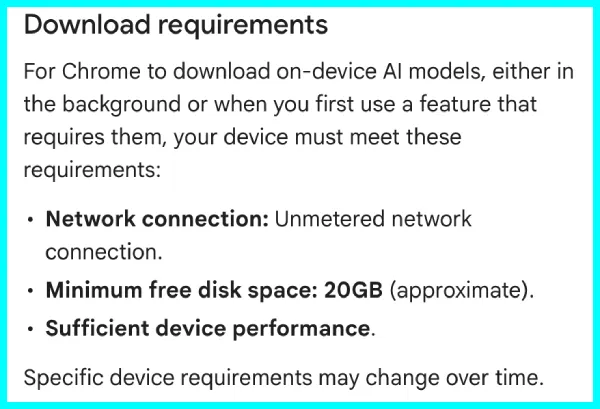
It looks like Google has put a number on something it used to leave vague. Chrome will not download its on-device AI models unless your computer has about 20GB of free disk space, according to a recently updated help page that lays out the requirements for the first time.
Apart from the storage space, Chrome also wants an “unmetered network connection,” meaning you won’t be able to get it downloaded on something like a mobile hotspot. But the most important bit here is that Chrome first checks if your device’s hardware is even capable enough to run the features.
Google notes the “specific device requirements may change over time,” so 20GB is where things stand today, not a permanent floor.
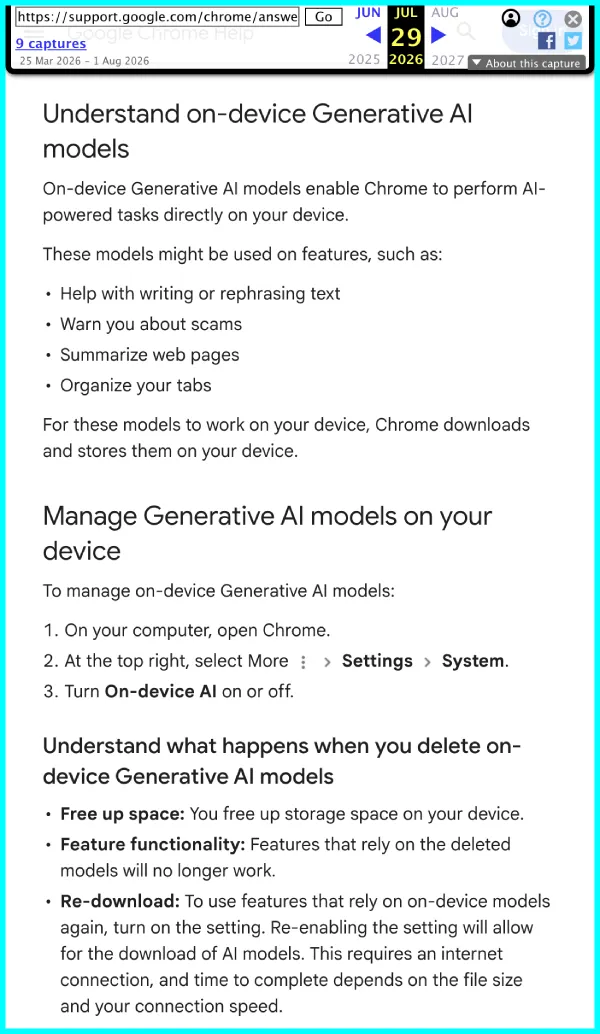
Of course, since local models aren’t nearly as capable on mainstream consumer hardware, the list of supported features is pretty basic. Google lists rephrasing text, flagging scams, summarizing pages, and grouping your tabs as supported features. It argues it is faster and better for privacy since the data never leaves your machine. It is the same local-first push behind the on-device embedding API Google opened to developers last month.
Since local models need capable hardware, we can expect that plenty of machines will not qualify. The document says the setting and its features “are not available on all devices,” and Chrome downloads the models only if your hardware supports them. No supported hardware, no download.
But let’s say your machine does support running local AI on Chrome and it auto-downloads models; in that case, getting back your storage space isn’t as simple as manually deleting files. In fact, Google says it “is not recommended and may not prevent future downloads.”
The supported route is a toggle under Settings and then System. Switch it off, and Chrome deletes the files and stops pulling them until you turn it back on.
Windows Report first spotted the added requirements by comparing older and newer versions of the page. We’ve also captured a screenshot of the archived version of the page for reference:
That said, Google has spent months pushing more Gemini features into Chrome, and the storage question kept coming up as those downloads landed on people’s machines without much explanation. The updated help page is the closest Google has come to answering it.


Dwayne Cubbins
3155 Posts
I cover fast-moving stories across apps, online platforms, and everyday tech — phones, wearables, consoles, and whatever else people are fighting with this week. Bugs, rollouts, scams, policy enforcement, and the occasional internet-culture rabbit hole are all fair game. My goal is simple — make confusing tech news readable. When I'm not working, I'm working out or chilling with my dog. Got a tip? You can find me on X @dcubbins.
Next article View Article