Google has quietly changed one of the most sensitive moments in your day-to-day browsing: the split second when a website asks to switch on your camera or microphone. With the release of Chrome 151, the browser itself now sits in the middle of that request instead of leaving it entirely up to the website. This tweak hands a bit more control back to the person actually clicking the buttons.
The old process worked in the website’s favor. You would land on a page, tap a button the site had designed, and the site would fire off its own request for camera access. Chrome would then pop up its familiar permission box asking if you were fine with it. The catch is that the website started the whole exchange, and you were only ever responding to what it showed you.
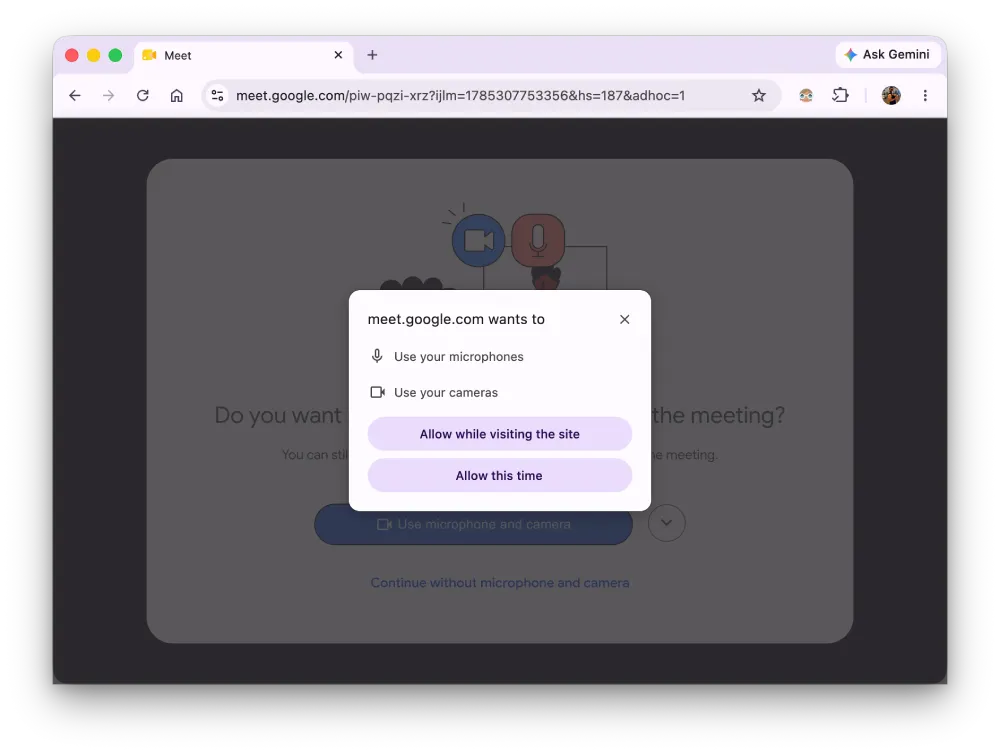
As highlighted in a developer blog post by Google, Chrome 151 introduces a new building block called '<usermedia>' that flips the order around. The control you click to turn on your camera now belongs to the browser, not to the website dressing up a button to look safe. When you tap it, Chrome knows the request came from you and not from a page trying to nudge you into saying yes, giving the browser what Google calls “a trusted signal of the user’s intent.”
The browser also enforces strict rules on how that button can look, so a site cannot make it deceptively see-through, shrink it down to nothing, or warp it to hide what you are agreeing to.
The change also cleans things up underneath. A site used to run its own code to request camera and microphone access and then handle whatever came back, but the new element lets the browser take over, and Google says it now “manages the entire flow for camera and microphone access” from the moment you click through to the moment the video reaches the app.
Maybe the most useful part is what happens when you say no by accident. Anyone who has ever blocked their camera on a video call knows the pain of hunting through browser settings to switch it back on, and plenty of people just give up at that point. Tapping the new control triggers a quick recovery flow that lets you re-enable your camera or mic right there on the page, and the early results back that up.
In an earlier introduction, Google said Cisco saw people who had first denied access go from roughly 10 percent likely to successfully turn it back on to more than 65 percent, while Google Meet reported a 131 percent jump in successful recovery and 17 percent fewer “mic not working” complaints. Zoom logged nearly a 47 percent drop in camera and mic errors.
You will not find any of this in your settings, because it is a tool that developers build into their sites, so the difference only shows up once the apps and services you use start adopting it. When they do, those camera and mic prompts should feel more like a choice you made and less like something that snuck up on you. The '<usermedia>' element follows '<geolocation>', which handled location requests the same way, and, of course, there’s no telling when more sites will get on board.
This seems to be a part of a wider effort by Google to hand more control back to the user.
The company recently began testing Global Privacy Control in Chrome Canary, a feature that tells websites once that you do not want your personal information sold or shared. And if a site still feels off, Chrome now lets you report harmful websites straight from the Help menu.


Dwayne Cubbins
3155 Posts
I cover fast-moving stories across apps, online platforms, and everyday tech — phones, wearables, consoles, and whatever else people are fighting with this week. Bugs, rollouts, scams, policy enforcement, and the occasional internet-culture rabbit hole are all fair game. My goal is simple — make confusing tech news readable. When I'm not working, I'm working out or chilling with my dog. Got a tip? You can find me on X @dcubbins.
Next article View Article