Scrolling is one of those things you don’t really notice until it feels wrong. You’re halfway through an article, flick your thumb, and the page suddenly hesitates for a split second. It’s not enough to completely ruin the experience, but it’s enough that your brain picks up on it.
Google has been trying to fix exactly that in Chrome for Android, and it says the work is paying off. According to the Chrome team, the browser now runs into these “janky” scrolling moments 48 percent less often than it did back in 2023.
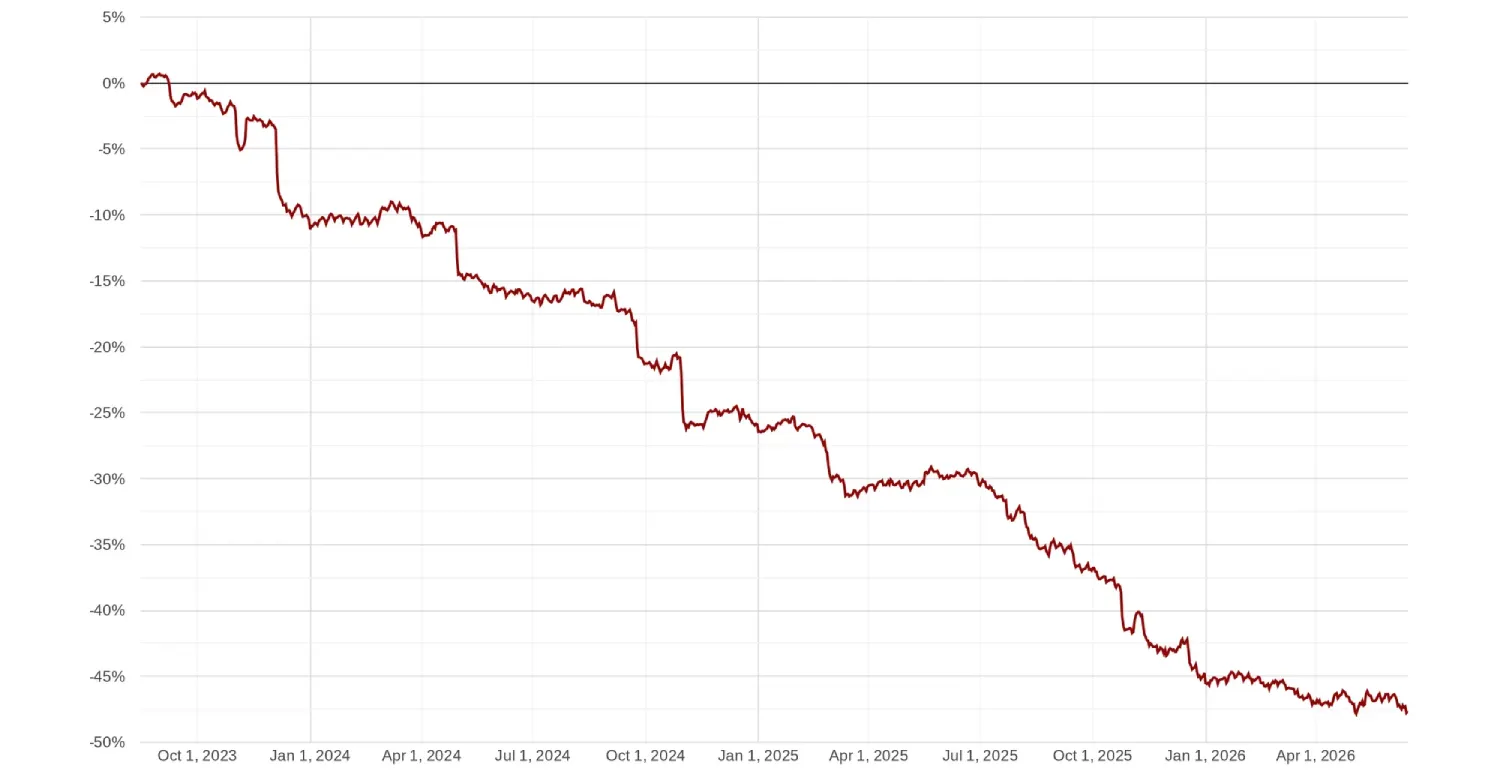
The interesting thing is that Google wasn’t chasing higher benchmark numbers or faster rendering speeds. It was chasing consistency. As the company puts it, “raw speed isn’t enough to guarantee a good experience, consistency is the real key.”
That makes sense once you understand what’s happening behind the scenes. Your phone is constantly refreshing the display, and Chrome has to have the next frame ready before each refresh. If it misses that window, even by a tiny amount, the display ends up showing the previous frame again. That’s the little hitch or stutter you sometimes notice while scrolling.
Here’s a neat example Googled showed off. The phone on the left scrolls smoothly, while you can see the stutter on the right.
Chrome also has a tougher job than many apps because of how it’s built. Instead of doing everything inside one process, it spreads work across multiple processes for better stability and security. That’s great for preventing crashes and isolating websites, but it also means every touch input has to pass through several stages before anything appears on screen. A small delay at any point can snowball into a missed frame.
Google spent the last few years attacking that problem from different angles instead of relying on a single big change.
One of the bigger improvements is something called Input Vizard, which moves touch processing away from Chrome’s busiest thread so it doesn’t get stuck waiting behind other work.
Another change, Input Framer, waits just a little longer before giving up on incoming touch data. That tiny delay gives Chrome a better chance of drawing the correct frame instead of falling back to an older one.
The browser has also become a little smarter about predicting movement. If your latest touch input hasn’t arrived yet, Chrome can estimate where the page is likely heading and keep the animation moving smoothly until the real data catches up.
Google says the work isn’t finished either. The team describes web performance as “a game of milliseconds,” and it plans to keep looking for ways to shave off more delays wherever it can. As a sucker for smooth scrolling, I’m glad to see Google making some progress here. You can read the original blog post for the detailed technical breakdown.
If you’re the type who cares about these under-the-hood changes, Chrome has also been testing smarter text selection tools recently, and it’s changing how those pushy notification prompts work too.


Dwayne Cubbins
3101 Posts
I cover fast-moving stories across apps, online platforms, and everyday tech — phones, wearables, consoles, and whatever else people are fighting with this week. Bugs, rollouts, scams, policy enforcement, and the occasional internet-culture rabbit hole are all fair game. My goal is simple — make confusing tech news readable. When I'm not working, I'm working out or chilling with my dog. Got a tip? You can find me on X @dcubbins.
Next article View Article