If you spend as much time jumping between your phone and your laptop as I do, you know that small friction points in browser navigation can derail your entire flow. Fortunately, Google is actively working behind the scenes to smooth out those rough edges.
From expanding Android’s text selection options to making vertical tab navigation less frustrating on desktop, a series of impressive quality-of-life updates have landed in experimental builds. Here is a breakdown of what is currently in testing and what you can expect to see in upcoming Google Chrome releases.
Chrome for Android’s text selection drops desktop features
One of my biggest pet peeves when browsing on mobile is having to take three extra steps to perform basic text actions that are effortless on a PC. Google is addressing this head-on by giving Chrome for Android’s text selection dropdown menu a major functional boost to bring it closer to desktop parity.
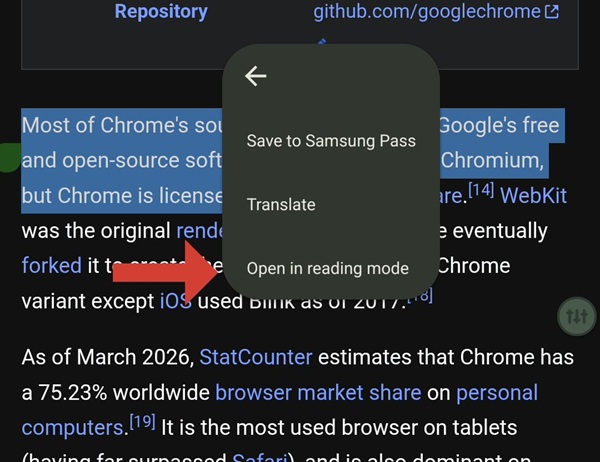
According to updates spotted by browser researcher and leaker Leopeva64, Google is working on adding three key options to Chrome for Android’s contextual text highlight menu:
- Print: Directly send selected page text or entire pages to your connected printer.
- Copy link to highlight: Generate a deep link that automatically scrolls to and highlights specific text on a webpage when shared.
- Open in reading mode: Instantly push highlighted text directly into Chrome’s simplified reading layout.
While “Print” and “Copy link to highlight” are still under active development, the “Open in reading mode” option is already live in Chrome Canary builds. Being able to select a tricky paragraph and immediately jump into Reading Mode with a single tap makes reading long-form web content on a phone significantly cleaner.
Chrome for desktop’s vertical tabs get an auto-scroll upgrade
If you have been testing vertical tabs in Chrome Canary on desktop, you might have run into an annoying usability bug. Previously, when you opened a link in the background from a tab that was scrolled out of view, the vertical tab panel stayed completely static. You were left guessing whether your click actually worked or if the tab was created somewhere hidden in the stack.
Google has officially merged a code patch in Chrome Canary to fix this exact issue, as detailed in a recent Chromium commit:
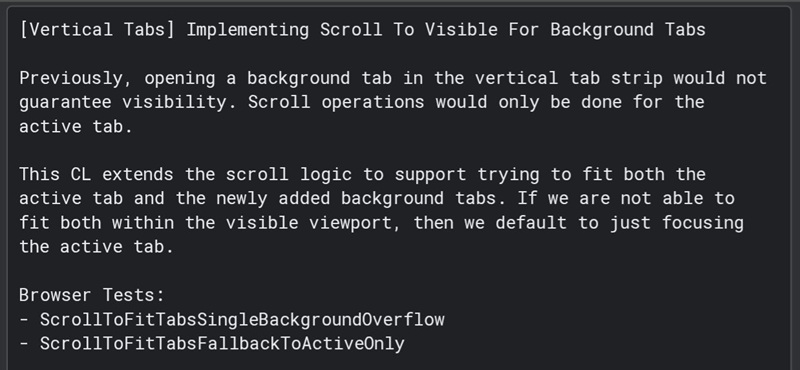
This visual feedback loop eliminates the guesswork and ensures you always see exactly where your newly created tab ended up.
These UI refinements build directly on Google’s broader strategy of turning Chrome into a smarter, highly responsive productivity hub. This comes right on the heels of another major update where Chrome for Android picked up Gemini-powered autofill search. That feature allows users to search saved form credentials and personal details using natural language AI rather than digging through static autofill entries.
When you combine Gemini-assisted form filling with desktop-style text selection tools and smarter tab management, it is clear that Google wants Chrome across mobile and desktop to feel like one unified, effortless ecosystem.


Hillary Keverenge
2723 Posts
Tech has been my playground for over a decade. While the Android journey began early, it truly took flight with the revolutionary Lollipop update. Since then, it's been a parade of Android devices (with a sprinkle of iOS), culminating in a mostly happy marriage with Google's smart home ecosystem. Expect insightful articles and explorations of the ever-evolving world of Android and Google products coupled with occasional rants on the Nest smart home ecosystem.
Next article View Article