While the stable version of Vivaldi is still on 8.1, the snapshot (v4106.4) for Vivaldi 8.2 has just come out with a ton of bug fixes and improvements.
Titled “Summer fixes,” an official blog post from the company details the long list of patches in this snapshot release. You can view a snippet of the changelog in the image below.
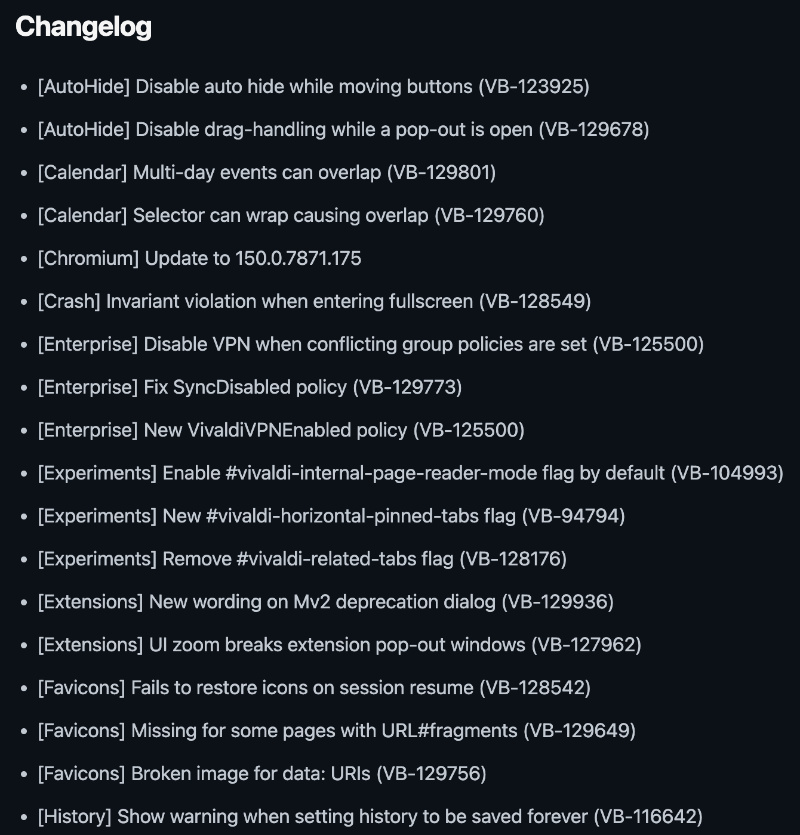
This is a simplified list of the important changes:
- AutoHide Bar has now been fixed, so it doesn’t activate randomly when moving buttons. Additionally, issues with dragging it while a pop-up window is open have also been fixed.
- Calendar: Multi-day events used to overlap incorrectly before, but now that has been addressed.
- The Chromium version has been updated to 150.0.7871.175, bringing important security and stability improvements.
- Some issues with crashing when entering the full-screen mode have also been resolved.
- Enterprise & Business: Better handling of VPN policy conflicts, and fixes bugs with “SyncDisabled.”
- Moving to experiments, the Reader Mode seems to be enabled by default for internal Vivaldi pages on the browser. There’s also a new flag for horizontally pinned tabs.
- An issue with favicons not restoring properly when resuming a session has been fixed, and sometimes, favicons would not show up on pages with a “#” in the URL; that has also been addressed.
- Various other issues with Mail, PWAs, Settings, Quick Commands, and more have been solved.
Note: A snapshot release for Vivaldi isn’t intended for daily use, since it’s a preview of upcoming features and fixes. If you’re a developer/tester and are interested in trying out the preview release, you can grab the download links from here.
Since people were heavily complaining about stability and bugs in Vivaldi, a lot of the issues should be solved once the changes from this snapshot version go live for the public. A lot of people also attributed the stability issues to Vivaldi’s entire interface and customization being based on a Chromium extension, as we detailed in previous coverage.
While the snapshot on the desktop version has received several fixes, the Android version also got a tiny update focused on bug fixes. We covered that here. Additionally, the latest update also added 20 new app icons (more on that here).


Sudhanshu K
286 Posts
I have been a consumer technology enthusiast for over 5 years. Thanks to my experience in software beta testing and product reviews, I've understood and learnt a lot about what bugs and issues bother people, and I spend time trying to simplify their solutions. I cover smartphones, software, social media, apps, AI, and most consumer tech gadgets. Actively pursuing a Computer Science bachelor’s degree. I'm mostly active on Twitter/X (@TechWhirlUlt), drop a DM or tag me if you want to share info or connect!
Next article View Article