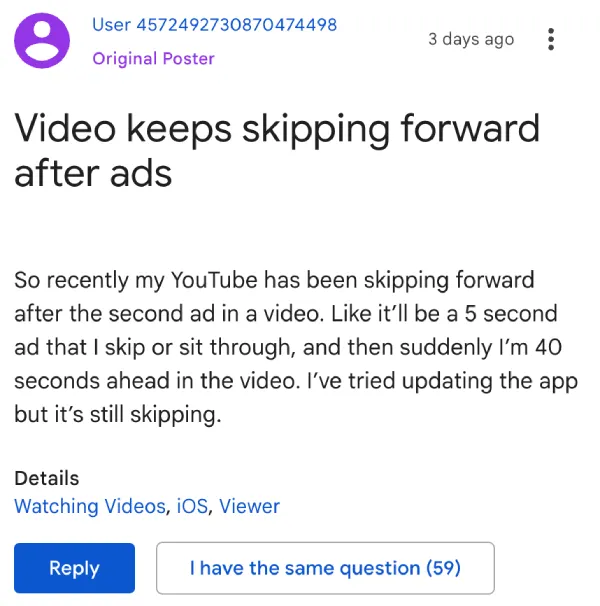
Some YouTube users are reporting that skipping ads causes their video to jump forward anywhere from 30 seconds to a couple of minutes, picking up at a random point in whatever they were watching.
Complaints about the issue have been popping up on Reddit and a Google support thread where one poster noted they have the same problem on iOS after a 5-second ad, whether they skip it or sit through it.
Over on Reddit, one post describes the screen visibly shrinking a few seconds before each ad, a sticky tab that reappears after every ad break, and videos being forced into vertical mode mid-playback after interacting with a vertical ad.
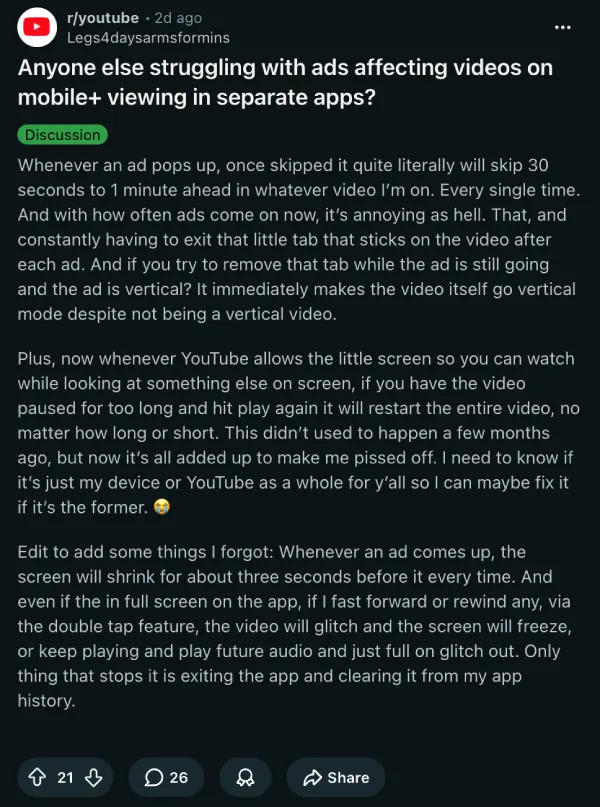
On top of that, the user says scrubbing through videos using the double-tap feature causes the video to freeze or the audio to desync, with the only fix being to close the app entirely and clear it from recent apps.
Some commenters in the threads say this is an intentional change to discourage skipping and push people toward YouTube Premium, but it’s highly unlikely. This seems like an unintended bug since the issue does not impact everyone.
Furthermore, one user pointed out that the video timer keeps ticking even when audio and video both freeze, which suggests the player is losing sync during the ad transition rather than something more deliberate happening under the hood.
Worth noting that YouTube has had no shortage of problems lately. Just today, we reported many users stuck with blank home pages becayse they had paused watch histories.
That’s on top of ad-related glitches we covered recently, like corner ads refusing to dismiss in March and the Skip button being obscured by an ad card just a couple of weeks ago.
YouTube has not acknowledged the issue yet. So it’s unclear how long it’ll take before a fix goes out.


Dwayne Cubbins
3067 Posts
I cover fast-moving stories across apps, online platforms, and everyday tech — phones, wearables, consoles, and whatever else people are fighting with this week. Bugs, rollouts, scams, policy enforcement, and the occasional internet-culture rabbit hole are all fair game. My goal is simple — make confusing tech news readable. When I'm not working, I'm working out or chilling with my dog. Got a tip? You can find me on X @dcubbins.
Next article View Article