YouTube videos stopped loading for Ghostery users earlier today, leaving them staring at blank black screens instead of their favorite content. The issue appeared suddenly across multiple browsers including Firefox, Chrome, Safari, and Opera, with reports flooding Reddit within the past few hours.
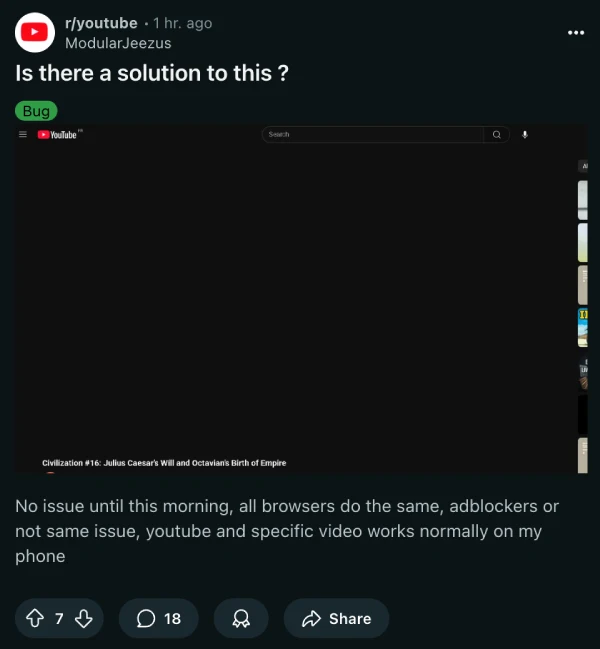
Users on the r/youtube subreddit were among the first to notice something was wrong. What initially looked like a random YouTube glitch turned out to be specifically tied to the Ghostery privacy extension. Videos work fine on mobile devices and in browsers without Ghostery, but desktop users with the extension enabled got nothing but a black rectangle where the player should be.
The problem affects Ghostery version 10.5.11 and 10.5.12 across different setups. One frustrated user on the r/Ghostery subreddit mentioned spending about an hour trying to figure out what broke on their computer before realizing it was the extension. Others reported the same experience, systematically disabling extensions one by one until Ghostery turned out to be the culprit.
Simply pausing Ghostery doesn’t fix the issue for everyone. Some users found they had to completely disable or uninstall the extension to get videos playing again. Even adding YouTube to Ghostery’s exception list didn’t help, which suggests something deeper changed on YouTube’s end or in how Ghostery interacts with the video player.
Interestingly, users running other privacy tools like uBlock Origin and Privacy Badger report no issues, which narrows the problem down to Ghostery specifically.
On the bright side, Ghostery’s development team responded quickly. Philipp Classen from Ghostery confirmed they could reproduce the problem and were working on a fix. Within a few hours, they pushed an update to their ad blocker filter lists that should resolve the black screen issue. Users can manually force an update by going to Settings, then Privacy Protection, and clicking “Update now.”

For anyone still experiencing problems, the temporary workaround is disabling Ghostery for YouTube or switching to an alternative like uBlock Origin until the fix propagates fully.
This isn’t the first time YouTube has caused headaches with browser compatibility. Last month, Brave Browser users couldn’t play YouTube in the background, while YouTube also tested oversized Theater mode controls that left many users frustrated with the bloated interface.
Nevertheless, even if you don’t force the update, it’s likely the extension will automatically be updated in a short while and you’ll be back to watching YouTube videos as normal.


Dwayne Cubbins
3064 Posts
I cover fast-moving stories across apps, online platforms, and everyday tech — phones, wearables, consoles, and whatever else people are fighting with this week. Bugs, rollouts, scams, policy enforcement, and the occasional internet-culture rabbit hole are all fair game. My goal is simple — make confusing tech news readable. When I'm not working, I'm working out or chilling with my dog. Got a tip? You can find me on X @dcubbins.
Next article View Article