






The v1.23.4b stable build came out recently for the Zen browser. It’s mostly a maintenance release, and the biggest change is a security update that improves protection against the recently compromised eMudhra certificates. It also includes some quality-of-life improvements that first appeared in Twilight.
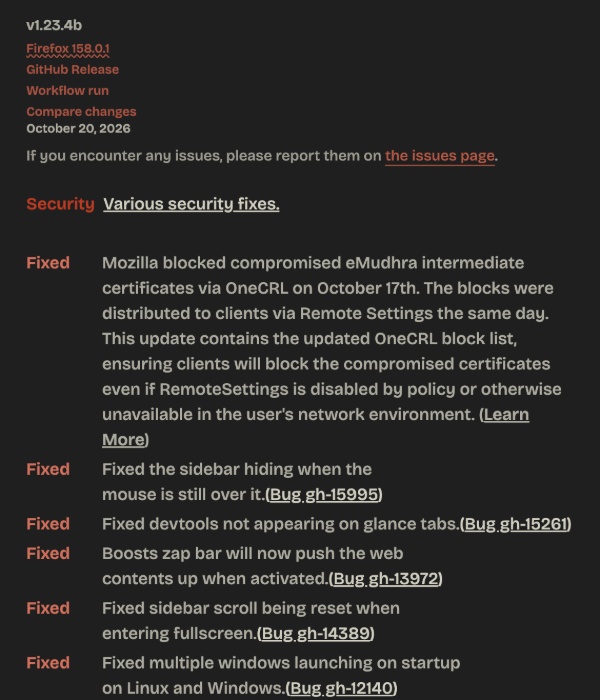
Zen published an entire list in the official changelog, and you can view a partial screenshot attached below. The actual list is quite long.
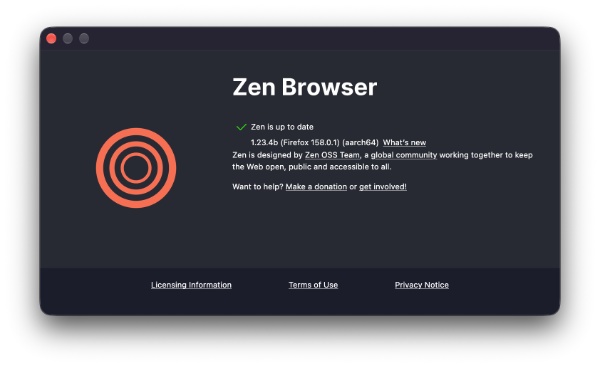
I checked for this update, and sure enough, it began installing after I clicked on “About Zen.”
Here are the important changes:
- Security: eMudhra certificate blocks: It’s worldwide news that private keys for eight eMudhra intermediate certificates had been compromised. The company immediately pushed blocks via OneCRL, and most Firefox users were provided with a fix within hours, without needing to even restart the browser. This Zen update embeds the updated OneCRL update directly.
- Sidebar: It’ll continue to stay open even while the mouse is over it. Sometimes, in Compact Mode, or when auto-hide was enabled, the sidebar would collapse even though the pointer was on top of it. This was specifically an issue on Linux. The hover detection is more reliable now.
- DevTools work properly on Glance tabs: Opening Developer Tools (Inspect Element) on a Glance preview used to produce a black screen or fail to show the tools properly. This issue has been patched.
- Boosts Zap bar pushes page content up.
- Sidebar scroll position is now preserved after a fullscreen: Exciting fullscreen used to reset the sidebar scroll position to the top before.
- Multiple windows no longer launch on startup for Linux and Windows. On some systems, Zen used to open two or more windows every time it started.
- It also includes various crash fixes, such as issues with Windows when saving a page as a PDF. Zen browser windows no longer open on the wrong monitor for multi-monitor setups (on Linux).
- On macOS, dragging files into the browser from other apps works correctly. External links are also routed properly through Space Routing on startup.
- Boosts Focus: Boosts now include a Focus option that lets you focus on a specific part of a website while you’re customizing it.
- Performance: Windows builds use PGO (Profile-Guided Optimization), which improves startup times and responsiveness.
- Update to Firefox v158.0.1.
If you want to read the entire changelog, you can find it here. I have only highlighted the most important changes in the update.
In case you missed it, a lot of these improvements were previously available in a Twilight update, which we covered here.


Sudhanshu K
343 Posts
I have been a consumer technology enthusiast for over 5 years. Thanks to my experience in software beta testing and product reviews, I've understood and learnt a lot about what bugs and issues bother people, and I spend time trying to simplify their solutions. I cover smartphones, software, social media, apps, AI, and most consumer tech gadgets. Actively pursuing a Computer Science bachelor’s degree. I'm mostly active on Twitter/X (@TechWhirlUlt), drop a DM or tag me if you want to share info or connect!