





Chrome users in India are in for a treat as Google has released Gemini in Chrome to Android devices, and desktop users are getting access to the agentic ‘auto browse’ feature in the country.
This announcement comes just a few days after we reported that Google was gearing up to expand Gemini in Chrome to Android users in more regions. So it looks like India was first on the company’s list. Until now, both features were only available to users in North America.
On Android phones, the update puts Gemini right into the toolbar. You can tap it to summarize lengthy articles, ask questions about whatever page you are reading, and pull context from Google Keep or Calendar without jumping back and forth between different apps.

Coming to desktop, that’s where things get more interesting. Google initially rolled out the agent to Android users in the US back in August, and it is now available in India for Google AI Pro and AI Ultra members.
According to Charmaine Dsilva, Senior Director of Product Management for Chrome, the tool is built to “handle tedious everyday tasks for you, helping you do things like book parking for an event, fill out a long form, or order groceries for the week.”
I gave auto browse a quick run on desktop to see how it handled looking up smartphone discounts on Flipkart. After setting up a simple prompt, it laid out a clear plan, opened the storefront, scrolled through the listings, and rounded up the top offers without getting confused along the way.
I suspect it’ll change how I use Chrome once I adapt my workflow. That said, I’m curious about how auto browse will impact the usage limits, if at all. Google doesn’t have any documentation on usage limits for auto browse in the browser.
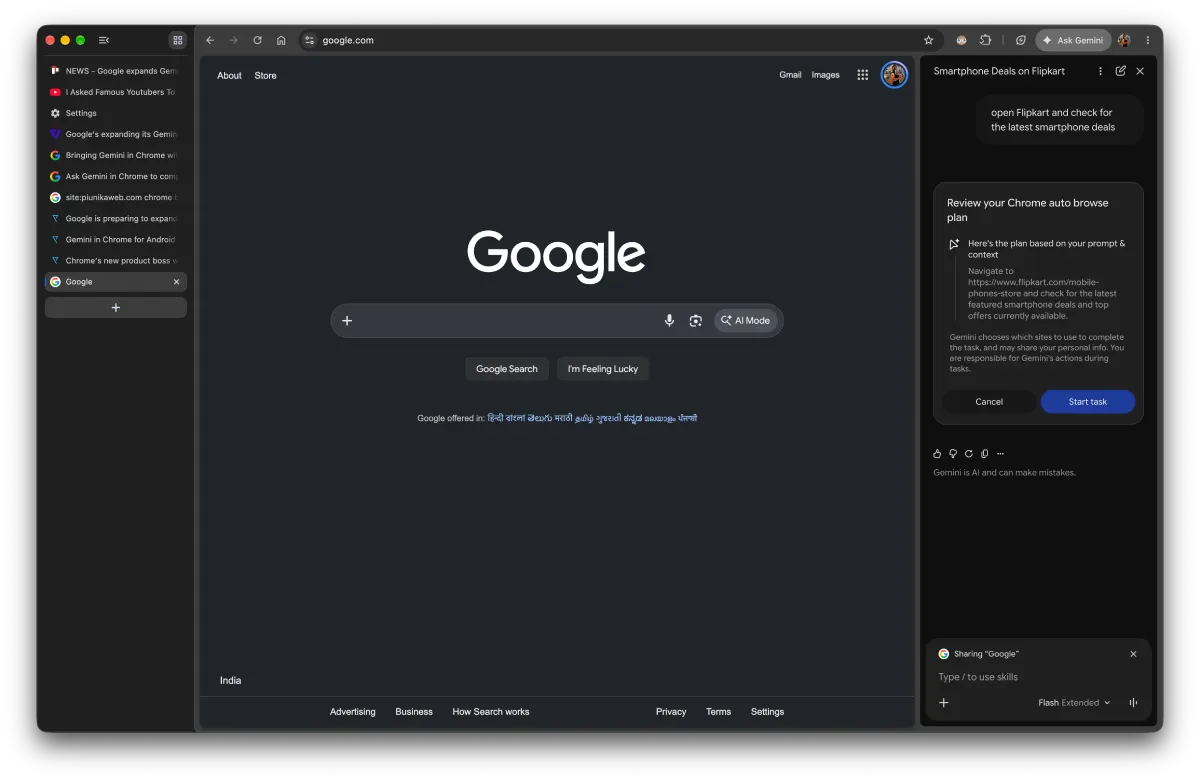

And speaking of documentation, it’s funny because Google seems to have moved faster than its own support staff. The official Google Chrome Help page still claims that users need to be in the US to run auto browse, even though the feature is already active and working in India.
That said, we’ll likely see the two features go live in more regions soon. After all, Google’s new product boss for Chrome, Jacob Bank, had already been vocal about the AI push. Bank argued that browsers should stop being passive viewports and start working alongside users to get actual work done, and this rollout is the first major taste of that philosophy in India.


Dwayne Cubbins
3089 Posts
I cover fast-moving stories across apps, online platforms, and everyday tech — phones, wearables, consoles, and whatever else people are fighting with this week. Bugs, rollouts, scams, policy enforcement, and the occasional internet-culture rabbit hole are all fair game. My goal is simple — make confusing tech news readable. When I'm not working, I'm working out or chilling with my dog. Got a tip? You can find me on X @dcubbins.