






An upcoming update to Brave will fix various bugs and also mark private screenshots as sensitive. There are various other smaller fixes involved, and while this isn’t a feature-focused update, it brings multiple tiny refinements.
For now, the Release Notes are available on GitHub, and we have attached a screenshot of them below. The update has just been prepared and not shipped. The GitHub issue (desktop notes) is basically a draft list, and the public Release Notes will only appear once the build ships to users.
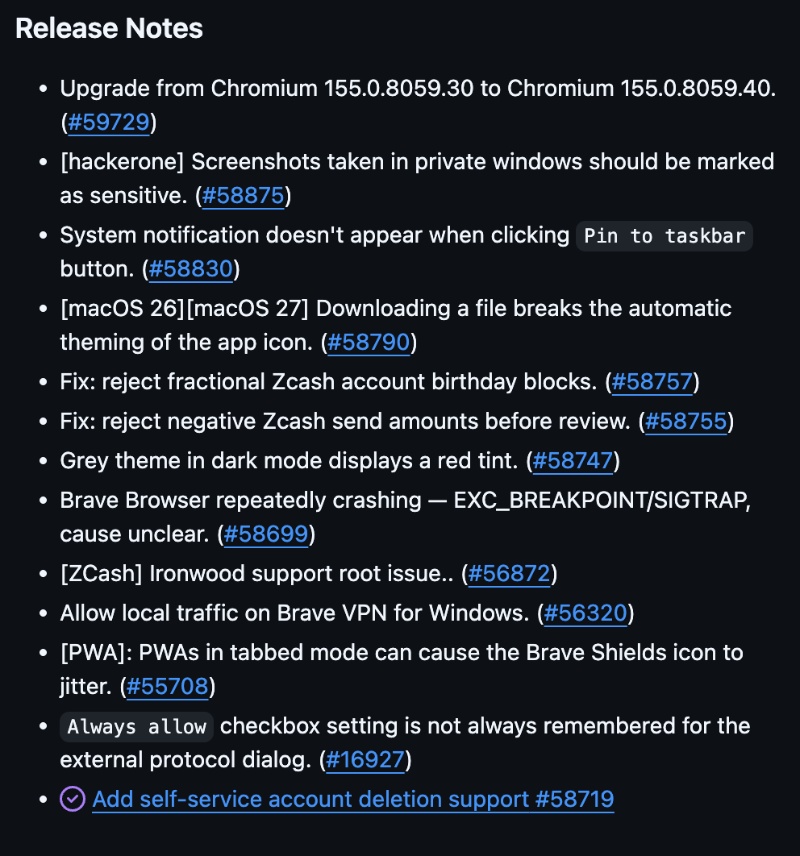
Here’s a summary of the important changes with this update:
- Chromium security bump: Since Brave is Chromium-based, it brings some security and stability improvements with the newer build.
- Screenshots from Private windows will be marked as sensitive: This is a Windows clipboard-related fix. Basically, Brave’s screenshot tool has a “Copy to clipboard” button. These copies were being treated like any regular image, so they also showed up in Windows clipboard history. If cloud sync was enabled, these screenshots would also sync to the cloud. After this update, Private screenshots are flagged, so that Windows leaves them out of clipboard history and cloud sync.
- You can now delete a Brave account yourself: This change has been listed for desktop, Android, and iOS. You can now delete your Brave account from the “More actions” menu. There’s no need to go through support anymore.
- A crash issue has been fixed: On some MacBook Air models, Brave used to crash several times, with the same error message. This has been addressed now.
- Brave VPN on Windows can leave local devices alone: Local network traffic (such as printers) can stay on the same local network, while the rest of the internet traffic moves through the VPN.
- There are some improvements to Zcash, which is a privacy-focused cryptocurrency in Brave Wallet. A wallet needs a starting point on a blockchain, so that it knows how far it has to go to look for transactions. That starting point has to specifically be a whole block number, and Brave now rejects fractional numbers. Negative amounts aren’t allowed either.
- There are also some smaller fixes. Clicking “Pin to taskbar” did not always raise a system notification, which should appear now. On macOS 26 and macOS 27, downloading a file could break the automatic light/dark styling of Brave’s icon, and that should no longer happen.
- With the grey theme in dark mode, parts of the browser could look red. The tint has been fixed.
- If an installed PWA opened in tabs, the Shields lion icon could shake or jump. That jitter is fixed now.
Note: I have only added some important changes above, but the original list consists of a few more.
You can view the entire list on GitHub. The official Release Notes page will be updated with the changelog once it has been publicly released.
In other Brave news, the company has begun working on official support for extensions on Android. More on that here.


Sudhanshu K
313 Posts
I have been a consumer technology enthusiast for over 5 years. Thanks to my experience in software beta testing and product reviews, I've understood and learnt a lot about what bugs and issues bother people, and I spend time trying to simplify their solutions. I cover smartphones, software, social media, apps, AI, and most consumer tech gadgets. Actively pursuing a Computer Science bachelor’s degree. I'm mostly active on Twitter/X (@TechWhirlUlt), drop a DM or tag me if you want to share info or connect!