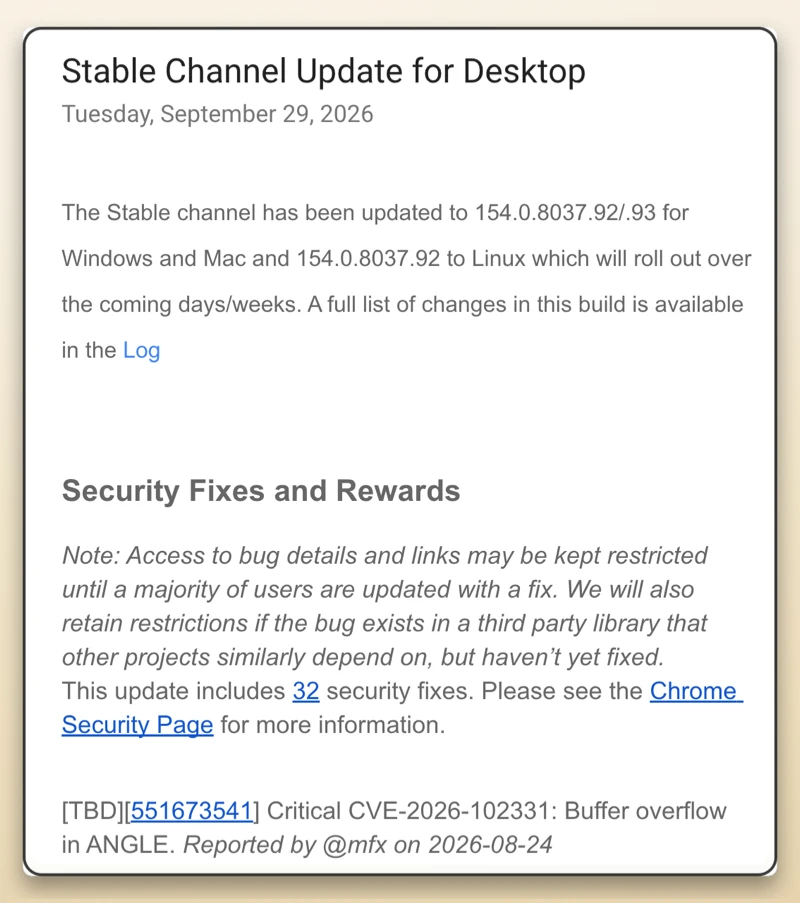
If you’ve kept Chrome running for days with lots of tabs pinned, now is a good time to restart it. Google just released a new desktop update to the stable channel: version 154.0.8037.92 or .93 for Windows and Mac, and .92 for Linux.
This update includes 32 security fixes. That might seem minor compared to last week, when Google released Chrome 154 with over a hundred fixes.
The main reason to update now is a major flaw called CVE-2026-102331. Google has marked this rare, critical security issue as a buffer overflow problem inside ANGLE.
A security researcher known as @mfx reported this issue in late August. Google isn’t sharing all the details yet. ANGLE is the graphics engine Chrome uses to run WebGL content smoothly on your computer.
A buffer overflow in a graphics component like this means memory is written where it shouldn’t be. This could let a malicious website send bad data to your browser and escape the usual protections to run harmful code on your computer.
Google is keeping the instructions for reproducing the bug private for now. In the release announcement, they said access to bug details and links “may be kept restricted until a majority of users are updated with a fix”.
This is standard practice to stop attackers from using public bug reports to exploit issues before most people have updated.
Besides the critical graphics issue, this update also fixes several high-severity problems in the V8 JavaScript engine, Bluetooth connections, and the password manager. Interestingly, OpenAI Codex Security found and reported several of the script engine bugs.
This continues a remarkably busy month of patching for the browser, as two weeks ago we covered another Chrome update that addressed 42 flaws, including three critical bugs.
Restarting your browser in the midst of a busy workday is always a nuisance. And this is precisely why Google is currently testing an idle restart system, which waits for your desk break, so that updates happen quietly when you step away, but until then you still have to take care of it yourself.
To download it right away, go to the three dots in the top-right corner, click Help, open About Google Chrome, and let it download the update so you can relaunch with peace of mind.


Dwayne Cubbins
3101 Posts
I cover fast-moving stories across apps, online platforms, and everyday tech — phones, wearables, consoles, and whatever else people are fighting with this week. Bugs, rollouts, scams, policy enforcement, and the occasional internet-culture rabbit hole are all fair game. My goal is simple — make confusing tech news readable. When I'm not working, I'm working out or chilling with my dog. Got a tip? You can find me on X @dcubbins.
Next article View Article