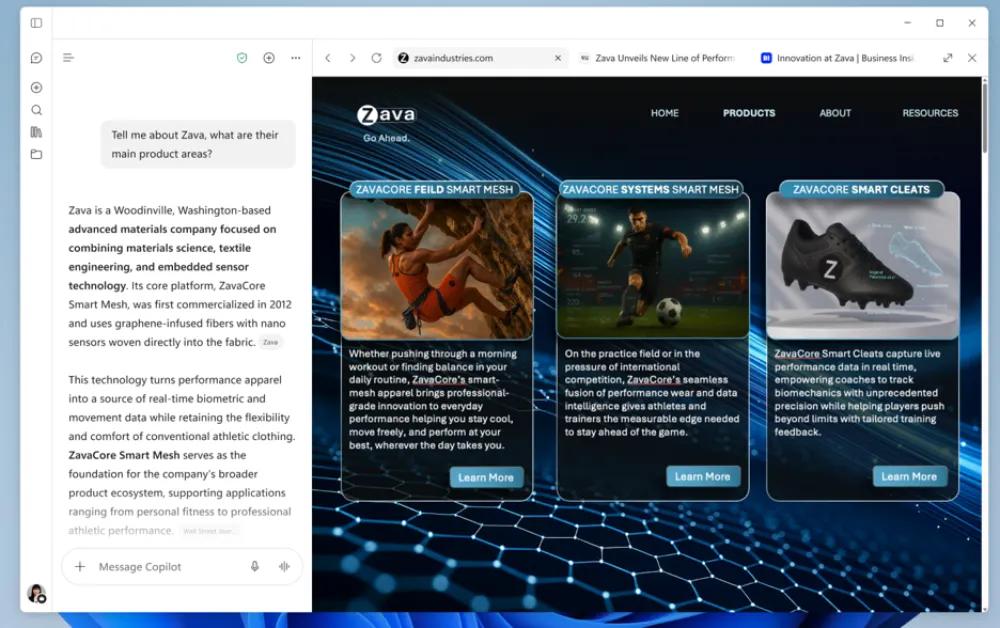
Instead of opening webpages in Edge, Microsoft wants users to do browser-related tasks within the Copilot app when in use. The app will display a full side-by-side browser window each time you click a web link generated in a chat session. This means users can read articles and browse websites without using Edge or any other browser at all.
The update was quietly outlined in an advisory posted on the Microsoft 365 Message Center, initially noticed by Neowin. As Windows Central pointed out, Microsoft began testing the side-by-side browsing feature in March, and the company is now finally preparing for a wider release.
It lets Windows and Mac users open multiple tabs, resize the viewing pane, and switch to full screen, turning the AI client into an everyday browsing window.
The irony of this decision is hard to overlook. For months, Microsoft has done all it could think of to get Copilot into Microsoft Edge, and we got persistent sidebar flyouts, shiny toolbar icons, and AI summaries appearing unprompted in every part of the browsing experience.
Many people disliked the clutter and deliberately sought ways to turn off Copilot in Edge to return to a clean, distraction-free browser. However, Microsoft appears to believe that if people refuse to use Edge to talk to AI, they may use AI to browse the web instead.
Inside the app, this new in-app browser isn’t based on a completely new engine. As Microsoft states in its rollout advisory, user data, autofill entries, cookies, and browsing history are saved locally, and the browser thus functions “similar to Edge” within the app directory. It is really just Edge disguised as an AI assistant.

Even though the company is already exploring ways to get AI agents to carry out online tasks in Edge, the decision to include a separate web viewer in Copilot suggests Microsoft realizes people may one day stop launching standalone browsers altogether.
If you genuinely don’t want Copilot behaving like your browser, there are still methods by which you can get out of it. Microsoft says users can open pages in an external browser by right-clicking a tab, using the three-dot menu, or copying the address manually.
At the moment, the feature is available on a voluntary basis to enterprise IT administrators who want to try device management policies, and Microsoft intends to begin a wider automatic rollout to ordinary users in late November.


Dwayne Cubbins
3141 Posts
I cover fast-moving stories across apps, online platforms, and everyday tech — phones, wearables, consoles, and whatever else people are fighting with this week. Bugs, rollouts, scams, policy enforcement, and the occasional internet-culture rabbit hole are all fair game. My goal is simple — make confusing tech news readable. When I'm not working, I'm working out or chilling with my dog. Got a tip? You can find me on X @dcubbins.
Next article View Article