





Google is preparing to bring AI-powered dictation directly in your browser, as the company looks to expand the Gemini project to other areas. Gemini 3.5 Transcribe, an audio model that’s already live in other Google products, will let you dictate text directly to text fields rather than having to type on a keyboard.
Many built-in voice-to-text applications are fiddly at best, often getting caught up on processing sounds and making typos in otherwise fine sentences. Google claims this new model will turn speech into text more efficiently, producing properly formatted documents with minimal mistakes.
Google notes that this new model can correct itself mid-sentence if the user makes a mistake and then immediately corrects it.
This is the same model that currently powers the much-talked-about Rambler feature in Google’s latest Pixel 11 series phones. So you won’t have to bother about manually removing fillers like “um” and “uh” from the text. Gemini 3.5 Transcribe will take care of all the little things and leave you with a clean block of text.
Apart from powering Rambler, the speech-to-text model can also be found in Google’s Antigravity app and the Gemini app on macOS. So Chrome will be the next stop for it.
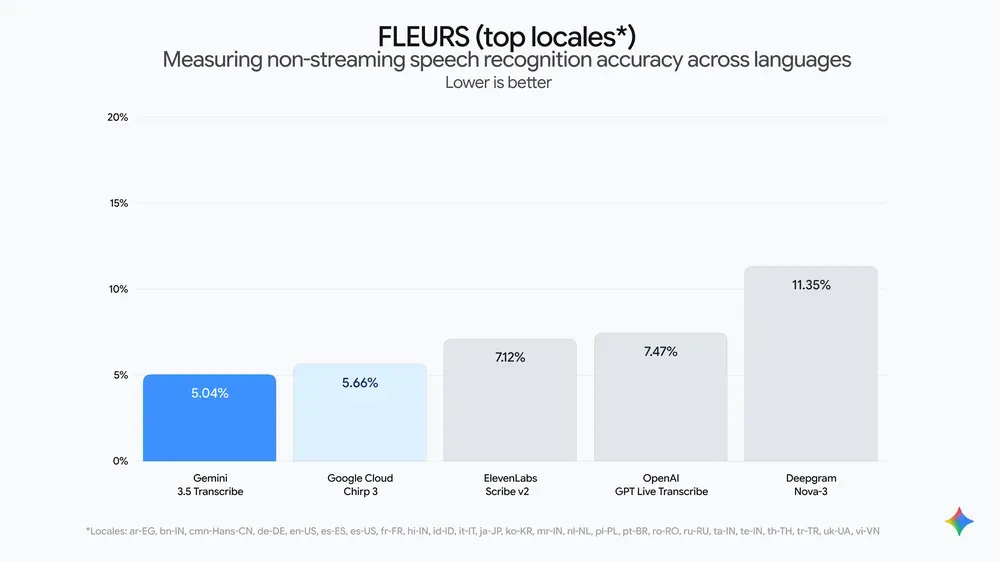
For those of you who want to know how it performs on benchmarks, Google has shared the following information:
- As measured by Artificial Analysis, [Gemini 3.5 Transcribe] achieves an average Word Error Rate (WER) of 4.0% for streaming and 2.6% for non-streaming use-cases. It shows strong performance across noisy, real-world environments, accurately capturing alphanumeric entities like postal codes and order IDs.
- As measured by Artificial Analysis, time to final transcription, for example, improves by 70%. On the FLEURS benchmark across a set of top languages and locales, the model delivers precise multilingual performance, improving over Chirp 3, and achieving a 5.50% WER in streaming mode and 5.04% WER in non-streaming use-cases.
Google also says that the model can transcribe over 85 languages and can handle regional accents and diverse dialects. Another interesting feature is that if you ask Gemini 3.5 Transcribe to perform a complex task like generating an image, it will automatically route the request to an appropriate model via function calls.
The company is aiming to let its users “dictate replies and compose posts” with greater ease, while cutting out extra verbiage like um and ah, as well as recognizing proper nouns and other unique words so as not to mispronounce or misspell them.
That said, Google is also experimenting with other AI tricks in Chrome, such as turning articles into podcasts.
I’ve been testing out tools like Wispr Flow and Willow over the past few weeks to see how I could speed up my own workflow, so it’ll be interesting to see how Gemini 3.5. Transcript compares to these tools, especially since it’ll be baked into Chrome itself.


Dwayne Cubbins
2965 Posts
I cover fast-moving stories across apps, online platforms, and everyday tech — phones, wearables, consoles, and whatever else people are fighting with this week. Bugs, rollouts, scams, policy enforcement, and the occasional internet-culture rabbit hole are all fair game. My goal is simple — make confusing tech news readable. When I'm not working, I'm working out or chilling with my dog. Got a tip? You can find me on X @dcubbins.