Brave has started rolling out another change aimed at making browser fingerprinting a little harder, and this time the focus is on your GPU. The protection is arriving with Brave 1.93 and is being enabled by default on desktop and Android, although it won’t necessarily appear for everyone at the same time.
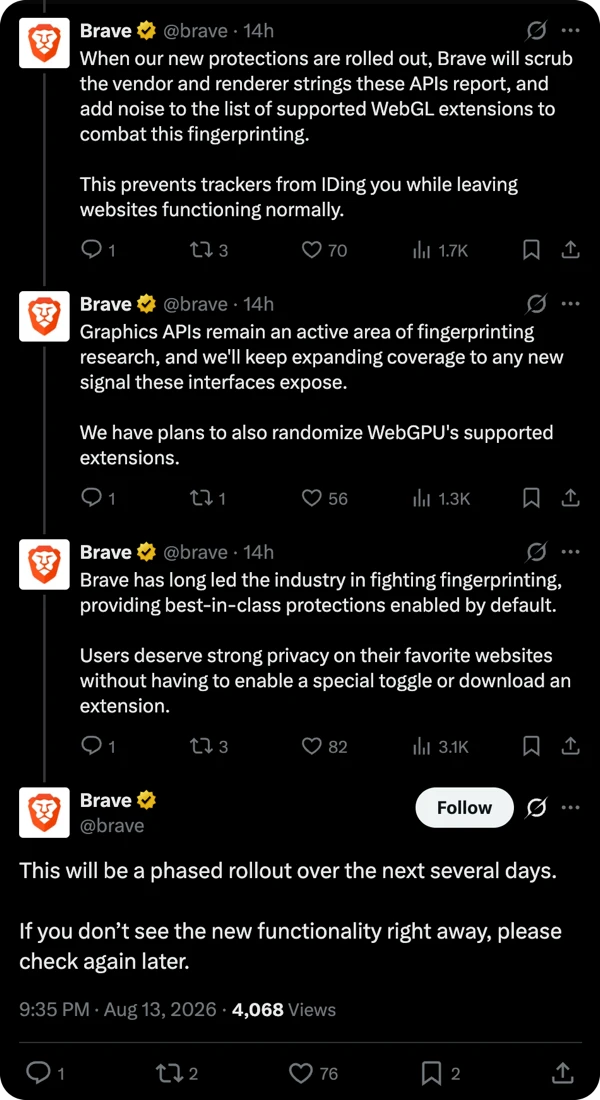
Brave confirmed on X that the rollout is happening gradually. “This will be a phased rollout over the next several days. If you don’t see the new functionality right away, please check again later.”
GPU information can be surprisingly useful for websites trying to build a fingerprint of your device. We’ve gone over browser fingerprinting before, but the basic idea is pretty simple. Websites collect a bunch of details about your browser and hardware and combine them to create something that can help identify you as you move around the web.
Your graphics hardware is particularly useful here because it tends to stay the same for a long time. The chances of someone suddenly switching from one GPU to another between browsing sessions aren’t exactly high, so that information can become another useful piece of the fingerprinting puzzle.
Brave looked into how websites were using graphics-related APIs and found something rather interesting. A lot of the sites accessing this information weren’t doing it because they needed your GPU details to provide some fancy graphics or other useful functionality. The information could instead be used for tracking.
The new protection is designed to get around that without simply breaking the APIs altogether. Brave hides the specific vendor and model information being exposed through these graphics APIs, replacing it with a generic value. The browser also adds some randomization, making it harder for trackers to rely on the same information every time.
That approach fits neatly with what Brave has been doing with fingerprinting for years. The browser already randomizes or blocks a number of fingerprinting signals through Shields, including information tied to graphics hardware and other device characteristics.
There’s always a balancing act here, though. Blocking too much hardware information can end up breaking websites that genuinely need access to it, so Brave has been leaning toward randomizing information instead. The company says this gives websites what they need while making it much harder to use the same signals to recognize you elsewhere.
Brave isn’t the only privacy browser going after fingerprinting either. The Helium browser has been stepping up its own protections, while the iOS-focused Psylo recently expanded its defenses to WebGL and other fingerprinting techniques.
The new GPU protection is enabled through Brave Shields, so there’s nothing you need to install or configure to get it. And if a particular site does run into trouble, Brave still lets you adjust or disable Shields for that site.
At the moment, we’ve not got the new GPU protection enabled on Brave for our Mac. So the test results do still show our GPU information.

The update also arrives at an interesting point for Brave, with the browser recently passing 51 million daily users. More people using the browser means these default protections can reach a much wider audience without requiring users to dig through settings to find them.


Dwayne Cubbins
3105 Posts
I cover fast-moving stories across apps, online platforms, and everyday tech — phones, wearables, consoles, and whatever else people are fighting with this week. Bugs, rollouts, scams, policy enforcement, and the occasional internet-culture rabbit hole are all fair game. My goal is simple — make confusing tech news readable. When I'm not working, I'm working out or chilling with my dog. Got a tip? You can find me on X @dcubbins.
Next article View Article