Back in May, we reported on Google’s mysterious Indigo feature after Chrome Canary started exposing a new AI-powered page action hidden behind experimental flags. At the time, there wasn’t much to go on beyond internal strings and early UI elements, leaving plenty of room for speculation about what Google was actually building.
Now, we finally have a much clearer picture.
The same Chromium leaker who first uncovered Indigo has shared another round of discoveries, and this time the mystery is largely solved. Google appears to have renamed the feature to “Try it on,” confirming that Indigo is, in fact, Chrome’s built-in AI virtual clothing try-on experience.
What is Chrome’s Indigo feature?
As it turns out, Indigo isn’t just a generic AI backend update. According to the fresh details, it is actually a built-in virtual try-on tool designed to drastically change your online shopping experience.
Here’s how it works: when you’re browsing clothing online, the AI will take a photo of you, accurately apply the garment shown on the current webpage, and seamlessly replace the original product image with a picture of you wearing it. It’s essentially a digital fitting room baked right into your browser.
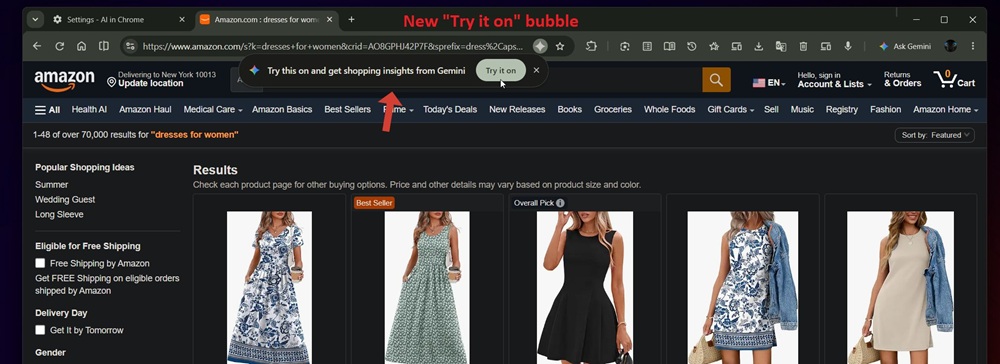
To support this new tool, Google is rolling out several UI changes in Chrome. The leaker has shared a few screenshots that give us a clear look at what to expect as the feature takes shape.
When navigating to supported shopping sites, a brand-new prompt bubble appears next to the omnibox. As seen in the screenshot above, the bubble prompts users to “Try this on and get shopping insights from Gemini,” accompanied by a prominent “Try it on” button. The page action button in the omnibox, which was previously referred to by its “Indigo” codename, has now been officially renamed to “Try it on.”
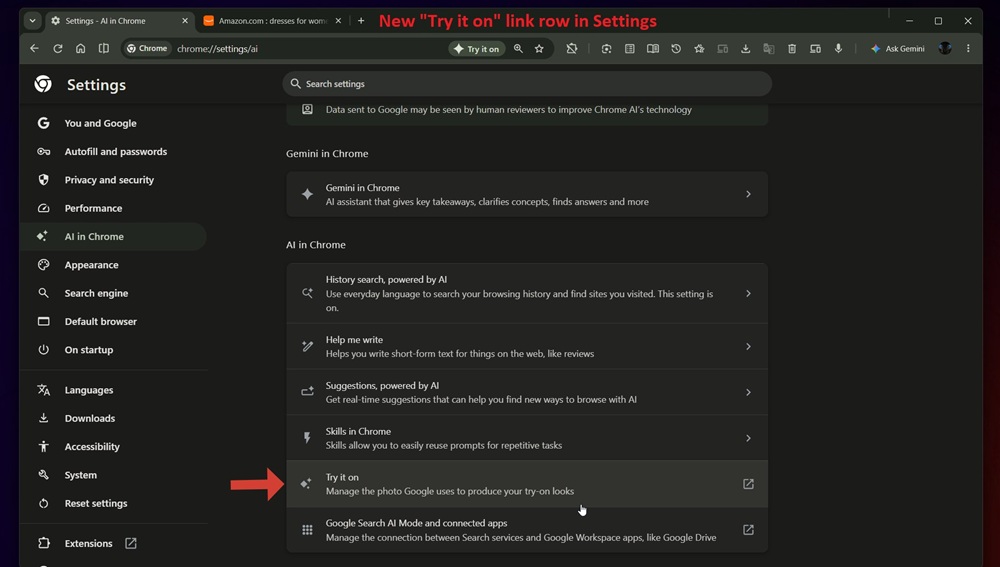
Naturally, a feature requiring your personal photos needs a place to manage that data. If you head over to your browser settings, there is a brand-new link row located under the AI in Chrome section. The screenshot below shows this new option titled “Try it on,” complete with a sub-description that reads: “Manage the photo Google uses to produce your try-on looks.”
What’s the current status of Chrome’s ‘Try it on’ shopping tool?
If you’re itching to test this out, you might have to hold your horses just a little longer. As is common with features in early development, it is not functional yet.
The leaker notes that currently, clicking the “Try it on” button in the omnibox or the prompt bubble does absolutely nothing. Furthermore, clicking on the new “Try it on” row within the Chrome Settings menu just directs you to a blank page.
It is clear that Google is still actively building the framework for this virtual try-on experience. However, seeing the UI elements actively falling into place strongly suggests that a functional rollout might not be too far off.


Hillary Keverenge
2723 Posts
Tech has been my playground for over a decade. While the Android journey began early, it truly took flight with the revolutionary Lollipop update. Since then, it's been a parade of Android devices (with a sprinkle of iOS), culminating in a mostly happy marriage with Google's smart home ecosystem. Expect insightful articles and explorations of the ever-evolving world of Android and Google products coupled with occasional rants on the Nest smart home ecosystem.
Next article View Article