






For a long time now, Microsoft has been relentlessly integrating Copilot features into the Edge browser. While a new entry on the official Microsoft 365 roadmap portal has just made headlines for promising a one-click “Analyze image” feature, the truth is that Microsoft has been building up to this moment for months in the Canary channel.
A recent report highlights that Edge users will soon be able to send any web image directly to Copilot via a simple right-click, completely bypassing the need to download or copy the image. However, thanks to the discoveries of serial leaker Leopeva64, we know this roadmap entry is merely the final puzzle piece of a much larger Copilot overhaul that began back in March.
The groundwork for this new context menu integration started months ago with fundamental changes to Edge’s layout.
Back in March, Microsoft began experimenting heavily with Copilot’s placement. The AI assistant was moved to the “standard” side pane, the same one used by features like History and Drop, effectively separating it from the sidebar app list. This UI shift was a necessary stepping stone before Microsoft officially removed the sidebar app list in late April (though workarounds to restore it still exist).
Around late March, Microsoft also began testing support for multiple instances of the Copilot pane in Edge Canary. This allowed the pane to remain active only in the current tab, enabling users to maintain separate, independent AI chat sessions for every open tab rather than a single, global chat.
From floating toolbars to context menu headers
The specific “Analyze image” feature actually first surfaced in early April. Serial leaker Leopeva64 discovered Microsoft testing a new Copilot floating toolbar that appeared above or below the traditional right-click menu.
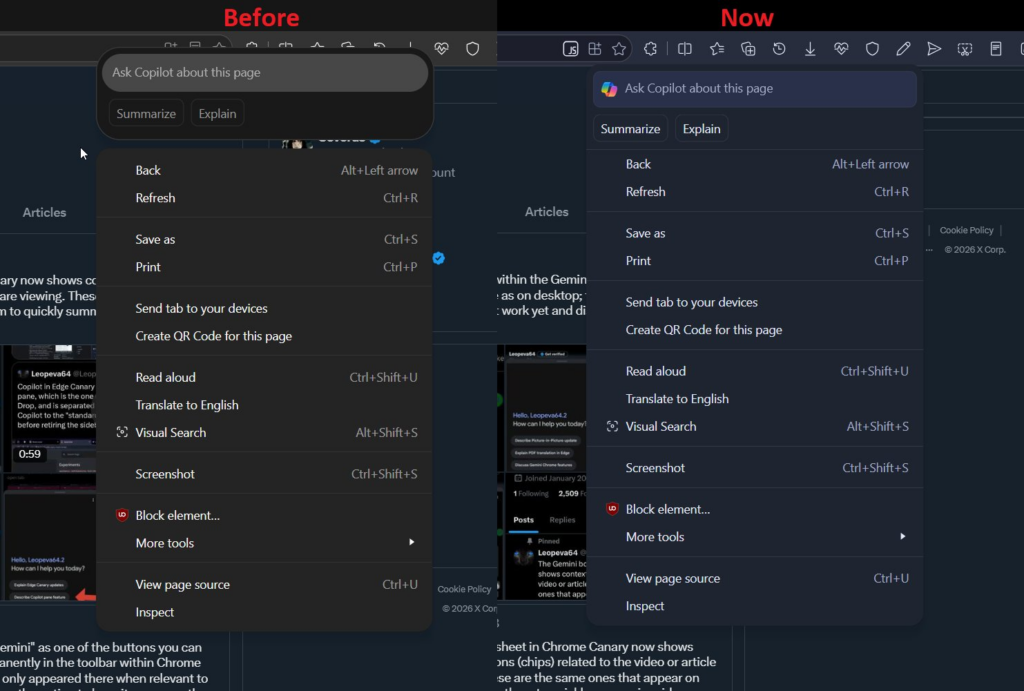
- Selecting text spawned a toolbar with an input box and options to summarize, explain, or rewrite.
- Right-clicking an empty space on the page offered “Summarize” or “Explain” options.
- Right-clicking an image revealed the early version of the “Analyze image” prompt.
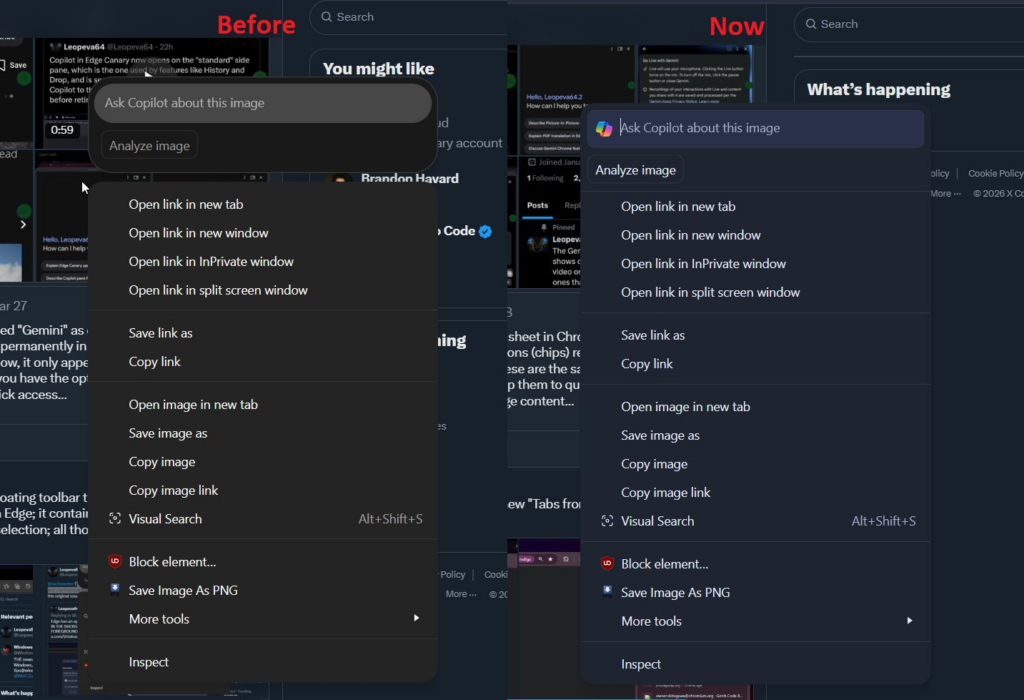
By early May, Microsoft refined this floating UI. Instead of floating separately, the company integrated the Copilot toolbar directly into the context menus in Edge Canary, making it appear as a sleek header for page, image, and text menus.
Official roadmap and Enterprise controls
Fast forward to today, and the Windows Report discovery simply confirms that these months of Canary testing are finally bearing fruit, with the feature making its way to the official Microsoft 365 roadmap portal.
While a basic “Ask Copilot about this image” option currently exists in the Stable version of Edge, the dedicated “Analyze Image” header that we’ve seen evolving in Canary is what’s officially on the way.
According to the roadmap listing, the rollout will initially target the web version of Microsoft Edge worldwide, with a scheduled release date of August 2026. Furthermore, organizations will have the ability to enable or disable this feature through specific policies, namely EdgeEntraCopilotPageContext and Microsoft365CopilotChatIconEnabled, allowing IT admins to dictate whether employees can access the Copilot image analysis experience on company machines.


Hillary Keverenge
2689 Posts
Tech has been my playground for over a decade. While the Android journey began early, it truly took flight with the revolutionary Lollipop update. Since then, it's been a parade of Android devices (with a sprinkle of iOS), culminating in a mostly happy marriage with Google's smart home ecosystem. Expect insightful articles and explorations of the ever-evolving world of Android and Google products coupled with occasional rants on the Nest smart home ecosystem.