





Google is testing a prominent new "Summarize" button in the toolbar of the PDF viewer in Chrome Canary. Clicking it currently does nothing, but it is expected to eventually send the file to Gemini for summarization in the side panel:https://t.co/PjfvI3qnli pic.twitter.com/oAYsiBj7ct
— Leopeva64 (@Leopeva64) February 13, 2026
Google is aggressively pushing to make Chrome more than just a gateway to the web, turning it into an all-in-one productivity hub. After recently expanding the Ask Gemini omnibox assistant to a massive list of locales, the company is now testing a native AI summarization tool directly inside Chrome’s built-in PDF viewer.
As someone who usually relies heavily on Microsoft Edge for its snappy startup and deeply integrated Copilot side-panel, seeing Google bring similar seamless AI functionality to Chrome is a welcome development for those of us who spend hours combing through tech whitepapers and lengthy reports.
Initially spotted as an experimental feature in Chrome Canary back in February, this capability is now officially making its way to the Chrome Beta channel.
The implementation is incredibly straightforward. A new, dedicated Summarize button now sits right on the top toolbar of the browser’s PDF viewer. Clicking this button immediately slides open the Gemini side panel, passes the active document to the AI, and generates a structured summary within seconds. From there, users can ask specific follow-up questions about the document’s contents without ever leaving the tab.
This removes one of the most tedious friction points in document research. Previously, analyzing a PDF with Gemini meant downloading the file locally, navigating to Google Drive or the Gemini web app, uploading it, and then prompting the AI. Now, the workflow is reduced to a single click directly within the browser.
However, before you rush to update your browser, be aware that this appears to be a very limited, server-side rollout. While the feature is technically live in Chrome Beta, it isn’t showing up for everyone. Despite running the latest Beta builds, neither I nor my colleagues, whether testing here in Kenya or checking in from India, have seen the Summarize button go live on our end just yet.
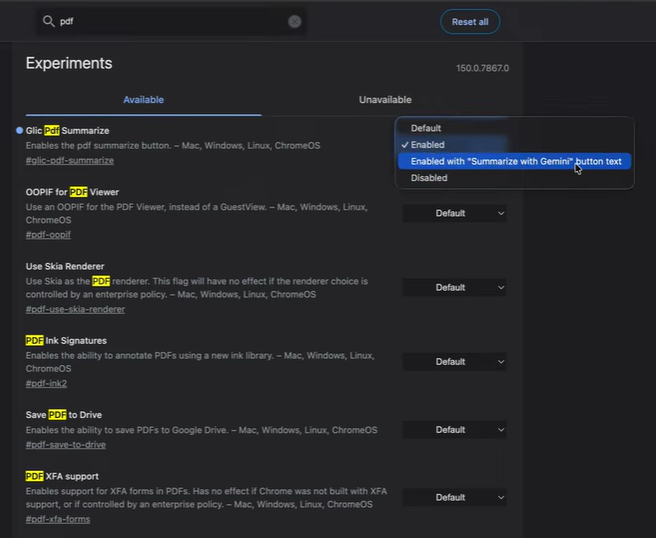
If you’re eager to test it out and aren’t seeing it by default, you can try enabling the specific PDF summarization flag tucked away in Chrome’s experimental features (chrome://flags/) and restarting your browser. For some lucky users in the Beta pool, though, it is reportedly working right out of the box without any manual tinkering.
This PDF integration is just one of several under-the-hood upgrades Google is currently cooking up for Chrome, sitting alongside casting refinements and under-the-hood improvements for Android users. We’ll be keeping a close eye on this and will update as the feature transitions from this limited Beta phase into a stable, global release.
NOTE: The article has been updated with an X link to the original reporting when the feature first surfaced in Chrome Canary.

We stand out from the tech-media crowd because we break news stories; we mainly bring you stuff that you won’t find anywhere in the mainstream tech media. Our stories have been picked up by some of the world’s most popular websites and media outlets—more info is available here.

Hillary Keverenge
2723 Posts
Tech has been my playground for over a decade. While the Android journey began early, it truly took flight with the revolutionary Lollipop update. Since then, it's been a parade of Android devices (with a sprinkle of iOS), culminating in a mostly happy marriage with Google's smart home ecosystem. Expect insightful articles and explorations of the ever-evolving world of Android and Google products coupled with occasional rants on the Nest smart home ecosystem.
Next article View Article
Did OpenAI forget about the ChatGPT Atlas browser?
OpenAI's ChatGPT Atlas browser looks abandoned at first glance. The official release notes haven't been updated since March 10, which naturally makes it seem like development has gone...
Jun 29, 2026 4 Min Read