Many Pinterest users on iOS are facing a problem where the “Edit Widget” option does not show up for the Pinterest widget on the home screen. Personally, I’ve also experienced a bug where it says I have to sign in to Pinterest, despite me already being signed in.
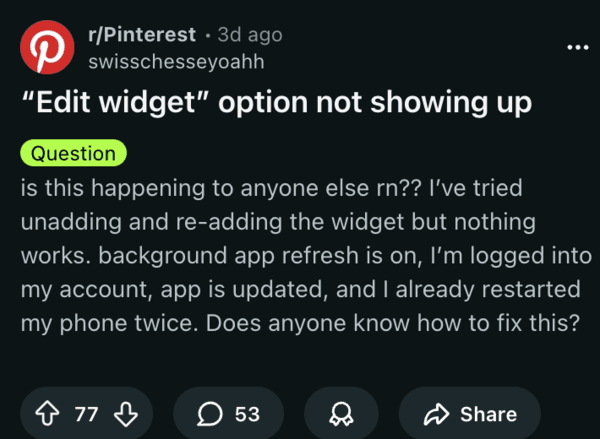
Since users are unable to edit the widget, they cannot customize it either. Selecting a specific Pinterest board to display pins is no longer possible. Normally, long-pressing the widget is supposed to bring up the “Edit Widget” menu. However, it simply refuses to show up.
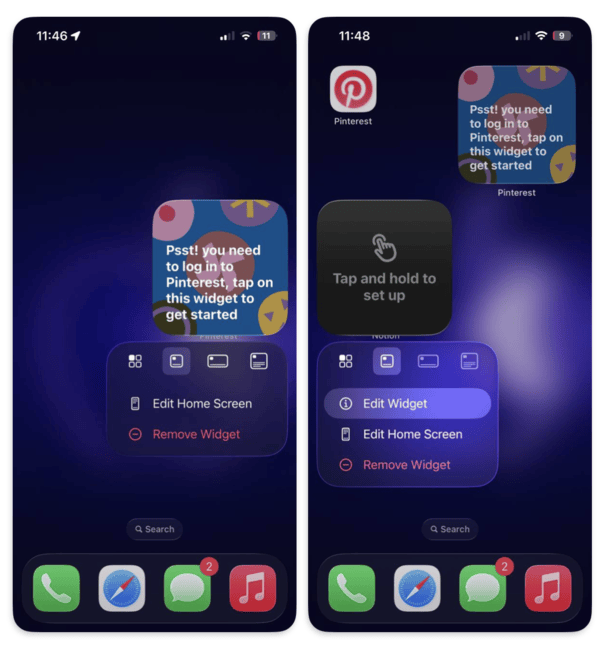
I’ve checked it on iOS myself, and it does not give me the option to edit the widget. It’s not a user error or a problem with iOS, since it does work for other widgets, as I’ve demonstrated below. People report that it’s either stuck on the same pictures or showing random images.
People have tried reinstalling the app, re-adding the widget, and restarting the phone; these basic workarounds do not help. I don’t know the exact reason for this problem, but it’s probably an issue with app developers not optimizing the Pinterest app properly for iOS 26.3. People claim that background app refresh hasn’t been turned off, and that the app is currently on the latest version as well.
Since Pinterest widgets enhance the look of home screens by showing your boards at a glance, users are quite disappointed about this bug, as it’s making their home screens look empty. This isn’t the first major experience-breaking bug for Pinterest as of late, as there was a major outage just last month.
I have tried logging out of the app and then logging back in as well, but it did not help for me. It’s mostly an iOS 26.3-specific issue, and Pinterest has to fix something at the backend. They typically update the app around once a week, so I’d recommend regularly checking the App Store for updates. It seems to be a fairly buggy week for popular apps, as Instagram is experiencing some issues as well. We’ve covered that here.


Dwayne Cubbins
3187 Posts
I cover fast-moving stories across apps, online platforms, and everyday tech — phones, wearables, consoles, and whatever else people are fighting with this week. Bugs, rollouts, scams, policy enforcement, and the occasional internet-culture rabbit hole are all fair game. My goal is simple — make confusing tech news readable. When I'm not working, I'm working out or chilling with my dog. Got a tip? You can find me on X @dcubbins.
Next article View Article