Google has had a busy week, dropping the second major milestone for Android 17 and unveiling significant AI-driven features for its latest flagship hardware. From improved privacy controls to the long-awaited windowed mode for every app, here is the essential breakdown of the latest Pixel and Android news.
Android 17 Beta 2 brings enhanced productivity and privacy
The second beta of Android 17 (Build CP21.260206.011) is now rolling out to eligible Pixel devices. While it carries the February 2026 security patch, it’s worth noting that the Pixel 6 and 7 series are currently on a December 2025 baseline with the .A1 build variant.

Perhaps the most fun change is the ability to force any app into a floating window. By long-pressing a launcher icon, users can now “bubble” an app, effectively bringing a pop-out windowed mode to the entire OS. Google has refreshed the location and camera access indicators, ditching the wide pill design for a more streamlined look. Additionally, a new Local Network Access permission (ACCESS_LOCAL_NETWORK) has been introduced to better protect communication between your device and LAN hardware.
A new EyeDropper API allows apps to capture pixel colors from the display securely, without needing full-screen-recording permissions. Android 17 Beta 2 is also getting smarter about multi-device setups. A new Handoff API allows you to start a task on your phone and resume the exact state on a tablet or foldable via the CompanionDeviceManager.
In a major security win, Android 17 will now delay programmatic access to SMS OTP messages by three hours for most apps, making it harder for malicious software to intercept login codes in real-time.
Despite these new features, Google Assistant and Gemini hotword is not working for many Google Pixel users on this build, an issue Google is currently investigating.
Gemini’s background automation & multi-step tasks for Pixel 10
Google is pushing the boundaries of what a mobile assistant can do with Agentic capabilities. Gemini can now complete complex, multi-step tasks in the background.
When you request a complex task, Gemini automates the process in a secure, virtual window. You can monitor the progress via a notification or even intercept the AI if it takes a wrong turn. This is currently a beta feature for select apps in the US and Korea. It is exclusive to the Pixel 10 series and the Galaxy S26 series.
Circle to Search gains multi-object recognition on Pixel 10
Circle to Search is getting a massive efficiency boost thanks to Gemini 3’s agentic planning. With the new batch searching, you no longer need to circle one item at a time. You can now circle multiple objects in a single image, and Google will provide relevant search results for all of them simultaneously.
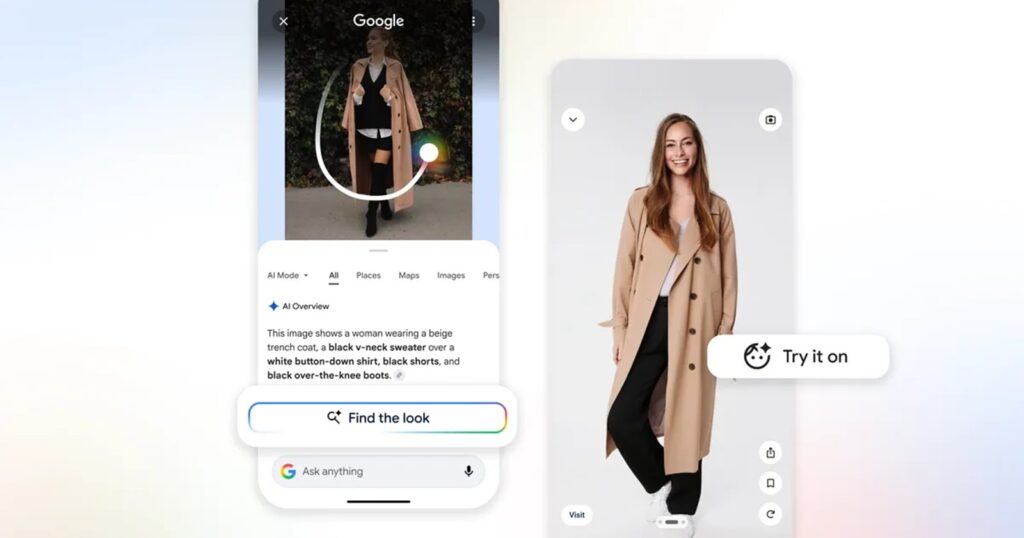
The “Try on” feature for clothing is now integrated directly into the Circle to Search interface, allowing for a more seamless shopping experience. These improvements are rolling out first to the Pixel 10 and Galaxy S26 series before a wider release.
We’ll continue tracking further Pixel and Android 17 developments as they unfold.


Hillary Keverenge
2723 Posts
Tech has been my playground for over a decade. While the Android journey began early, it truly took flight with the revolutionary Lollipop update. Since then, it's been a parade of Android devices (with a sprinkle of iOS), culminating in a mostly happy marriage with Google's smart home ecosystem. Expect insightful articles and explorations of the ever-evolving world of Android and Google products coupled with occasional rants on the Nest smart home ecosystem.
Next article View Article