





Just days after we spotted it resurfacing in beta, Google has now confirmed that the “Keep portrait mode on calls” option in the Google Phone app is officially rolling out to all users.
The feature, which addresses a long-standing and widely reported rotation bug that forced calls into landscape mode, is now available beyond the beta channel. Google announced the wider availability in a new community post, putting an end to weeks of uncertainty around the setting.
A feature that took the long way around
As we reported earlier this week, Google recently reintroduced the Keep portrait mode toggle in the Phone app beta after it had been quietly removed. That back-and-forth sparked confusion among testers, especially since the original removal happened without much explanation.
Google has now clarified what happened.
According to the company, the setting was briefly pulled from the beta so it could be updated based on early user feedback. With those changes in place, Google says the feature is now ready for a wider rollout.
“We realize that some users in our beta program are confused by this setting’s initial introduction and then disappearance. We briefly removed this setting to update it in response to community’s helpful feedback,” Google explained.
Calls now default to portrait mode
The biggest change with this broader rollout is that calls now default to portrait orientation, meaning users no longer need to enable anything manually to avoid unwanted screen rotation during calls.
In other words, for most people, the problem is already fixed out of the box.
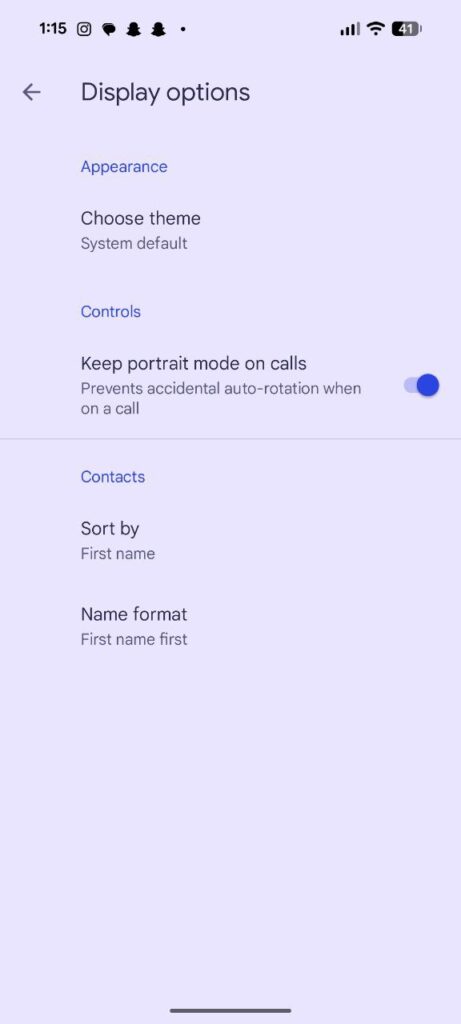
However, Google is still keeping the toggle around for those who prefer the old behavior. Users who want calls to rotate into landscape can turn the option off by heading to:
Phone app → Menu → Settings → Display options → Turn off “Keep portrait mode.”
A small fix with big impact
While this isn’t a flashy new feature, it’s a meaningful quality-of-life improvement, especially for Pixel users and others who rely on auto-rotation but found calls constantly flipping to landscape annoying or outright broken.
With the feature now rolling out widely, Google appears confident that the updated implementation addresses the issues that led to its temporary removal in beta. If you’ve been frustrated by call screen rotation, relief should finally be here.


Hillary Keverenge
2723 Posts
Tech has been my playground for over a decade. While the Android journey began early, it truly took flight with the revolutionary Lollipop update. Since then, it's been a parade of Android devices (with a sprinkle of iOS), culminating in a mostly happy marriage with Google's smart home ecosystem. Expect insightful articles and explorations of the ever-evolving world of Android and Google products coupled with occasional rants on the Nest smart home ecosystem.
Next article View Article
