





![Meta Quest Link suddenly showing “isn’t working correctly” for many PC VR users [U: Fix out]](https://piunikaweb.com/wp-content/uploads/2026/01/meta-quest-featured.webp "Meta Quest Link suddenly showing “isn’t working correctly” for many PC VR users [U: Fix out]")
Update 21/01/26 – 03:16 pm (IST): Multiple users have confirmed in this Reddit thread that the latest software update for the Meta app seems to have fixed the “isn’t working correctly” issue. So if you’re still stuck, go ahead and see if there are any updates available for the app.
Update 20/01/26 – 06:03 pm (IST): A more permanent solution has emerged from the community. User FarmerJohn88NW identified that OculusDash.exe is the specific file causing the problem and shared a method to block just that executable through Windows Firewall. Navigate to C:\Program Files\Oculus\Support\oculus-dash\dash\bin (or wherever your Meta Horizon installation is located), then open Windows Defender Firewall with Advanced Security. Create a new Outbound Rule (not Inbound) that blocks OculusDash.exe from accessing the internet.
Multiple users confirm this fixes the issue completely without needing to disconnect your entire PC from the network each time you want to use Link. The fact that blocking Dash’s internet access resolves the problem strongly suggests Meta’s software is failing when it tries to phone home — possibly due to a revoked certificate or broken server-side change.
Original article published on January 19, 2026, follows:
If you tried to use Meta Quest Link over the weekend and got slapped with a “Meta Quest Link isn’t working correctly” error on Windows, you’re not alone. The PC app appears to be broken for a lot of people right now.
Users on Reddit and Meta’s forums say their setups were working fine yesterday. Then today, nothing. The error pops up and won’t go away no matter what they try. We’re talking Rift S, Quest 2, Quest 3, Quest 3S — basically the whole lineup.
One Rift S user on r/oculus laid out everything they attempted. They repaired the software, uninstalled and reinstalled, updated Visual C++ redistributables, switched to the Public Test Channel, and even restarted the PC multiple times. And even after all that, it was still broken. “I am super tired and just want to play my games,” they said.
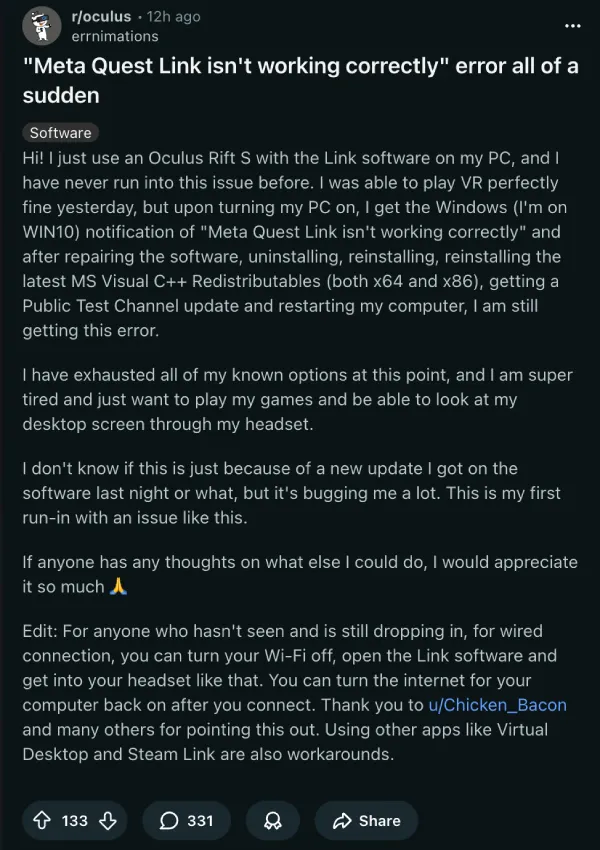
That’s the pattern showing up everywhere. People are factory resetting headsets, rolling back GPU drivers, trying different USB ports and cables. None of the standard fixes are working because this isn’t a standard problem.
The good news is there’s a workaround, and it’s weird. Turn off your PC’s internet connection before you launch Meta Quest Link. The software will start up fine, your headset connects, and then you can turn the internet back on. Everything apparently works after that, at least according to user reports.
Why does that fix it? Probably because something Meta’s software is trying to reach online is either down or broken. When you block internet access, it skips whatever check is failing.
Reddit user FarmerJohn88NW went a step further and posted instructions for blocking OculusDash.exe specifically through Windows Firewall. You create an outbound rule for the executable (it lives in the Horizon\Support\oculus-dash\dash\bin folder) and that stops the failure from happening. No need to manually disconnect every time.
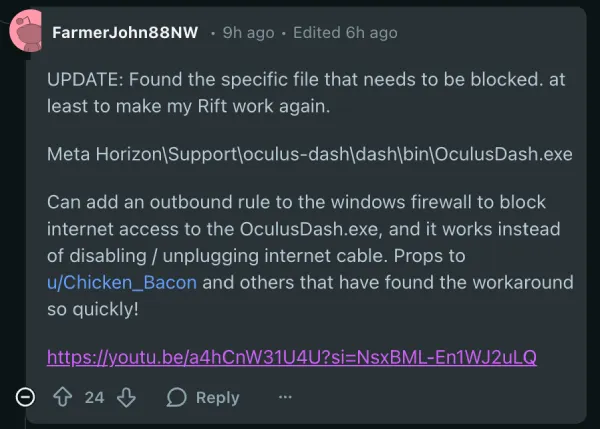
Here’s the YouTube video tutorial they shared for reference:
Some users are reading between the lines here. The fact that blocking Dash from calling home fixes the issue has people wondering if Meta accidentally revoked a certificate or pushed a bad server-side change.
The workarounds don’t work for everyone, though. A handful of Quest 3 owners say disconnecting the internet didn’t help. Others are running into bonus issues like no audio in the headset or Guardian errors after trying the fixes.
If you’re completely stuck, Virtual Desktop and Steam Link still work since they don’t touch Meta’s PC software. ALVR is another free option people are suggesting.
Meta hasn’t said anything publicly about this yet. But it’s worth noting this isn’t their first rodeo with broken Link updates. Back in October, the v79 update killed wired USB Link for a bunch of users and the only fix was enrolling in the Public Test Channel.


Dwayne Cubbins
3082 Posts
I cover fast-moving stories across apps, online platforms, and everyday tech — phones, wearables, consoles, and whatever else people are fighting with this week. Bugs, rollouts, scams, policy enforcement, and the occasional internet-culture rabbit hole are all fair game. My goal is simple — make confusing tech news readable. When I'm not working, I'm working out or chilling with my dog. Got a tip? You can find me on X @dcubbins.
Next article View Article
