Earlier this week, we reported on a developing theory that Google might have quietly shifted older devices, like the Pixel 7a, to a quarterly update schedule. That speculation arose after several devices seemingly skipped the December patch entirely.
However, as the January Android 16 update begins its rollout for the Pixel 10 series, a new, highly technical theory has emerged from the community. It suggests that missing updates might not be a business decision by Google to slow down support, but rather a complex software conflict involving “mutating” device partitions and rejected OTA packages.
Carrier delays and “ghost” updates
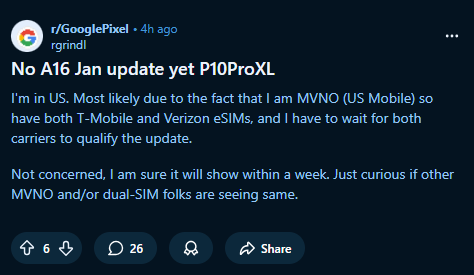
It is no secret that Google’s “instant” updates often face bottlenecks depending on your carrier. A recent thread on Reddit regarding the Pixel 10 Pro XL highlights the standard anxiety: users on Google Fi, T-Mobile, and various MVNOs like US Mobile are still waiting for the January patch.
“I’m in US… I have to wait for both carriers to qualify the update,” the OP noted. Others chimed in with similar frustrations, from India to the UK, noting that despite tapping “Check for update,” nothing appears.
But there is a more peculiar subset of reports that defies the standard carrier-delay explanation. Some users report seeing the update notification, watching the system status change to “Preparing system update,” and then suddenly witnessing the update vanish. The phone returns to the “Your system is up to date” screen, leaving the user stranded on the previous build.
One user described the behavior: “Checked on Pixel 10, showed preparing system update, and then suddenly went back to the update page with no update available now.”
This behavior, where the update appears and then is rejected, points to something happening on the device level, not just the server level.
The ‘Delta package’ theory
In a fascinating deep dive, Reddit user justarandomkitten offered a technical explanation that connects the dots between these “ghost” updates and the increasing number of Pixels failing to update over the last few months.
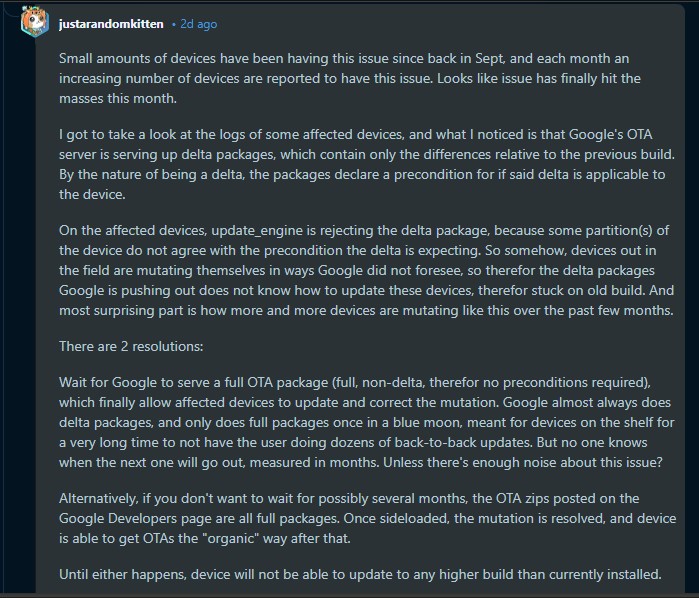
According to the user, who claims to have analyzed logs from affected devices, the issue lies in how Google delivers Over-The-Air (OTA) updates. Google typically pushes Delta packages. These are smaller files containing only the differences between your current software version and the new one.
Because they are deltas, they require strict preconditions. The updater checks your phone to ensure the existing files are exactly what the delta expects. If they match, the patch is applied. If they don’t, the update is rejected to prevent bricking the device.
justarandomkitten explains:
“On the affected devices, update_engine is rejecting the delta package, because some partition(s) of the device do not agree with the precondition the delta is expecting. So somehow, devices out in the field are mutating themselves in ways Google did not foresee.”
Essentially, some Pixel phones are undergoing slight software “mutations” during daily use, likely harmless changes to partition data that technically result in a checksum mismatch. When the January Delta update arrives, it looks at the phone, realizes the partition isn’t in the exact state it predicted, and aborts the installation.
A potential link to the “quarterly update” mystery?
This technical glitch offers a compelling counter-theory to our previous report regarding older Pixels. We speculated that Google might be intentionally skipping months for older phones. However, if this “mutation” issue is affecting a growing number of devices (as the Redditor suggests), it is possible that those older Pixels were sent the December update, but their devices silently rejected the Delta package in the background, making it appear as if the update was never sent.
If a device rejects the monthly Delta, it effectively stays on the old build until one of two things happens:
Google pushes a Full OTA: Occasionally (described as “once in a blue moon”), Google pushes a full system image rather than a delta. This overwrites everything and corrects the “mutation,” bringing the device back in sync.
User intervention: Sideloading the full OTA image manually via ADB.
So, if you are stuck on an older build or watched your January update disappear on your Pixel 10, the “mutation” theory suggests waiting for a standard OTA might take months.
The immediate fix, confirmed by several users in the thread, is to manually sideload the Full OTA image from Google’s developer site. Because the full image contains the entire OS, it does not require the strict preconditions of a Delta update and will successfully overwrite the mismatched partitions, updating the phone and “curing” the issue for future monthly updates.
While I’m not a software engineer, this explanation from the community aligns with the erratic behavior seen across different Pixel generations recently. It suggests a growing widespread bug in how partitions are maintained or verified, rather than a deliberate reduction in support.
I’v reached out to Google for clarification on whether they are aware of update_engine rejections on the Pixel 10 series and will update this story if I hear back.
Are you seeing the “Preparing update” glitch on your Pixel? Let us know in the comments.
We stand out from the tech-media crowd because we break news stories; we mainly bring you stuff that you won’t find anywhere in the mainstream tech media. Our stories have been picked up by some of the world’s most popular websites and media outlets—more info is available here.
Tech has been my playground for over a decade. While the Android journey began early, it truly took flight with the revolutionary Lollipop update. Since then, it's been a parade of Android devices (with a sprinkle of iOS), culminating in a mostly happy marriage with Google's smart home ecosystem. Expect insightful articles and explorations of the ever-evolving world of Android and Google products coupled with occasional rants on the Nest smart home ecosystem.
Update 12/02/26 - 02:17 pm (IST): Looks like Instagram's Android crashing problem is back with a vengeance. Reports started flooding in earlier today from users who can...