






Google has rolled out an interesting new feature dubbed ‘Number Search’ (translated from Japanese to English) for Pixel users in Japan. It gives users the ability to easily search for unknown phone numbers directly within the Phone app’s call history. This eliminates the need to sift through call logs or search multiple platforms to figure out the identity of a missed call.
We’ve all experienced the frustration of receiving a call from an unknown number. Should you call back? Was it someone important, or just a telemarketer? The ‘Number Search’ feature gives you a quick and easy tool to help you make that decision.
‘Number Search’ will appear on the history screen of your Google Phone app. Simply tap on an unknown number in your call log and then hit the ‘Number Search’ button to start your search. Google didn’t specify how the search results are generated, but it’s likely to cross-reference your history with web data to provide potential matches, similar to how Caller ID works.
The implementation of Caller ID in the Phone app lets users see information about a number only when making or receiving a call. You can’t manually search for a number to look up. That said, Japanese blog Jetstream shared a screenshot of the new feature that you can check out below.
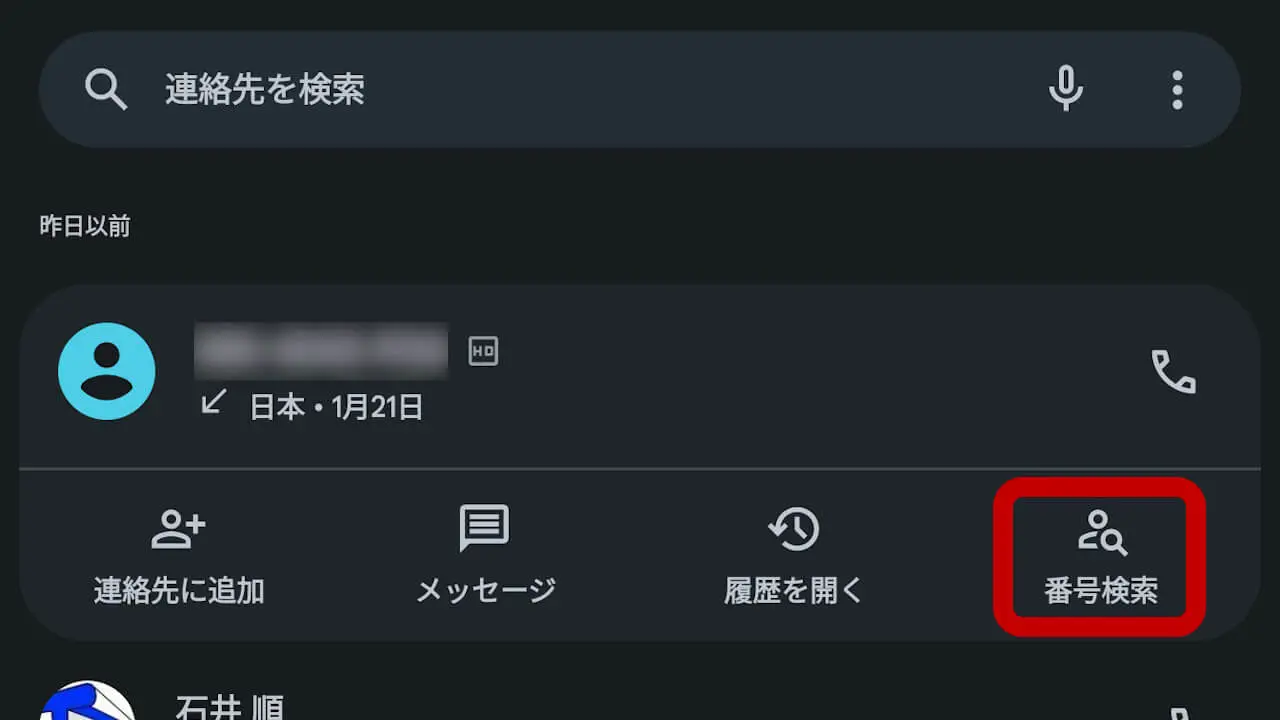
Starting with the Pixel 6 and later models, Pixel users in Japan will now have access to the ‘Number Search’ functionality. To check it out, users will have to install the new March Feature Drop. It’s worth pointing out that the Pixel 6a won’t get the feature. While Google hasn’t mentioned plans to bring this feature to its devices globally, we’re hopeful it will eventually become more widely available.
Google says it developed this feature based on user feedback from Japan. This release just goes to show how dedicated Google is with its focus to expand further in the Japanese smartphone market. The company saw massive growth in the region last year. That said, if you want to see additional tools and features, don’t be shy! Sending feedback to Google can impact future development and improve everyone’s experience.


Dwayne Cubbins
3101 Posts
I cover fast-moving stories across apps, online platforms, and everyday tech — phones, wearables, consoles, and whatever else people are fighting with this week. Bugs, rollouts, scams, policy enforcement, and the occasional internet-culture rabbit hole are all fair game. My goal is simple — make confusing tech news readable. When I'm not working, I'm working out or chilling with my dog. Got a tip? You can find me on X @dcubbins.
Next article View Article
