Juggling multiple health and fitness services can be very complex. Switching between devices further fuels the frustration, leaving valuable insights scattered across incompatible platforms. This is where Google’s Health Connect steps in, acting as a digital oasis where your health data can finally coexist peacefully. With the update to Android 14 QPR2 beta 2, Google is making it even better with the addition of a new ‘App priority’ option.
Think of Health Connect as a central hub for all your health metrics. No more jumping through hoops to merge data from different apps or platforms. With Health Connect, you can store and manage your steps, sleep cycles, heart rate, and more – all in one convenient location. This holistic approach unlocks some exciting possibilities. Imagine visualizing your sleep patterns alongside your workout data, or crafting comprehensive fitness plans informed by insights from various sources. Health Connect empowers you to see the bigger picture, making sense of your health journey across different apps and devices.
Android 14 QPR2 beta 2 brings an end to data wars between your favorite fitness apps. This new option lets you choose which app reigns supreme when it comes to feeding your activity data into Health Connect. Confused about duplicate steps or conflicting sleep cycles? Simply drag and drop your trusted apps in order of preference and let Health Connect do the rest.
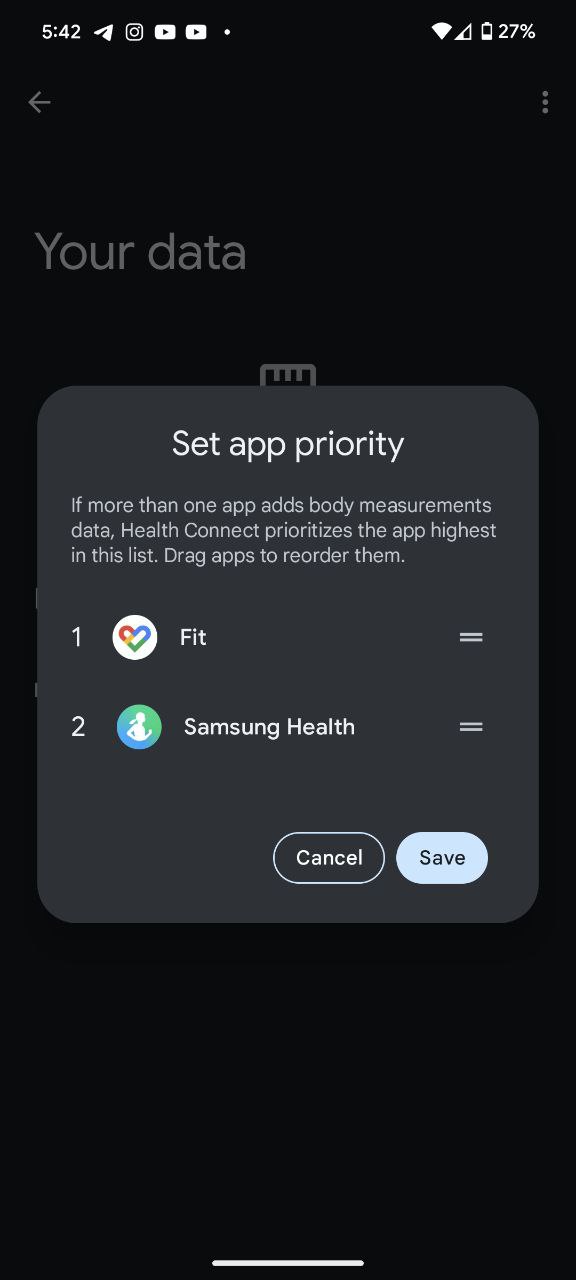
To try it on your Pixel phone, open Settings > Security & privacy > Privacy > Health Connect > Data and access > Select a category from ‘Browse data’ (e.g. ‘Activity’) > App priority.
You don’t need any special setting to set app priority in Health Connect in the latest Android 14 QPR2 beta 2. This suggests users can expect the feature in the stable release when the March 2024 Pixel Feature Drop arrives. If interested, you can join Android 14 QPR beta program using this simple guide and try this feature ahead of its wider availability.
Notably, Android expert Mishaal Rahman adds that Health Connect now defines a new runtime permission (http://android.permission.health.READ_HEALTH_DATA_IN_BACKGROUND) that will supposedly grant apps background access to health data.
Featured image: Google


Hillary Keverenge
2723 Posts
Tech has been my playground for over a decade. While the Android journey began early, it truly took flight with the revolutionary Lollipop update. Since then, it's been a parade of Android devices (with a sprinkle of iOS), culminating in a mostly happy marriage with Google's smart home ecosystem. Expect insightful articles and explorations of the ever-evolving world of Android and Google products coupled with occasional rants on the Nest smart home ecosystem.
Next article View Article