Google, in its commitment to innovation, introduced the Palm Timer feature in the Pixel Camera app with the advent of Android 13. This intelligent addition harnesses the capabilities of machine vision to activate a preset timer when users hold up their palm towards the camera while taking a selfie. Unlike traditional timers, the Palm Timer adds a touch of sophistication by responding to the user’s physical gesture.
Effortless selfies: Steps to use Palm Timer on Google Pixel phones
The Palm Timer offers flexibility by allowing users to choose between a three or ten-second countdown, catering to different preferences and scenarios. This innovative feature simplifies the selfie-taking process, making it a seamless experience even for those who prefer not to touch their devices while capturing memorable moments.
The beauty of the Palm Timer lies in its user-friendly design and the simplicity of its activation process. By combining machine vision technology with intuitive gestures, Google has created a feature that caters to both novice and seasoned photographers. The yellow box highlighting the detected palm adds a visual cue, ensuring users are aware of the timer activation, contributing to a more streamlined photography experience.
To employ this feature seamlessly, follow these simple steps:
- Open the Pixel Camera app, ensuring that you have the latest version installed for optimal performance.
- Position your face within the camera frame, ensuring clarity and a well-composed selfie.
- Raise your hand in front of the camera with your palm straight and facing the camera lens. This action signals to the camera that you’re ready to capture the perfect shot.
- As you raise your palm, a yellow box will appear around it in the camera viewfinder. This signifies that the Palm Timer is activated, and the countdown will commence.
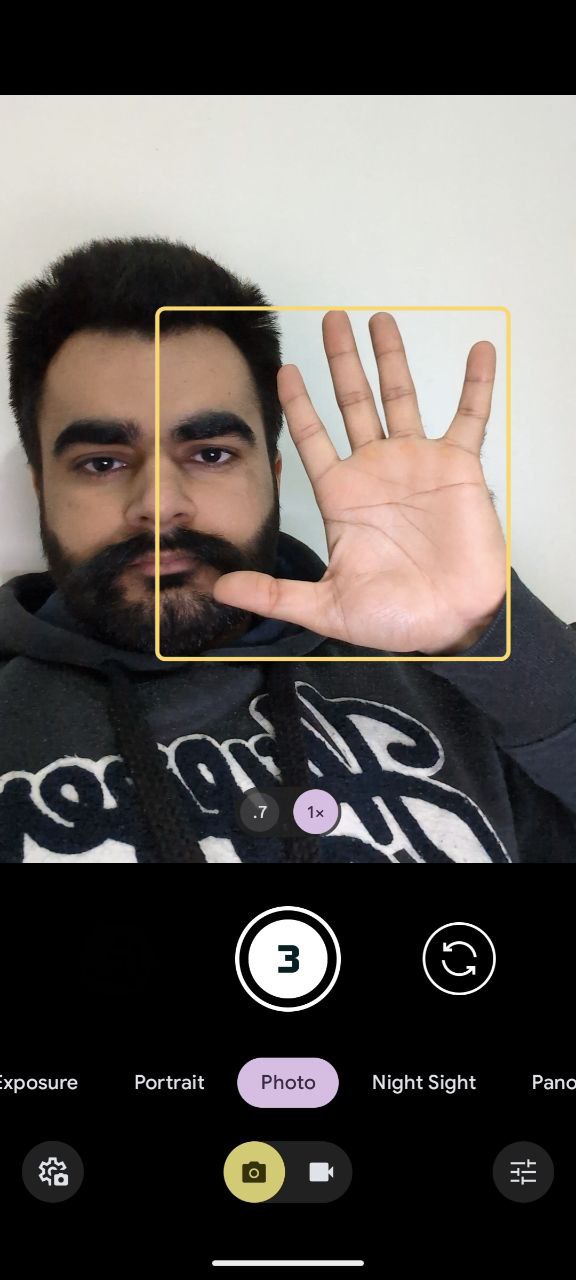
- When the timer reaches zero, the camera will take the photo, freezing the moment effortlessly.
So, the next time you crave a selfie or yearn to be in the moment without sacrificing photographic proof, remember the Palm Timer. It’s a hidden gem in your Pixel Camera app, waiting to unleash your inner shutterbug and make solo picture-taking a breeze. Now go forth, raise your hand, and capture the world, hands-free!


Karanjot Sidhu
1024 Posts
A computer science engineer who loves tech and won't stop talking about it. Here at Piunikaweb, I mostly cover Google Pixel deals and how-tos, though you may find me covering Pixel news as well sometimes. Apart from being a nerd, i love gaming and watching movies in my free time.
Next article View Article