





Soon, RCS chats in Google Messages will let you attach captions directly to your photos, ditching the clunky two-message routine. This seemingly small tweak packs a big punch, streamlining communication and adding a touch of personal flair to your visual messages.
This new feature that’s still being worked on was first spotted by Assemble Debug, who shared a screenshot of the new UI with a post on X. To make the change easier to comprehend, I’ve added a screenshot of the current implementation and the screenshot of the upcoming UI.
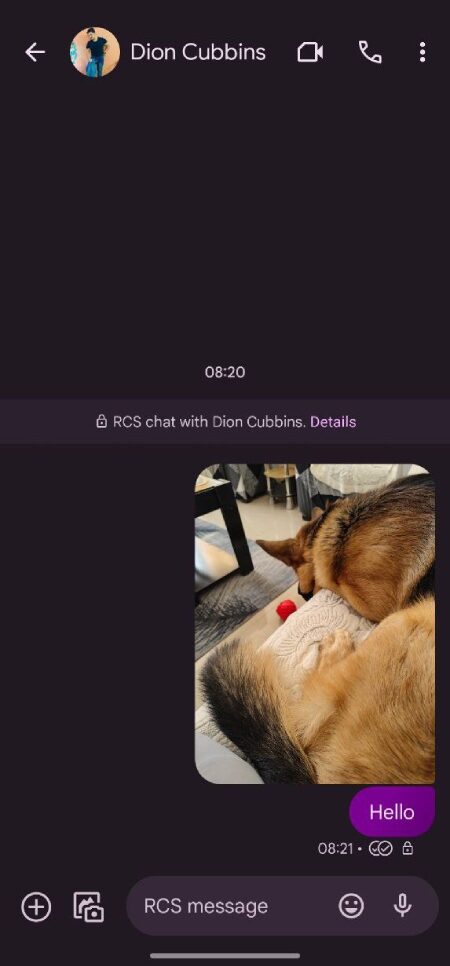
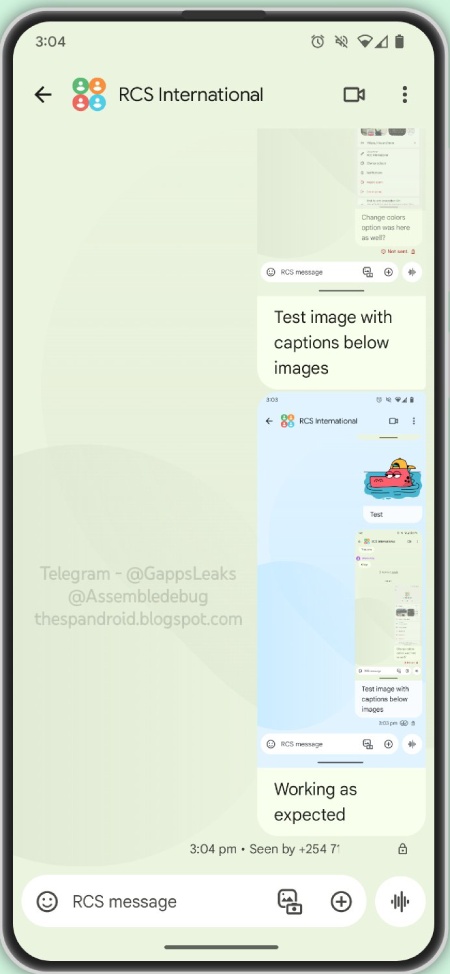
As you can see from the images above, the new Google Messages UI clubs captions with the images rather than sending the text in a separate bubble. Captions offer more than just convenience. They add context, evoke emotions, and even set the tone for your message. Whether it’s a witty quip under a hilarious meme or a heartfelt note accompanying a cherished memory, captions become an extension of your personality, breathing life into your visual storytelling.
While this is a minor tweak, it does go to show that Google is committed to improving the Messages experience on Android. In fact, Google Messages is set to get Bard integration, selfie GIFs, and even advanced Magic Compose suggestions too. So users have a lot to look forward to in the coming weeks.
With each update, Google Messages continues to evolve into a powerful and personalized communication hub. So buckle up, Pixel users, because the future of messaging looks bright, vibrant, and most importantly, captioned!


Dwayne Cubbins
2851 Posts
I cover fast-moving stories across apps, online platforms, and everyday tech — phones, wearables, consoles, and whatever else people are fighting with this week. Bugs, rollouts, scams, policy enforcement, and the occasional internet-culture rabbit hole are all fair game. My goal is simple — make confusing tech news readable. When I'm not working, I'm working out or chilling with my dog. Got a tip? You can find me on X @dcubbins.
Next article View Article
