






Microsoft is experimenting with a seamless update system for Edge that installs new versions in the background without forcing you to close and reopen the browser.
Normally, when the browser downloads an update, it nags you to restart the browser to apply it. That’s one of the main reasons why some users hold off updating. Plus, ever since Edge switched to a faster two-week release cycle back in August, those nagging relaunch prompts have been showing up twice as often.
With this new prototype, Microsoft says Edge “moves the browser to a new, more secure version while your open work continues, with no restart prompt and hardly anything to notice.” Even if you are halfway through filling out an expense report or juggling dozens of tabs, the browser updates itself while everything on your screen stays right where it is.
Microsoft shared a video demo of the new prototype feature in action. Check it out below.
Edge pulls this off by downloading the update quietly and switching the main browser controls over first. Your open tabs just keep running on the older version until you click a link or load a new page, and only then do they jump over to the updated version.
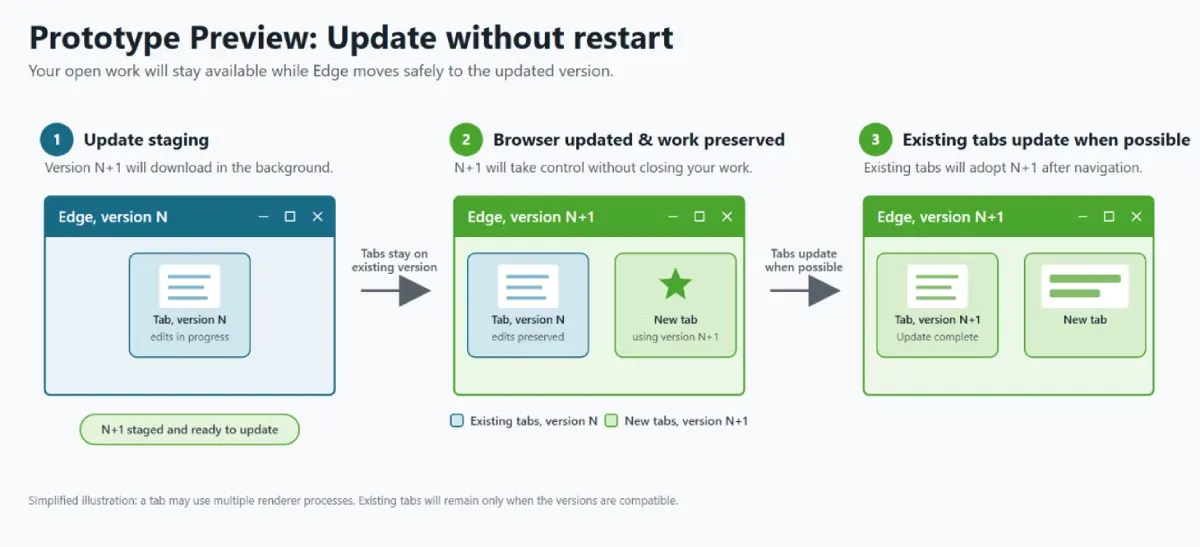
Before you go digging through your settings to turn this on, Microsoft notes that the feature “is not in production code or part of Chromium today.” The team is just sharing the early prototype to get the wider browser industry talking about ways to ditch restarts altogether.
Anyone who wants less interruption right now can opt into an existing Edge feature called “Restart to update on idle,” formerly known as Instant Updates. It waits until you leave your desk before quietly relaunching the browser and restoring your tabs, much like how Google is testing an idle restart option in Chrome that waits for a five-minute break.
IT admins managing office PCs are also getting new Security Update Alerts inside the Edge management dashboard to flag critical or zero-day patches and trigger idle restarts across company machines.


Dwayne Cubbins
3120 Posts
I cover fast-moving stories across apps, online platforms, and everyday tech — phones, wearables, consoles, and whatever else people are fighting with this week. Bugs, rollouts, scams, policy enforcement, and the occasional internet-culture rabbit hole are all fair game. My goal is simple — make confusing tech news readable. When I'm not working, I'm working out or chilling with my dog. Got a tip? You can find me on X @dcubbins.