


The Dia Browser just received a new update, bringing improvements to tab management, startup performance, keyboard shortcuts, and connected tools. The new versions also introduce easier ways to export browsing sessions and keep track of GitHub pull requests.
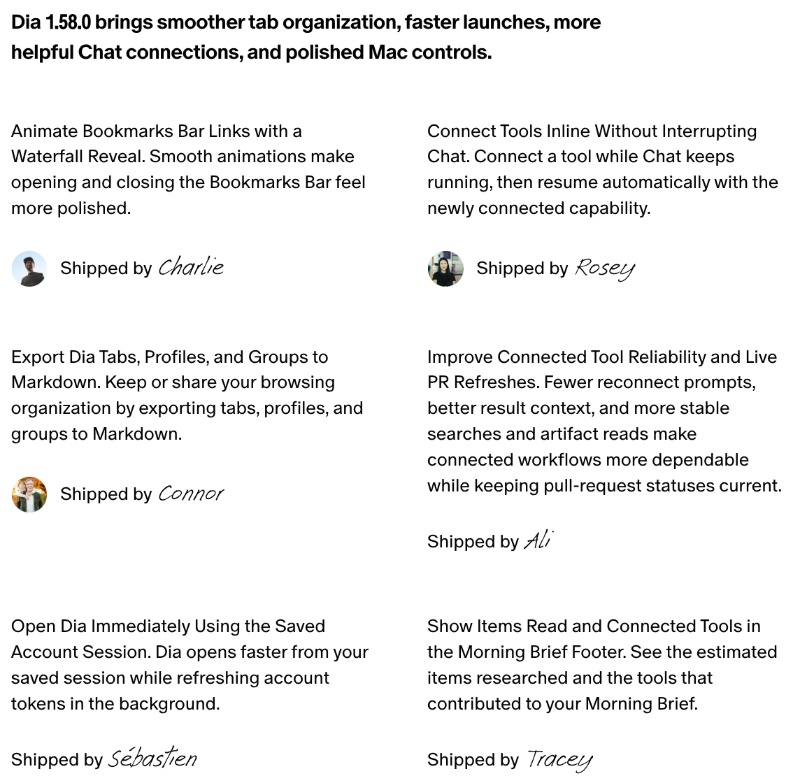
Dia has officially published the release notes on the changelog website, and we’ve attached a screenshot below.
Both Windows and Mac have received Dia updates, and here are the major changes on macOS:
- Bookmark animations: The latest Dia update on macOS improves the transition for opening and closing the Bookmarks bar. It feels smoother to operate overall.
- Users can connect new tools while Chat is running, so you don’t have to interrupt the chat.
- You can now export tabs and profiles as Markdown files.
- Dia has reduced the unnecessary number of reconnection prompts; GitHub pull requests are also better now.
- Dia now opens much faster during startup. I checked this personally, and there was a marginal difference in startup speed.
- Improvement to Morning Briefs: The footer displays an estimated number of researched items and connected tools.
That’s about it for the macOS changes. On Dia for Windows, there are several improvements that are platform-specific. For example, startup and shutdown are both much faster, and users can configure custom keyboard shortcuts according to their preferences. Dia also identifies conflicting combinations and saves choices.
Furthermore, tab archiving is more frequent, and the connected tools are more reliable. The rest of the changes are shared with macOS.
If you haven’t installed this update yet, head over to Dia -> Check for updates. The latest version is v1.58.0. The full list of Release Notes is available here.
As you may already know, the Arc browser is shutting down soon, and The Browser Company really wants people to move over to Dia. Some “hero” features from Arc, like Little Arc and Peek, are soon coming over to Dia as well. More on that here.


Sudhanshu K
395 Posts
I have been a consumer technology enthusiast for over 5 years. Thanks to my experience in software beta testing and product reviews, I've understood and learnt a lot about what bugs and issues bother people, and I spend time trying to simplify their solutions. I cover smartphones, software, social media, apps, AI, and most consumer tech gadgets. Actively pursuing a Computer Science bachelor’s degree. I'm mostly active on Twitter/X (@TechWhirlUlt), drop a DM or tag me if you want to share info or connect!