



More CSS off the main thread!
— Andreas Kling (@awesomekling) November 2, 2026
I just implemented parallel scroll-driven animations, so they can update even while the main thread is busy! 🤓
Left: @ladybirdbrowser
Right: Chrome (but every other browser looks the same) pic.twitter.com/q4Pg0XvQPj
Ladybird has just made an interesting case for its independent browser engine. It has two notable improvements that make the experience of browsing the web much smoother.
Two aspects of everyday browsing include scrolling through web pages and selecting text, and this is what the developers have chosen to focus on improving. When the browser (more specifically, JavaScript) is busy with another task, interfaces can sometimes drop frames or become unresponsive.
Andreas Kling, a developer at Ladybird, has demonstrated how the browser can keep CSS scroll-driven animations and text selection responsive even when the browser’s main thread is occupied. A video demo has been posted on X, and you can view it below.
The demonstration compares Ladybird with Chrome and Firefox, highlighting how it handles interactions better. For those unaware, scroll-driven animations are a CSS feature. Basically, webpage elements change their appearance depending on how far someone scrolls.
Instead of relying on JavaScript to repeatedly calculate scrolling positions and trigger animations, CSS can handle these more efficiently. In the video, content cards expand as they approach the middle and shrink as they move away. On the other hand, Chrome is visibly lagging.
In simpler terms, these animations run independently of the main thread.
That’s not all. A second video was posted on X, which applies a similar idea to text selection. Kling shows how dragging across paragraphs continues to highlight the text content smoothly in Ladybird. It remains smooth even when JS is busy. However, other browsers struggle with this.
Text selection off the main thread! 🤓
— Andreas Kling (@awesomekling) November 4, 2026
(We still have to initiate selection on the main thread, since JS could cancel it, but the subsequent drag can be handled without interruptions.)
Left: @ladybirdbrowser
Right: Firefox (but all other browsers look the same) pic.twitter.com/MbeEfALLw8
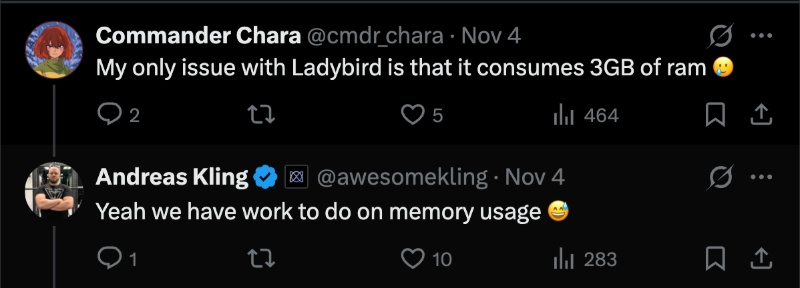
While browsing through the comments, I came across one complaint among a sea of largely positive responses: The RAM/memory usage on Ladybird is still on the higher side. The developer has responded to the comment, stating that the team still has work to do on memory usage.
It’s worth noting that Ladybird is still in the pre-alpha stage. You still have to build it from the source, and there’s no public beta or alpha one-click download available. The only way to use the browser is by cloning the repo and building it yourself. According to the official timeline, the Alpha release for Linux and macOS is “later this year.” Assuming there are no delays, it’s sometime before December 2026. A beta release is expected in 2027, with a stable release planned for 2028.

We stand out from the tech-media crowd because we break news stories; we mainly bring you stuff that you won’t find anywhere in the mainstream tech media. Our stories have been picked up by some of the world’s most popular websites and media outlets—more info is available here.

Sudhanshu K
366 Posts
I have been a consumer technology enthusiast for over 5 years. Thanks to my experience in software beta testing and product reviews, I've understood and learnt a lot about what bugs and issues bother people, and I spend time trying to simplify their solutions. I cover smartphones, software, social media, apps, AI, and most consumer tech gadgets. Actively pursuing a Computer Science bachelor’s degree. I'm mostly active on Twitter/X (@TechWhirlUlt), drop a DM or tag me if you want to share info or connect!