





Leo, the AI assistant in Brave, now offers end-to-end encrypted chat with GLM 5.3 Flash!
— Brave (@brave) October 15, 2026
Your browser encrypts each prompt before it leaves your device, so only an attested Trusted Execution Environment (TEE) can decrypt it.
It's industry-leading privacy you can verify. pic.twitter.com/f37CQabhfM
Brave has now added end-to-end encrypted conversations to Leo, its built-in AI assistant. However, it’s specifically for the open-weight GLM 5.3 Flash model. Other models don’t have this.
When users select that specific model, the browser encrypts each prompt on-device before it’s sent out to the AI model. Furthermore, only a verified Trusted Execution Environment can decrypt the prompt and run the model. Brave detailed the entire methodology of encryption in an official blog post.
In its official announcement thread on X, Brave also says that the feature is already live in the stable version of Brave. The Beta and Nightly channels have it as well.
Since most AI chat tools send conversations to company servers, where the content can be used for training, can be linked to an account, preserved for legal requests, or exposed in leaks, Brave has decided to introduce this end-to-end encryption feature.
The prompts are sealed using Oblivious HTTP, which is an IETF standard, before they’re shared with the models. The encryption key is issued only after hardware-signed attestation, which verifies that the TEE is genuine. If the verification fails, the browser does not send the message at all. Moreover, all the related code for verification, encryption, and relaying is open source.
Speaking of relaying, Brave’s open-source AI Gateway itself acts as a relay. It can see the user’s IP address, but it cannot read the encrypted content. NEAR AI’s TEE is what processes the decrypted prompt. The processing occurs inside hardware-protected memory, and that never receives the IP either.
The blog post also notes that chat history remains on the device. So, neither Brave nor NEAR AI will hold a readable copy of your texts. And if you think end-to-end encryption will slow down the responses, Brave has also reported that encryption and decryption added only a tiny fraction of total response time in their first-party tests.
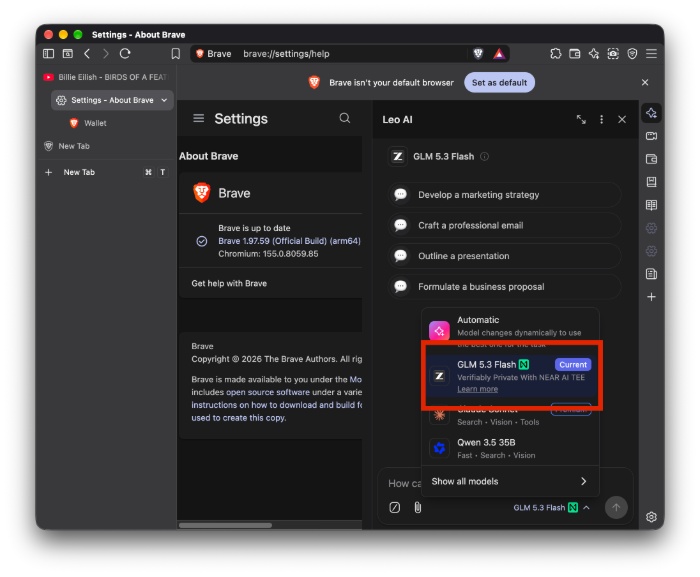
To use it right now, just head over to Leo in any current Brave channel and choose the “GLM 5.3 Flash” from the model selection menu. You don’t have to pay anything extra to access this model or the new encryption feature, and it’s available to the public for free.
You can view the entire blog post from Brave here.
In other Brave news, the browser recently picked up a minor security update for the desktop version. More on that here.

We stand out from the tech-media crowd because we break news stories; we mainly bring you stuff that you won’t find anywhere in the mainstream tech media. Our stories have been picked up by some of the world’s most popular websites and media outlets—more info is available here.

Sudhanshu K
334 Posts
I have been a consumer technology enthusiast for over 5 years. Thanks to my experience in software beta testing and product reviews, I've understood and learnt a lot about what bugs and issues bother people, and I spend time trying to simplify their solutions. I cover smartphones, software, social media, apps, AI, and most consumer tech gadgets. Actively pursuing a Computer Science bachelor’s degree. I'm mostly active on Twitter/X (@TechWhirlUlt), drop a DM or tag me if you want to share info or connect!