





If you’ve used Aside in the past few months, you probably noticed how much memory it eats up. The browser offers some cool features, but it often uses so much system memory that your laptop fan sounds like it’s about to take off.
This week, Chanhee, one of Aside’s cofounders, posted on X that things are finally getting better. He said Aside now uses 60% to 93% less memory and CPU.
He said they found and fixed some tough memory leaks in tab previews, WebSocket handlers, and dev tools communication. “We fixed everything,” he posted. “Native updates are rolling out pushing fixes to you.”

Not only that, but Aside claims to have revamped the way some of their background AI agents operate to free up even more memory. Chanhee explained that their compaction and dreaming system now consumes 7x to 14x fewer tokens and boasts a 2x cache hit rate increase.

In simple terms, Aside’s background AI agents now use fewer computer resources and should be cheaper to run. They also no longer take focus away from your active windows or mouse cursor.
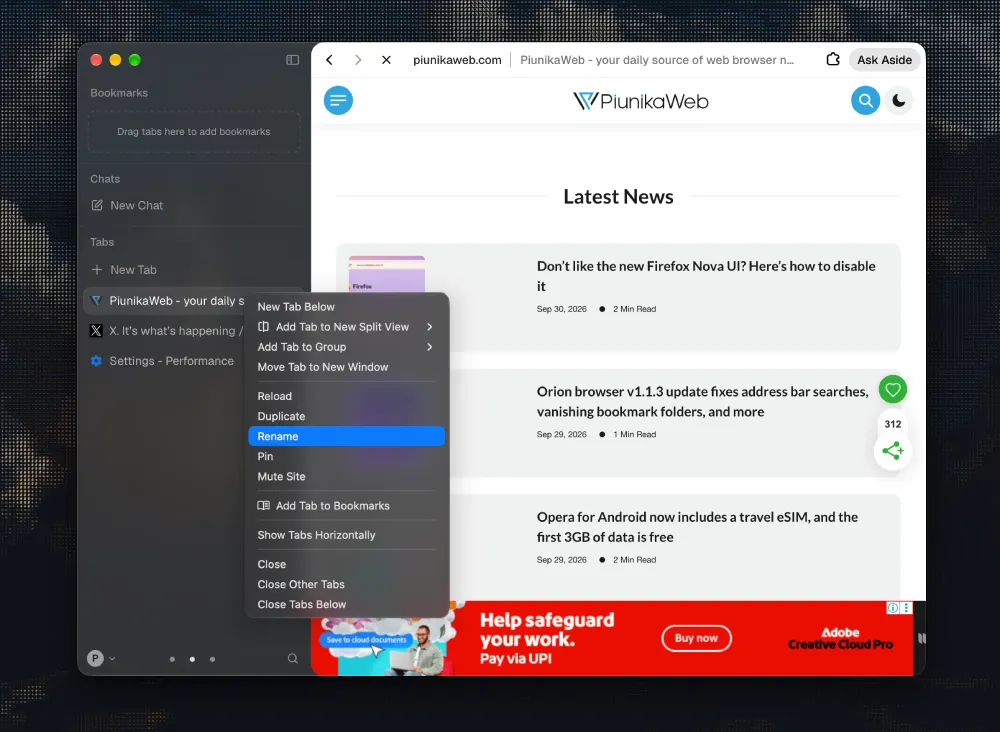
Another nifty addition with the v1.0.928.1 update is that you can now rename a tab by right-clicking it.
All of this sounds very nice on paper, but I have to admit that I am quite skeptical.
Aside has made big performance promises before, but not all of them worked out. For example, their claim about being twice as fast on Speedometer tests in August didn’t hold up. Many developers and I tested it, and the results were clearly different.
I updated to the latest version as soon as it was available to see if these performance improvements were noticeable. So far, Aside still stutters at times, and switching between tabs still feels slow.
When I first reviewed Aside, I hoped it would become my go-to browser and a real alternative to Comet and Dia. But after several months, it still hasn’t surpassed them.
Aside is still one of the few browsers that makes my M2 MacBook Air feel slow because of its occasional hiccups. Mind you, I jump between dozens of browsers all the time on the same MacBook, so I’m not only comparing it to Chrome or Safari. I’m comparing the performance to just about every browser on the market. And it still feels like it’s the slowest.
Still, it’s good to see a skilled team fixing memory leaks. If you stopped using Aside because your computer kept overheating, try the latest update and see if it works better for you.


Dwayne Cubbins
3066 Posts
I cover fast-moving stories across apps, online platforms, and everyday tech — phones, wearables, consoles, and whatever else people are fighting with this week. Bugs, rollouts, scams, policy enforcement, and the occasional internet-culture rabbit hole are all fair game. My goal is simple — make confusing tech news readable. When I'm not working, I'm working out or chilling with my dog. Got a tip? You can find me on X @dcubbins.