If you think manually clicking the “Add to Chrome/Edge” button is the only way to add an extension to your browser, you’d be wrong. At least that’s what researchers at Elastic have found.
In a recent report, the team spotlighted a new malware campaign targeting Google Chrome and Microsoft Edge users. This malware can sneak rogue extensions onto your browser without you even knowing what happened.
This is especially concerning when you consider how frequently extensions are being caught red-handed stealing things like login credentials and clipboard contents from unsuspecting victims.
That said, in most cases, users had to manually install the malicious extensions. But with this new campaign, tracked under the toolkit name KREMLIN, it’s a different story.
The researchers have found that the malware works by the attacker sending fake invoices or bank receipts in an email. When a user opens the email, the malware stays silent until they step away from the keyboard or close the browser.
If Chrome or Edge stays open too long, it will outright kill the browser process so it can mess with your profile data without triggering write errors. This should not happen in normal circumstances. Chromium browsers lock down user preferences to stop outside programs from dropping files into your profile folder. If something modifies those settings without the right digital signature, the browser simply discards the changes.
But with KREMLIN, the malware gets around this by digging out the browser’s internal encryption keys and forging the exact security signatures Chrome expects to see.
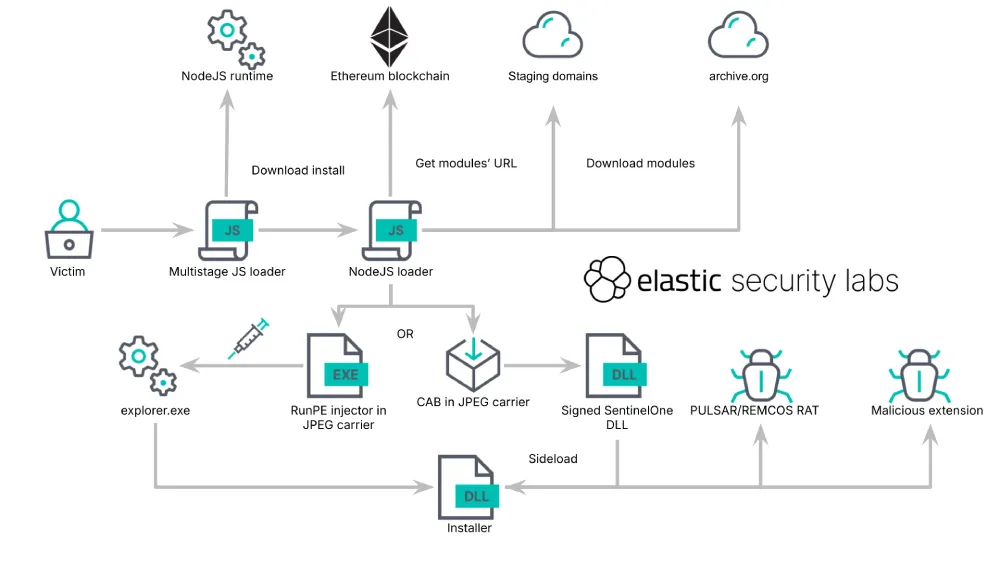
The security researchers point out that the malware manually copies the extension into browser profile directories and registers it directly, adding that “because Chromium protects these entries with cryptographic integrity checks, the malware must retrieve the required keys and regenerate the associated HMACs and encrypted hashes.”
When users open Chrome or Edge, the extension runs in the background, turning on developer mode behind the scenes. Furthermore, it disguises itself as a utility called AVSync.
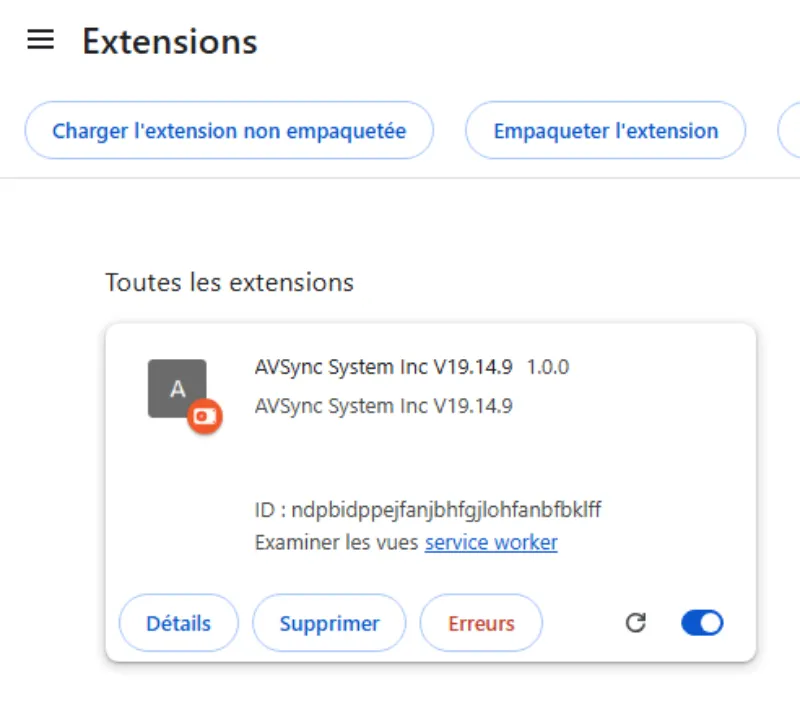
From there, it logs keystrokes, copies passwords you type into web forms, and grabs active cookies. It looks a lot like the dangerous extensions caught stealing crypto sessions, except here you never approved the installation in the first place.
In their report, Elastic researchers said the malware primarily targets Brazilian banking users and financial institutions.
Still, it’s a good time to open your browser and see if you spot any suspicious extensions that you didn’t install yourself. To be even safer, you can remove any extensions you don’t actively use, even if you installed them yourself.


Dwayne Cubbins
3123 Posts
I cover fast-moving stories across apps, online platforms, and everyday tech — phones, wearables, consoles, and whatever else people are fighting with this week. Bugs, rollouts, scams, policy enforcement, and the occasional internet-culture rabbit hole are all fair game. My goal is simple — make confusing tech news readable. When I'm not working, I'm working out or chilling with my dog. Got a tip? You can find me on X @dcubbins.
Next article View Article