When you read the word Cloudflare, it’s probably web security, domain names, or website traffic filtering that comes to your mind. However, the company has recently announced a… web browser. It’s called Kitesurf, and it’s not built for humans at all.
The company posted an official blog explaining what Kitesurf is. It’s purposefully designed without human usage in mind. Instead of shipping something built on top of Chromium, Kitesurf focuses on token count, context windows, scalability, performance, and other important aspects for AI agents/LLMs.
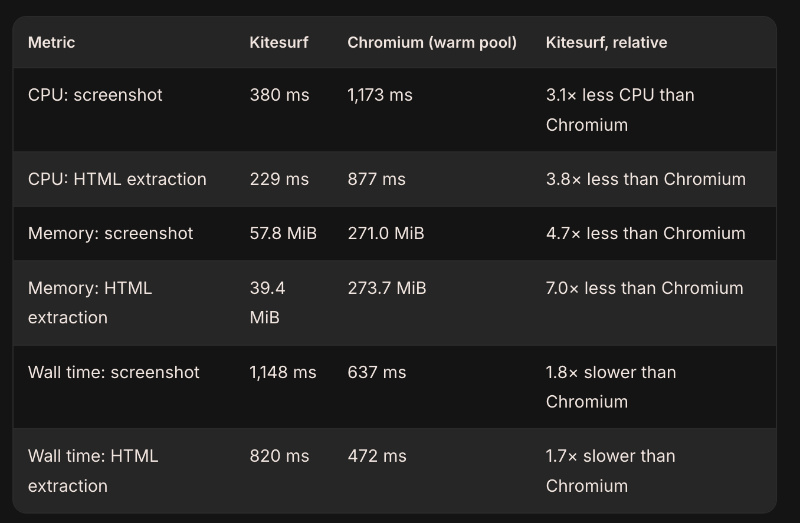
They’ve intentionally stripped out features that humans use, such as tabs, themes, extensions, and more. If the LLM has to take screenshots (agentic tasks) or extract HTML, the CPU use is allegedly much lower than Chromium, allowing you to run more sessions. The post includes a comparison table, which is attached below for your reference.
Note: The blog mentions that Kitesurf is in beta, though it’s available for free (with limits).
It’s good for AI agents that need to render pages, but you’ll need to sacrifice the features of a Chromium-based browser. Additionally, it’s good for automations and apps such as content extraction, PDF generation, and more.
Cloudflare also made the limitations very clear. It cannot play video or render WebGL, and it can’t bypass a modern CAPTCHA directly. It also cannot start long-running authenticated sessions which require a persistent active state.
If you want to perform any of these tasks, the company already has a tool called Browser Run, which is built on Chromium.
Furthermore, the blog goes on to describe three ways in which you can use the browser right now. It includes Quick Actions, the CDP endpoint, or from an MCP client.
There’s also a public playground available, and you can test any URL with it. You can view an image below. You have the options for Inspect, Screenshot, PDF, and HTML.
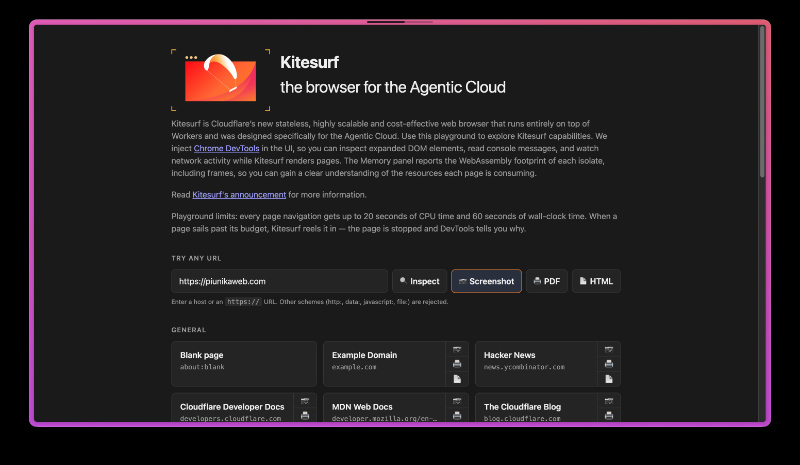
While the inspect tool works correctly, the screenshot tool does not properly render the size and spacing of the website overall, and it still needs work. The tools are all functional at the time of writing.
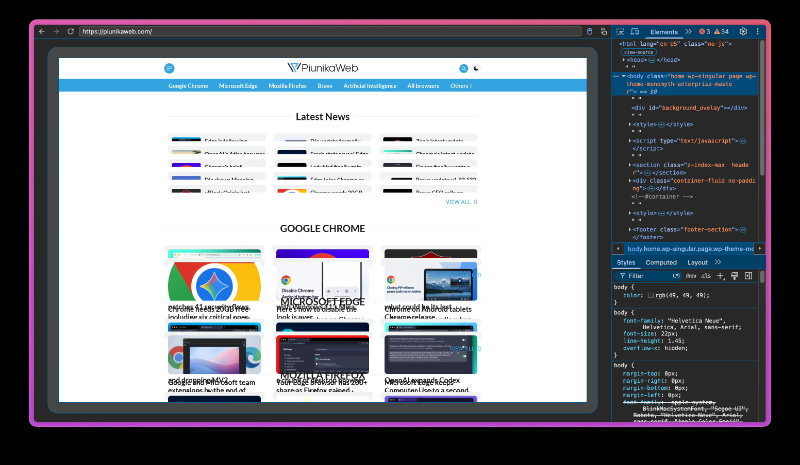
As you can see, the text isn’t properly displayed here.

If you’re interested in reading further, there’s also another post which details why exactly they built Kitesurf, and how they did it. It explains how Chromium wasn’t built for LLMs and is therefore not very efficient for AI agent use. AI doesn’t care about the features that humans do, such as tabs and extensions. Then, they dive deeper into the design decisions and the technology used.


Sudhanshu K
243 Posts
I have been a consumer technology enthusiast for over 5 years. Thanks to my experience in software beta testing and product reviews, I've understood and learnt a lot about what bugs and issues bother people, and I spend time trying to simplify their solutions. I cover smartphones, software, social media, apps, AI, and most consumer tech gadgets. Actively pursuing a Computer Science bachelor’s degree. I'm mostly active on Twitter/X (@TechWhirlUlt), drop a DM or tag me if you want to share info or connect!
Next article View Article