Sometimes, the smallest bugs end up having the longest stories. That’s exactly what has happened with a Windows feature that Google Chrome and Microsoft Edge have ignored for more than 13 years.
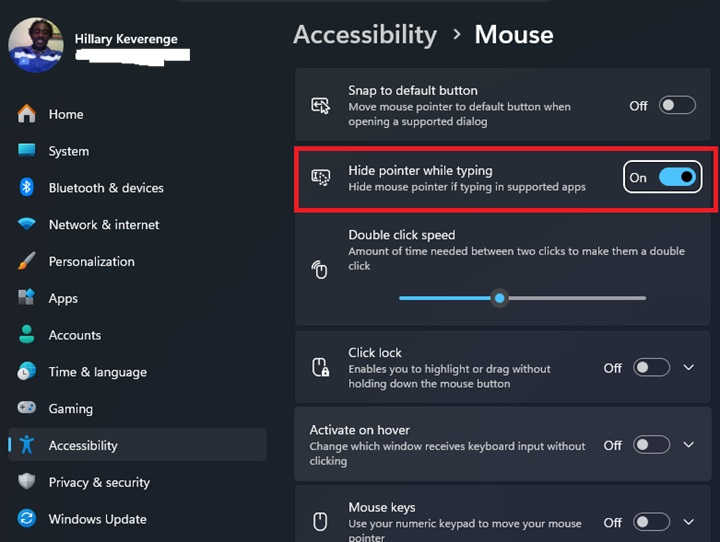
A recently merged Chromium change finally adds support for Windows’ “Hide pointer while typing” setting, meaning the mouse cursor will disappear while you’re typing in editable fields and reappear as soon as you move the mouse. It’s a subtle quality-of-life improvement, but one that Windows users have been requesting since 2013.
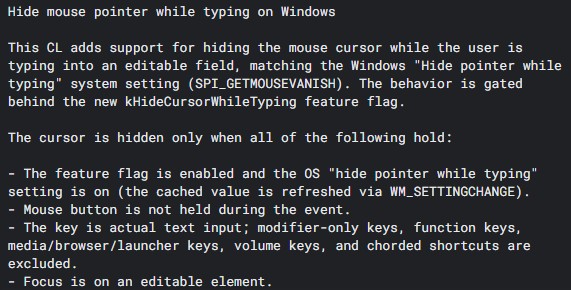
The patch was merged into Chromium Gerrit on July 7 by Microsoft engineer Ashish Kumar, who works on the Chromium project. The implementation is currently available in Chromium Canary and is expected to make its way to future stable releases of Chrome and Edge.
Under the hood, Chromium now checks Windows’ SPI_GETMOUSEVANISH system setting through a new feature flag called kHideCursorWhileTyping. The cursor is hidden only when the Windows preference is enabled, the user is typing into an editable field, no mouse button is being held, and the keystroke is actual text input rather than function keys, media keys, modifier keys, or keyboard shortcuts.
While the feature itself is straightforward, the story behind it is anything but.
I dug through Chromium’s issue tracker and discovered that the original report was filed on June 26, 2013. The reporter explained that Chrome failed to honor a Windows accessibility feature that automatically hides the mouse pointer while typing, often leaving the cursor covering the text being entered. However, the initial response wasn’t particularly encouraging.
Just one day later, the report was marked “Won’t Fix,” with a Chromium developer noting that Firefox and Internet Explorer behaved the same way and questioning whether hiding the cursor was really expected Windows behavior. The original reporter disagreed and pointed out that Windows had supported the feature for years. The issue was reopened the very same day, but the response remained cautious. A Chromium developer acknowledged the request and remarked that, realistically, nobody would spend time fixing it unless someone eventually submitted a patch.
Years passed without any progress. In August 2018, the bug was archived and once again closed as “Won’t Fix” during a cleanup of old inactive reports. Most bug reports would have ended there, but this one didn’t. A small group of users continued commenting on the issue over the years, repeatedly asking for Chromium to support the Windows setting instead of letting the request fade away.
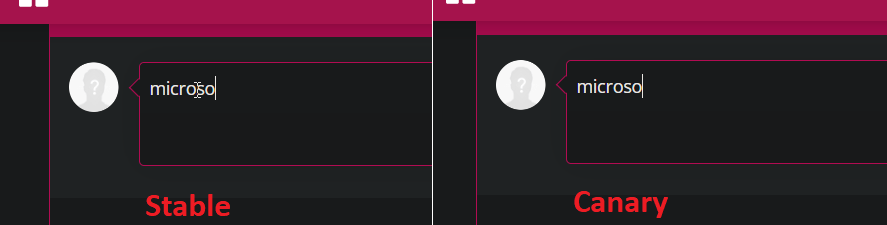
Their persistence ultimately paid off. The issue was reopened in May 2026, accepted by Ashish Kumar in June, and on July 7, the implementation officially landed in Chromium Gerrit. Serial leaker Leopeva64 was among the first to spot the change in Canary builds. As demonstrated below, current stable versions of Chrome and Edge continue to leave the pointer visible while typing, whereas Canary builds now hide it when text entry begins and restore it the moment the mouse moves.
It’s a tiny change that many users may never notice. But for those who have been waiting for decades, the wait has finally paid off.


Hillary Keverenge
2723 Posts
Tech has been my playground for over a decade. While the Android journey began early, it truly took flight with the revolutionary Lollipop update. Since then, it's been a parade of Android devices (with a sprinkle of iOS), culminating in a mostly happy marriage with Google's smart home ecosystem. Expect insightful articles and explorations of the ever-evolving world of Android and Google products coupled with occasional rants on the Nest smart home ecosystem.
Next article View Article