If you’ve recently updated the Bitwarden Password Manager browser extension and were prompted with an unexpected “Action required” message, don’t panic. The message isn’t the result of a security issue or a rogue update. Instead, it’s the visible effect of a deliberate change Bitwarden introduced in version 2026.6.0.
The update changes how the extension handles native messaging, a feature that allows it to communicate with the Bitwarden desktop application. Previously, this permission was optional and only requested when users enabled biometric unlock. Now, Bitwarden has made it a required permission from the outset.
The change has caught many existing users off guard. Reports quickly surfaced on Reddit from people using Chrome, Microsoft Edge, Vivaldi, and other Chromium-based browsers after seeing a notification stating that the Bitwarden Password Manager had been disabled until they accepted a new permission to “Communicate with cooperating native applications.”
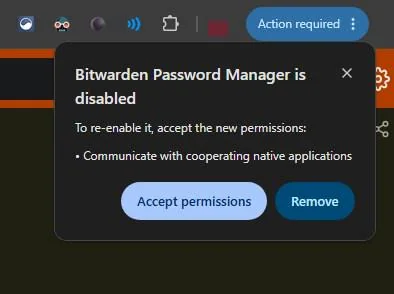
At first glance, the wording is enough to raise eyebrows. I know I’d pause before granting a browser extension additional permissions, especially when the prompt appears unexpectedly after an update.
Fortunately, Bitwarden has already explained why the change was made.
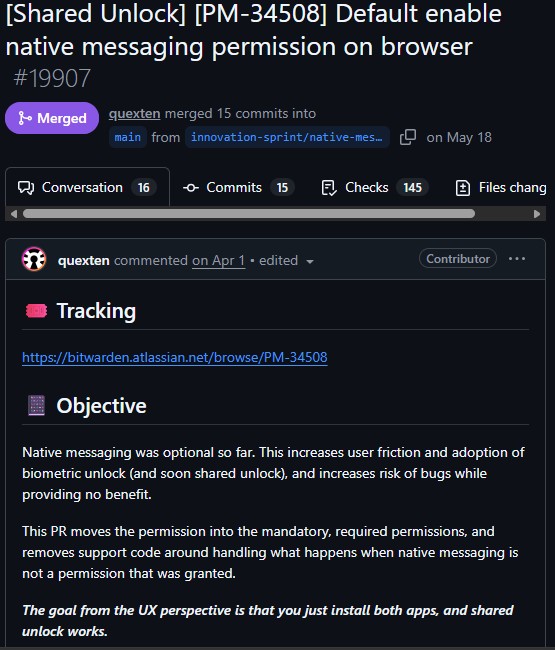
According to a recently merged pull request, the company has moved native messaging from an optional permission to a mandatory one. Developers say the old approach created unnecessary friction for users trying to set up biometric unlock and increased the likelihood of bugs while offering little benefit.
The update also lays the groundwork for Bitwarden’s upcoming Shared Unlock feature, which relies on communication between the browser extension and the desktop application. Bitwarden’s goal is to make these features work automatically, rather than requiring users to manually grant permissions later.
A Bitwarden employee has since confirmed that the new prompt is expected behavior. They explained that enabling the permission by default means the extension can communicate with the desktop app immediately if it’s installed, eliminating one of the more confusing steps involved in setting up biometric authentication.
As they put it, the goal is for things to “just work,” noting that the current biometric setup has long been a source of frustration for customers.
Hi! This is expected. We default enabled the permission instead of asking for it on-demand when you enable biometric unlock. This allows the extension to communicate with the desktop app, if you have it installed. While this introduces a on-time prompt for existing installations, for new installations there no longer is any permissions prompt needed. This is in preparation for shared unlock as @Nail1684 mentions but also affects biometric unlock in the extension.The desire here is for things to “just work”, since the current biometric setup is quite complex and a frequent point of frustration for customers.
One aspect that has added to the confusion, however, is Bitwarden’s own documentation. The company’s support article states that users who decline the permission can continue using the extension, with only biometric unlock being unavailable.
In practice, that isn’t what existing users are seeing. Chromium browsers currently present only two options: Accept permissions or Remove the extension. There doesn’t appear to be a straightforward way to decline the permission while continuing to use the extension, suggesting the support article may no longer accurately reflect the current behavior.
So, if Bitwarden suddenly asks for new permissions after updating to version 2026.6.0, you now know what’s behind it. The prompt is expected, stems from Bitwarden’s decision to require native messaging by default, and is intended to simplify biometric unlock today while preparing the extension for Shared Unlock in the future.


Hillary Keverenge
2710 Posts
Tech has been my playground for over a decade. While the Android journey began early, it truly took flight with the revolutionary Lollipop update. Since then, it's been a parade of Android devices (with a sprinkle of iOS), culminating in a mostly happy marriage with Google's smart home ecosystem. Expect insightful articles and explorations of the ever-evolving world of Android and Google products coupled with occasional rants on the Nest smart home ecosystem.
Next article View Article