
Brave Origin has been the talk of the town lately. Ever since the premium, stripped-down browsing experience first popped up for testing at a steep $59.99, users have been eager to see exactly what the privacy-focused company has been cooking up.
When the much-anticipated feature arrived earlier this month for desktop and Android users, the iOS community was left waiting in the wings with a “coming soon” promise. Thankfully, that wait is over. With the rollout of Brave version 1.91 on iOS, iPhone and iPad users can finally switch on Brave Origin and see what all the fuss is about.
What’s new in Brave v1.91 for iOS?
For the uninitiated, Brave Origin isn’t a completely separate browser you download from the App Store, at least not on mobile devices, even though Brave is actively exploring a dedicated standalone app for Android. Instead, it lives right inside your standard Brave app as an unlockable, minimalist environment.
According to the official v1.91 changelog, the update brings:
- Brave Origin: Minimalist Brave. Features disabled by default and easily re-enabled in settings.
- Other enhancements, stability improvements, and security updates.
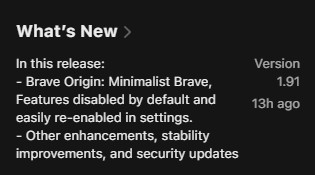
The core philosophy of Origin is to strip away the clutter. It turns off the extra bells and whistles by default, leaving you with a lightning-fast, distraction-free browser, while giving you the power to toggle specific features back on at your own pace.
How to enable Brave Origin on iPhone and iPad
Activating the new experience is straightforward, provided you are running the latest version of the app. Here is how you can switch it on:
- Launch the Brave app on your iPhone or iPad.
- Tap the Menu icon and navigate to All Settings.
- Tap on General, then select Origin.
- From here, you can tap Buy now on the App Store if you are a new buyer. If you already purchased the upgrade on your desktop, tap Verify Brave Origin purchase.
- Once confirmed, restart the app.
- You can now use the new Origin panel to toggle your preferred features on and off.
As a neat bonus for those who want to fully embrace the new aesthetic, Brave has included a custom app icon. You can swap out the classic lion head for the sleek new Origin icon by heading to Settings -> Appearance.
Having trouble verifying your Brave Origin desktop purchase?
While the launch is exciting, it hasn’t been completely flawless. Several users who already paid for Brave Origin on their desktops are reporting hiccups when trying to verify their cross-platform purchase on iOS. Tapping “Verify Brave Origin purchase” sometimes fails to recognize the linked account immediately.
If you run into this bug, don’t panic or try to buy it a second time. According to user reports, the verification system is just being a bit stubborn. The current workaround is simply to keep trying. Repeatedly tapping the verification button and restarting the app eventually forces the system to recognize your purchase and unlock the feature.


Hillary Keverenge
2723 Posts
Tech has been my playground for over a decade. While the Android journey began early, it truly took flight with the revolutionary Lollipop update. Since then, it's been a parade of Android devices (with a sprinkle of iOS), culminating in a mostly happy marriage with Google's smart home ecosystem. Expect insightful articles and explorations of the ever-evolving world of Android and Google products coupled with occasional rants on the Nest smart home ecosystem.
Next article View Article