Microsoft Edge users on version 149 are reporting that favicons in favorites and history have suddenly gone missing, with many seeing only a generic globe icon instead of site logos.
Some say the icons briefly return after a restart or cache clear, then disappear again once they start browsing for a while. Others report that new entries in history or bookmarks never get proper favicons at all.
We found reports on Reddit and Microsoft’s own community forums. Affected users claim that after updating to Edge v149 on Windows, when they open the favorites menu or history panel in the browser, they notice that most, if not all, site icons are replaced by a generic globe-style placeholder, as you can see in the screenshot below.

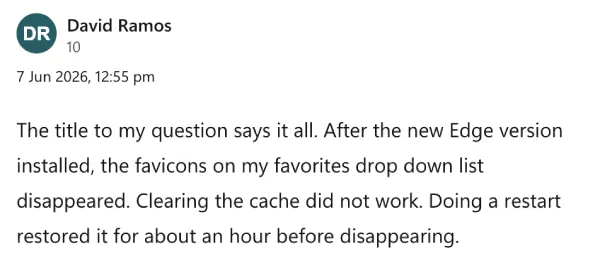
One affected user says the icons briefly reloaded after they cleaned cache and restarted the browser, only to vanish again about an hour later. Another calls out that scrolling through history is now much harder because visual cues are gone, even though the URLs and titles themselves are still intact.
The issue doesn’t seem tied to a specific set of sites. People mention seeing major services like Google, YouTube, and Reddit lose their icons right alongside smaller or less frequently visited websites. A few users also point out that favicons inside folders under favorites appear broken the same way, so it’s not only top‑level entries getting hit. Some suspect a corrupted favicon database in the user profile, while others think Edge v149 might be failing to refresh or cache icons properly after the update.
In our testing on Windows, we couldn’t reproduce the problem. Edge v149.0.4022.52 loaded and displayed favicons in favorites and history just fine on our end. So whatever is going on here isn’t affecting everyone. That also means we can’t confirm the bug’s exact trigger or how widespread it is based only on public reports.
Reddit threads and support posts contain a few workarounds that have helped some users, though results are mixed. The most common suggestion is to completely close Edge, then go to the browser’s profile folder and delete the Favicons database files so the browser is forced to rebuild them on the next launch. Some people say this restores icons for a while, or even fixes the issue, while others claim the favicons still vanish again after some time.

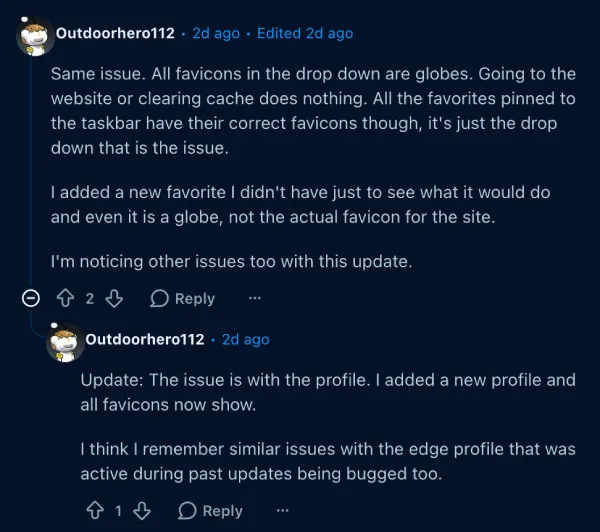
A second potential workaround is to create a fresh Edge profile and sign in again. One user noted that favicons show up normally in the new profile, at least initially, which lends weight to the theory that something in the old profile’s favicon storage is corrupt. The catch is that moving fully to a new profile can be a hassle if you rely on multiple profiles, stored passwords, or other profile-specific settings.
There are also the usual basic steps. Users report trying cache clears, disabling extensions, and restarting Edge or even Windows, with only temporary relief if any. Some say using the built‑in reset settings option in Edge helps briefly, while others see no change at all.
We weren’t able to independently verify any of these workarounds because the bug didn’t show up on our own Windows test systems. So if you’re affected, you might want to try the profile or favicon database reset steps at your own risk.
We’ll keep an eye out for any further developments and will update the article accordingly.


Dwayne Cubbins
2850 Posts
I cover fast-moving stories across apps, online platforms, and everyday tech — phones, wearables, consoles, and whatever else people are fighting with this week. Bugs, rollouts, scams, policy enforcement, and the occasional internet-culture rabbit hole are all fair game. My goal is simple — make confusing tech news readable. When I'm not working, I'm working out or chilling with my dog. Got a tip? You can find me on X @dcubbins.
Next article View Article