If you have ever tried juggling a playing video while frantically pulling up another application, you know the frustration of losing your video behind a wall of new windows. Google Chrome is currently looking to solve this exact multitasking headache by testing a nifty feature that automatically triggers Picture-in-Picture (PiP) mode whenever another app covers your active video tab.
A recent YouTube video shared by BrenTech perfectly demonstrates this functionality in action within Google Chrome Canary. The mechanics are beautifully simple: if you have a video playing in your browser and you maximize a different application over it, Chrome detects that the window is occluded and instantly pops the video out. The PiP window automatically appears in the bottom right corner of your screen, and you can easily resize the player however you see fit.
To power this seamless transition, Google relies on a couple of experimental flags hidden within the chrome://flags menu. The primary triggers are #auto-picture-in-picture-on-window-occluded (which allows PiP to trigger when a window is covered) and #browser-initiated-automatic-picture-in-picture (which gives the browser permission to enter PiP when those specific conditions are met). Additionally, Google is testing a bonus #picture-in-picture-mute-control flag that adds a much-needed mute/unmute button directly to the floating window.
Naturally, as someone who constantly has YouTube playing in the background, I immediately wanted to take this for a spin. However, actually getting this feature to work right now feels a bit like winning a lottery. Despite running the latest Chrome Canary v151 on my Windows 11 laptop, I simply could not trigger the auto-PiP mode. My colleague, who is running the latest macOS 26, ran into the exact same wall.
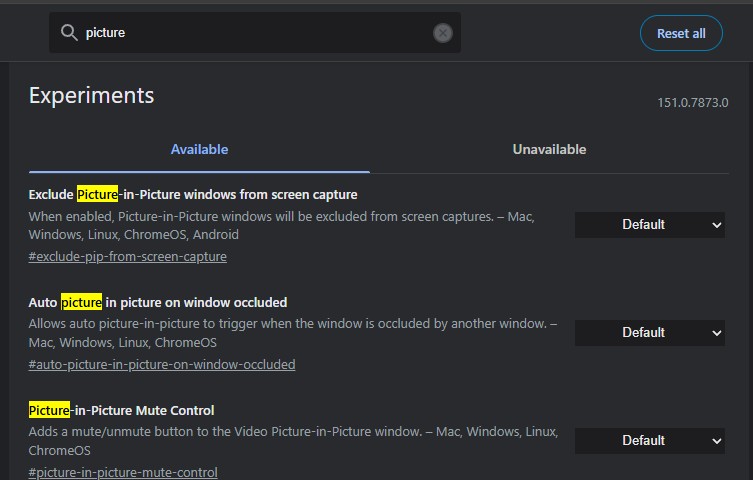
After some digging, I realized why: we are completely missing the essential browser-initiated-automatic-picture-in-picture flag in our Canary builds, as captured in the screenshot above.
In a rather bizarre twist, my colleague and I actually do have all the required flags present in the current Chrome 149 stable channel. But, as is often the case with dormant experimental features, manually enabling them in the stable build did absolutely nothing on our machines.
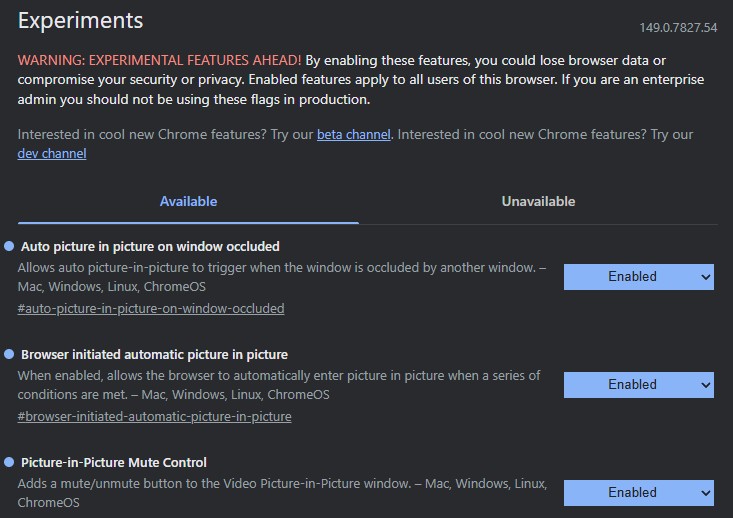
It is clear that Google is actively A/B testing this capability, tightly controlling who gets access via server-side updates even for users living on the bleeding edge of Canary.
For now, this automatic PiP functionality remains a hidden gem for a lucky subset of testers. If you want to try your luck, check your Canary flags, enable them, and restart your browser. While there is no concrete timeline yet, this incredibly useful multitasking tool will hopefully make its way to the broader public in a future stable release of Google Chrome.
To see how the feature works, check out the video below:


Hillary Keverenge
2723 Posts
Tech has been my playground for over a decade. While the Android journey began early, it truly took flight with the revolutionary Lollipop update. Since then, it's been a parade of Android devices (with a sprinkle of iOS), culminating in a mostly happy marriage with Google's smart home ecosystem. Expect insightful articles and explorations of the ever-evolving world of Android and Google products coupled with occasional rants on the Nest smart home ecosystem.
Next article View Article