Music streaming is all about seamless access, but lately, Apple Music is giving its subscribers a massive headache. If you’ve been trying to search for your favorite tracks only to hit a wall, or noticed your carefully curated “Recently Added” list hijacked by albums from half a decade ago, take a deep breath, because it’s not just you.
Across Reddit, X and support forums, Apple Music users on iOS, Mac, Windows, Android, and the web are reporting two bizarre, highly frustrating glitches that are effectively breaking the app’s core functionalities.
Before diving into the chaos, we should note that we’ve tested Apple Music on both the stable app for iPhone as well as on iOS and macOS beta builds on our end, and interestingly, everything appears to be working perfectly fine for us across the board. That said, the sheer number of complaints coming from users on iPhone, Android, Mac, Windows, and web strongly suggests this is not an isolated issue. If anything, it points to a possible server-side or region-specific glitch that may only be affecting certain accounts, stable app versions, or backend configurations at the moment.
Here is a breakdown of what is currently going wrong and what you can do about it.
The search function in Apple Music is broken
The first, and arguably most disruptive, bug affects the search bar. When users try to search for any specific artist, song, or album, Apple Music completely ignores its vast music catalog. Instead, it returns a localized list of user profiles with similar names and user-generated playlists.
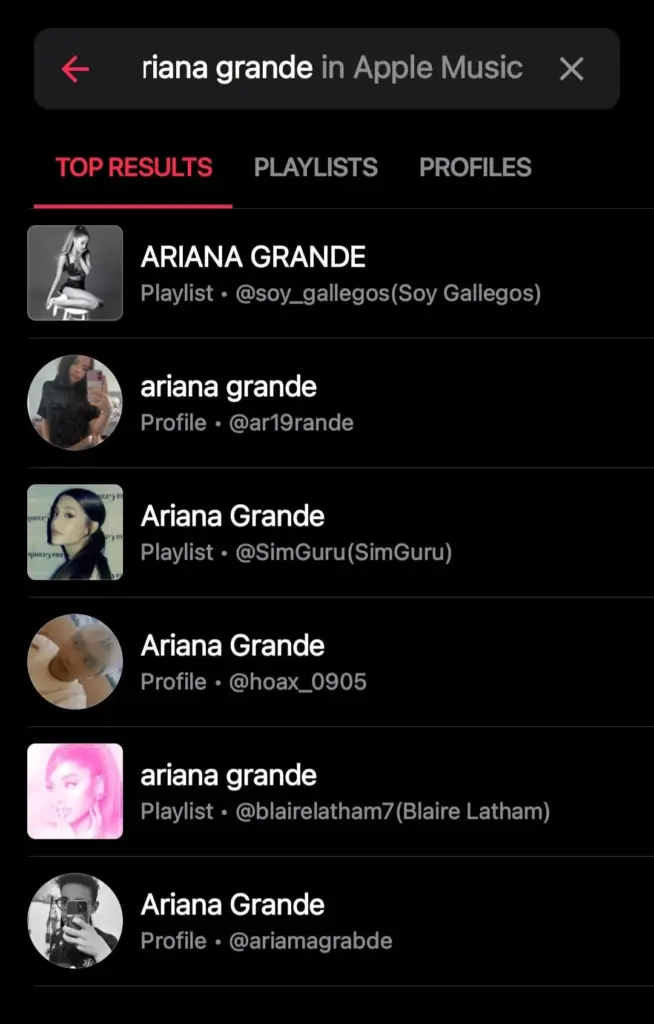

Whether you are looking for Kendrick Lamar or a specific indie pop track, the results are currently limited to random personal profiles and curated lists. This bug is essentially a brick wall for music discovery, and it is affecting users across every platform, be it iPhone, Android, Mac, or Windows.
While Apple hasn’t released an official patch, the community has banded together to find a few temporary band-aids:
- Switch your network: Several users have reported that the issue miraculously vanishes when switching to a different, stronger Wi-Fi network (ideally 50Mbps or higher). It appears the app struggles to load the main Apple Music catalog on weaker connections and defaults strictly to the user-curated cache.
- Fire up a VPN: One user in Asia noted that turning on a VPN and routing their connection through the US instantly restored normal search functionality.
- The iTunes backdoor (Mac/Windows): If you’re on a desktop app, you can enable the classic iTunes Store search in your settings. Search for your artist there, click on one of their albums, and hit “Listen Now.” This bypasses the broken search and redirects you to the proper album in Apple Music.
- Use third-party clients: If you happen to use alternative Apple Music players on iOS like the Marvis app, the search function remains entirely unaffected.
Ghost of 2021 & the notification spam bug
If the search bug wasn’t enough, the second issue is pure nightmare fuel for anyone who meticulously organizes their music library. Users are being bombarded with rapid-fire push notifications claiming that an “Album Updated” or “More music… has just arrived.”
The catch? These aren’t new releases. Apple Music is randomly digging up old albums and tracks, predominantly ones added to libraries back in 2021, and forcefully shoving them to the very top of the “Recently Added” section. For users who listen to their library chronologically or rely on smart playlists sorted by “Date Added,” this glitch is throwing off their entire system. Songs downloaded five years ago now appear as if they were added today, completely burying actual recent discoveries and scrambling library orders.
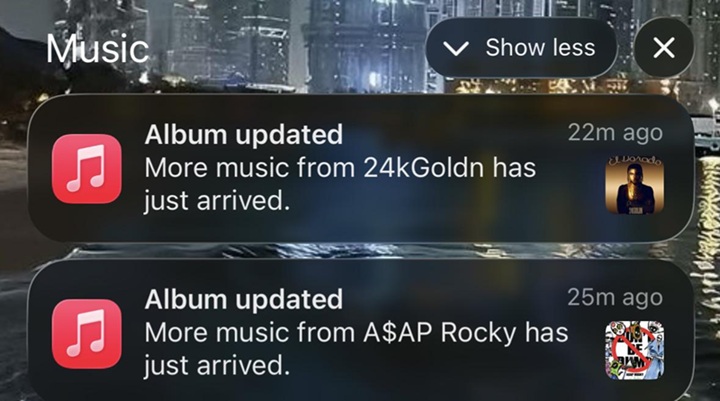
There isn’t a known way to reverse the messy re-ordering of your library just yet without manually deleting and re-adding your music, but you can stop the bleeding:
- Silence the spam: The immediate temporary relief is to head into your device’s settings and turn off notifications for Apple Music to stop your phone from buzzing with false updates.
- Clear storage and reboot: One user successfully broke the continuous loop of albums adding themselves by clearing out some local device storage, powering the device entirely off, and turning it back on.
Apple has yet to officially acknowledge either of these meltdowns. We will keep our ears to the ground and update this story as soon as a permanent fix rolls out. In the meantime, you might want to hold off on organizing your library until the dust settles.


Hillary Keverenge
2723 Posts
Tech has been my playground for over a decade. While the Android journey began early, it truly took flight with the revolutionary Lollipop update. Since then, it's been a parade of Android devices (with a sprinkle of iOS), culminating in a mostly happy marriage with Google's smart home ecosystem. Expect insightful articles and explorations of the ever-evolving world of Android and Google products coupled with occasional rants on the Nest smart home ecosystem.
Next article View Article