
For years, one of the most persistent requests from the Mac community has been native macOS AutoFill support for 1Password. If you’ve been relying strictly on browser extensions to ferry your credentials around, we have some excellent news: 1Password has officially launched the native macOS AutoFill feature in public beta.
By adopting Apple’s native Passwords API, 1Password is stepping up as a fully integrated Credential Provider on macOS. But as with any early-stage beta, there’s a bit of confusion in the community about what exactly has changed, and a few technical limitations are already raising eyebrows.
The most significant win here is the leap from browser-restricted autofill to system-wide integration. Previously, if you were logging into a standalone desktop application, you usually had to open the 1Password app, copy your password, and paste it into the field. It was functional, but definitely a few seconds slower than it needed to be.
With this beta, 1Password communicates directly with Apple’s native AutoFill engine. This means you’ll start seeing your 1Password login suggestions natively inside Safari and across supported desktop apps on your Mac.
Here is what the beta currently brings to the table:
- System-wide autofill: Fills credentials directly through the macOS UI in Safari and desktop apps without needing the browser extension.
- Passkey integration: You can now create, fill, and update passkeys directly through the macOS AutoFill prompt.
- Coming soon: Support for one-time passcodes (2FA) via the same native integration is slated to arrive later in the beta cycle.
If you want to jump in, you’ll need to be running macOS 14 (Sonoma) or later on an Apple Silicon Mac. You also need to update to 1Password for Mac version 8.12.22 (or later) on the beta channel. From there, just navigate to Settings > Autofill > Set up macOS AutoFill to give it the necessary system permissions.
Wait, didn’t we already have this?
Whenever a major background feature gets a quiet UI overhaul, confusion inevitably follows. Over on the community forums, a user named cyber-bacon perfectly captured the collective head-scratching, asking:
"Not sure what I have been doing wrong (or right?) all these years, but I thought this was already available. Or will this upgrade work without the browser extensions...?"
If you’re asking the same question, you aren’t alone. What cyber-bacon was actually using and even shared a screenshot of was the 1Password browser extension’s inline menu.
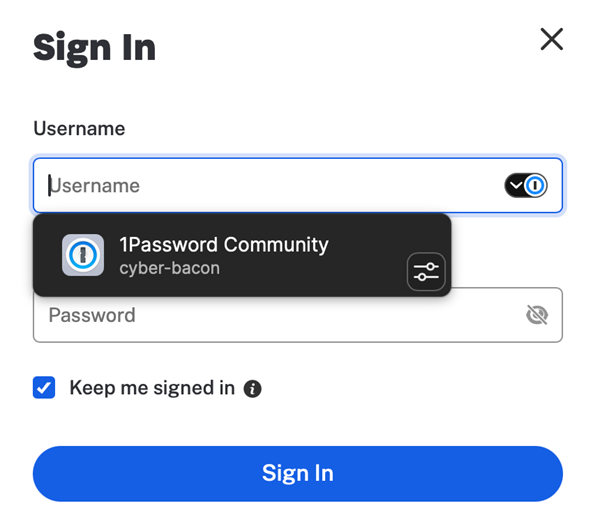
The 1Password team quickly stepped in to clarify the difference:
"The screenshot (above) you shared shows the suggestions menu from 1Password in the browser (the browser extension), and you’re absolutely welcome to keep using that experience. macOS AutoFill... lets you fill login credentials using the 1Password desktop app together with Apple’s native AutoFill feature. It works in Safari and other supported desktop apps on your Mac without relying on the browser extension for filling."
In short, the old way relied on the browser extension injecting itself into the webpage. The new way uses the Mac operating system to securely hand the credentials from the 1Password desktop app to whatever app or browser you are using.
The context menu is a technical limitation
While the inline autofill suggestions are working beautifully for most testers, power users who prefer right-clicking have immediately hit a roadblock.
A user on Reddit highlighted a frustrating quirk: when you right-click a text field and navigate to the AutoFill -> Passwords… context menu, macOS completely ignores 1Password and forcibly opens the native Apple Passwords app instead.
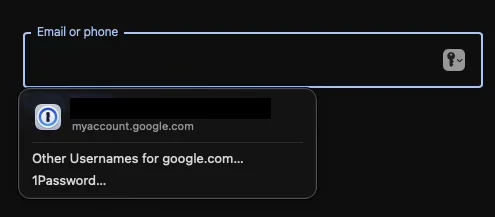
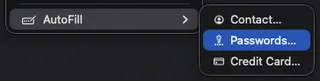
The user correctly noted that while inline suggestions work flawlessly when clicking a web field in Safari, the right-click context menu seems utterly broken for third-party managers.
“Is that a macOS limitation, or lack of support from 1Password?” the Redditor asked.
Unfortunately, this isn’t an oversight on 1Password’s part, but rather a wall built by Apple. Replying to the thread, 1Password staff confirmed the bad news:
"We have requested for API support to be able to autofill from this context menu as well. You're not seeing it currently because it is a technical limitation unfortunately."
Because Apple tightly controls how third-party Credential Providers interact with macOS, 1Password simply doesn’t have the system-level hooks yet to hijack that specific right-click menu. Until Apple updates its API to allow third parties to populate the AutoFill > Passwords context menu, users will have to rely on the inline pop-ups that appear when you simply click into a login field.
Despite the context menu limitation, the arrival of the native macOS autofill function is a massive quality-of-life improvement for 1Password users. It bridges the gap between web browsing and desktop app usage, creating a seamless login experience.


Hillary Keverenge
2723 Posts
Tech has been my playground for over a decade. While the Android journey began early, it truly took flight with the revolutionary Lollipop update. Since then, it's been a parade of Android devices (with a sprinkle of iOS), culminating in a mostly happy marriage with Google's smart home ecosystem. Expect insightful articles and explorations of the ever-evolving world of Android and Google products coupled with occasional rants on the Nest smart home ecosystem.
Next article View Article