Firefox 151 was released in May 2026, with a design refresh for the home screen and new tab page. However, many users criticized the changes, especially the persistent Firefox logo, which wastes space.
People dislike the spacing, the condensed nature of the icons, and the logo sitting too low. The customization is allegedly worse, and many others called it unnecessary and frustrating.
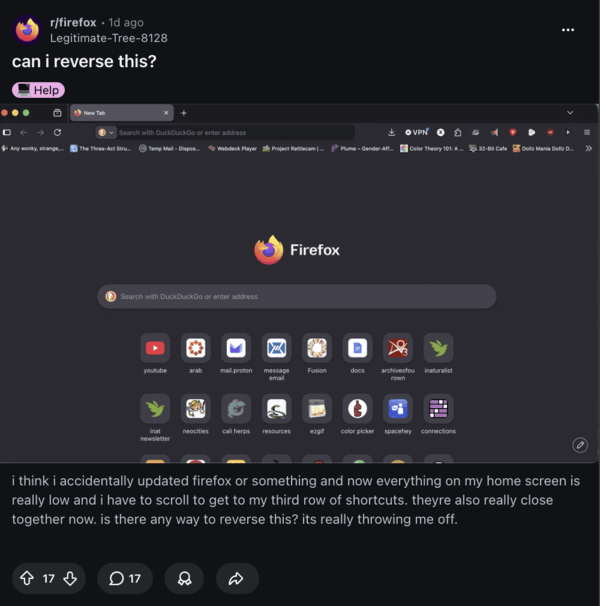
I’ve browsed through Reddit, Mozilla Firefox forums, and some comments online to figure out how these changes can be reversed, and fortunately, there are multiple workarounds you can try.
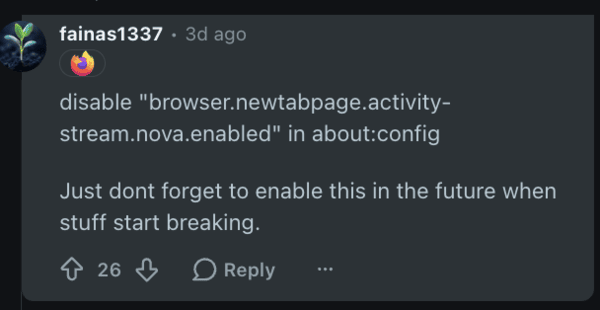
To restore the original spacing and larger icons:
- Go to about:config
- Type “nova” in the search box at the top.
- Set browser.newtabpage.activity-stream.nova.enabled to false. You need to double-click to change the value from true to false. This reverts the layout to the pre-151 design.
- Close about:config and open a new tab.
To adjust the logo directly:
- Head back to the same about:config page.
- Search for logowordmark.alwaysVisible and toggle that to false. This should hide the logo right away.
Adjusting the logo with custom CSS styles (as described on Reddit):
- Enable Custom Styles in Firefox. Type about:config in the address bar, and press Enter.
- Type toolkit.legacyUserProfileCustomizations.stylesheets in the search bar, and set the value to true.
- Go to about:support in a new tab.
- Next to the Profile Folder, click the Open Folder button.
- Inside the profile folder, create the “chrome” folder. Right-click -> New -> Folder. Name it “chrome.” All lowercase, and no spaces.
- Inside the new “chrome” folder, right-click, select New, and then create a new Text Document.
- Name it userContent.css (make sure it doesn’t end with .txt).
- Copy and paste the below CSS code into the file, save, and exit.
/* Remove Firefox Logo - Works on New Tab & Home Page */
@-moz-document url-prefix(about:home), url-prefix(about:newtab) {
    .logo-and-wordmark-wrapper,
    .logo-and-wordmark,
    .wordmark,
    .logo {
        display: none !important;
    }
}
Copy the code above → Paste into userContent.css file
After restarting Firefox, it should revert the logo changes.
With these simple tweaks, you can easily restore the cleaner experience. We’d recommend sharing your feedback with Mozilla directly, since sufficient negative backlash might make the company reconsider these changes.


Sudhanshu K
331 Posts
I have been a consumer technology enthusiast for over 5 years. Thanks to my experience in software beta testing and product reviews, I've understood and learnt a lot about what bugs and issues bother people, and I spend time trying to simplify their solutions. I cover smartphones, software, social media, apps, AI, and most consumer tech gadgets. Actively pursuing a Computer Science bachelor’s degree. I'm mostly active on Twitter/X (@TechWhirlUlt), drop a DM or tag me if you want to share info or connect!
Next article View Article