
Many Facebook Messenger users are reporting a persistent “Send photo?” prompt that shows up near the chat input box. It automatically suggests the latest photo or screenshot from the camera roll.
Tapping that button accidentally is easy because of its positioning, and as a result, people are sending sensitive images mistakenly.
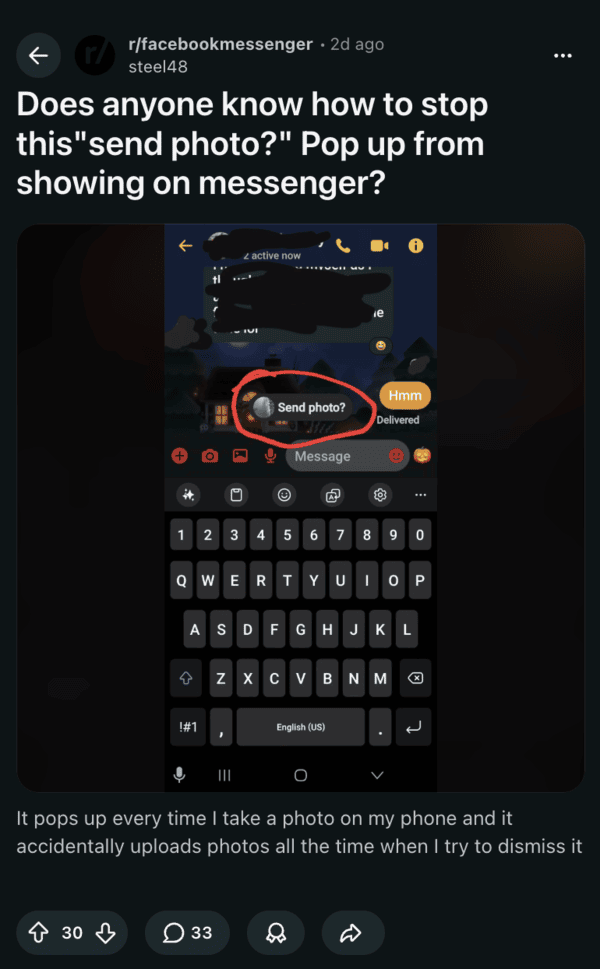
While there’s no official documentation, it’s likely part of Meta’s new camera roll suggestions, which was recently made opt-in for EU and UK users. At the moment, the suggestion appears to be showing up in the Android app when users take a screenshot or a photo.
We tested it ourselves and found the exact same “Send photo?” prompt appearing in the latest Messenger app for Android. However, nothing of the sort showed up in the iOS counterpart.
Due to the placement of the button, people are ending up in embarrassing situations. One user described sending an inappropriate message to a work group, and another almost shared private photos in a university chat.
With complaints surging in recent days, many users are frustrated about this. People call the prompt poorly placed and too easy to trigger mistakenly.
There are a few potential workarounds you can try if you dislike this prompt. I found one in Reddit comments, which involves adjusting settings in the main Facebook app, instead of Messenger.
- Go to the Facebook app.
- Enter Menu -> Settings & Privacy -> Settings.
- From here, select Preferences.
- You’ll find “Camera Roll Sharing Suggestions,” which you can toggle off.
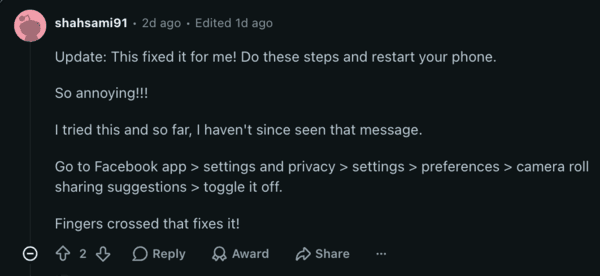
While some users report that the workaround mentioned above works, others didn’t have any luck with it. A restart after performing the above steps may help. But our testing was also fruitless. This didn’t work for us.
If this suggestion is ineffective, you can also try changing photo permissions. In the Facebook app, navigate to Settings & Privacy -> Settings -> Your Activity -> Device Permissions -> Photos and Videos. From here, you need to select “Don’t allow.”
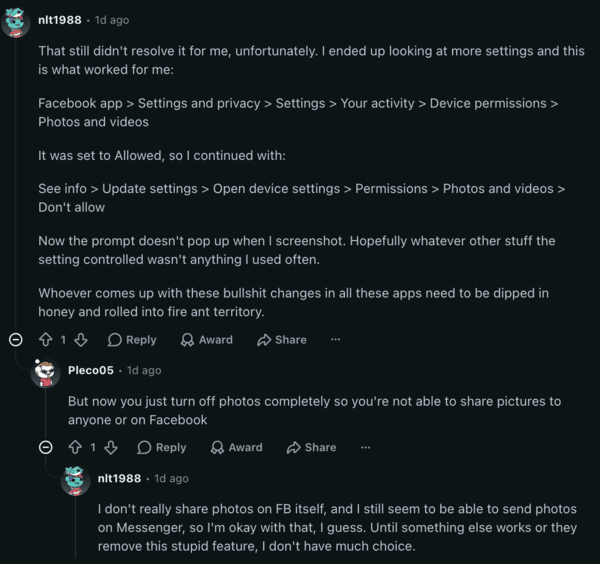
Note: This method completely disables sharing all photos on Facebook, since the app will not have permission to your photo gallery. This is the only way we also managed to get rid of the suggestion pill at the bottom.
Unfortunately, there’s no universal toggle to turn off this prompt within the Messenger app itself, and it’s high time Meta adds one. Affected users are urging Meta to add a proper opt-out for this feature.
Disclaimer: The Featured Image was generated with AI.


Sudhanshu K
297 Posts
I have been a consumer technology enthusiast for over 5 years. Thanks to my experience in software beta testing and product reviews, I've understood and learnt a lot about what bugs and issues bother people, and I spend time trying to simplify their solutions. I cover smartphones, software, social media, apps, AI, and most consumer tech gadgets. Actively pursuing a Computer Science bachelor’s degree. I'm mostly active on Twitter/X (@TechWhirlUlt), drop a DM or tag me if you want to share info or connect!
Next article View Article